
OPEN SOURCE DEEP DIVE
LoopForge: A Self-Hosted Delivery Platform for Coding Agents
LoopForge is Tencent’s self-hosted delivery platform for coding agents. It combines Docker workspaces, versioned SOPs, human approvals, and repeatable delivery.
LoopForge is Tencent's self-hosted delivery platform for coding agents. It does not present another foundation model or a new terminal replacement. Instead, it places a programmable layer around tools such as CodeBuddy, Codex, and Claude Code: repositories are checked out into Docker workspaces, project roles divide planning and review, standard workflows define the order of work, and human gates decide what may ship. The result is an attempt to turn an individual coding session into a repeatable software delivery process.
The repository reviewed here is Tencent/LoopForge at commit 39e1dac8d9539d20d484d404b09df6bf23341dde from 2026-11-12, under the MIT license. The public edition combines a Go execution engine, MySQL persistence, an embedded web workspace, GitHub integrations, and a separate local workflow package. The product is unusually explicit about its deployment boundary: the default server installation is designed for a trusted engineering team, not for isolated multi-tenant use.
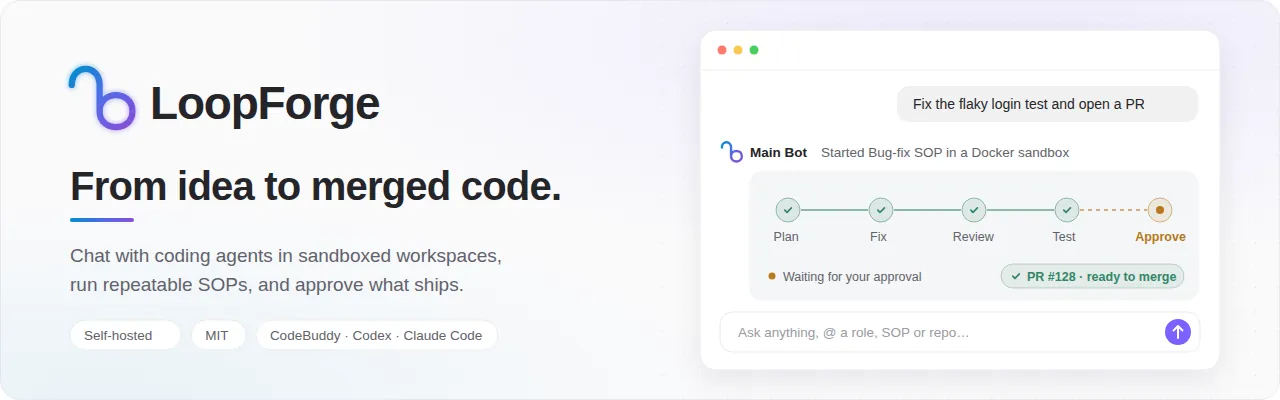
What the platform adds around the coding agent
A coding CLI is good at working inside a repository, but a team still has to decide which repository is involved, which agent performs each role, what evidence is required, when a person must review the result, and how the resulting branch reaches the mainline. LoopForge makes those concerns explicit. Its execution records connect a requirement, a run, the agent and script steps inside that run, generated artifacts, Git branches, pull requests, merges, token use, and cost.
This separation is the central design idea. CodeBuddy, Codex, and Claude Code remain the model-facing workers. LoopForge owns the surrounding contract: project roles, isolated workspaces, workflow versions, scheduling, leases, retries, human decisions, checkpoints, previews, and repository delivery. A team can change the executor for a role without rebuilding the entire workflow, and an SOP can contain deterministic shell checks alongside the model-driven steps.
Two ways to work, backed by one delivery record
Users can begin with Main Bot in the chat workbench or start a standard operating procedure directly. These are not separate products with disconnected histories. Both paths can be associated with the same requirement, and the platform tracks whether the resulting change is in progress, waiting for review, merged, or closed.
| Execution path | Best fit | What LoopForge controls | Typical output |
|---|---|---|---|
| Chat with Main Bot | Exploration, diagnosis, small changes, and iterative work with a person in the conversation | An on-demand Docker workspace, repository checkout, project roles as subagents, queued or steering messages, checkpoints, and workspace handoff | A change set, document, pull request, or direct merge into a selected branch |
| Run an SOP | Delivery that should follow the same stages, checks, reviewers, and approvals every time | A versioned workflow graph, node dependencies, sandbox snapshots, retries, send-back paths, human gates, and per-node artifacts | Code, tests, reports, a preview, a pull request, or another declared artifact |
The chat path is intentionally flexible. Main Bot opens a conversation workspace only when it needs to modify repositories or run commands. It chooses a Docker sandbox and the repositories relevant to the request, then binds that workspace to the conversation. Project roles run as subagents against the same workspace, so they can inspect files and execute commands without receiving a separate copy of the repository. The workspace records a work branch, a base branch, and enough state to recover after the conversation switches away.
The SOP path is more constrained. A run starts from a frozen workflow definition and a frozen sandbox profile. When a workflow changes later, an existing run does not silently switch to the new definition. This matters for auditing a failed node or reproducing why an approval was requested. Retrying a node, resuming after a pause, or sending work backward happens against the run that the team actually reviewed.
An SOP is a versioned delivery graph
LoopForge describes an SOP as a directed graph rather than a prompt with numbered headings. A node starts after its dependencies complete, and the workflow can branch, join, retry, or send work back to an earlier stage. The built-in catalog includes backend delivery, frontend delivery, bug fixing, and product-oriented workflows, but teams can copy and adapt them inside a project.
| Node type | Purpose in the delivery graph |
|---|---|
Agent | Runs a reusable role with its own prompt, executor, model, rules, skills, tools, and expected artifacts. |
Script | Runs a deterministic shell command such as a build, test, lint pass, or report generator. |
Human gate | Stops the run so a person can inspect evidence, approve continuation, add context, or send work back upstream. |
Sub-SOP | Runs another workflow as a child and imports its declared deliverables into the parent run. |
Preview build | Builds a static site, archives its output, and makes the result available for review. |
Artifacts are part of the workflow contract. A node can declare what it will publish, and later stages can consume those outputs instead of relying on hidden conversation context. The engine also has a sub-SOP path that imports selected child artifacts while excluding inherited context that should not be mistaken for a new deliverable. This is a modest but important distinction: completion is represented by durable outputs and node state, not only by a model's claim that the task is finished.
The built-in delivery workflow follows a recognizable sequence: clarify the requirement, design the change, implement it, perform an independent review, run tests, wait for human acceptance, and prepare delivery. A failed check can be routed to an earlier stage. The acceptance gate blocks progress until a person acts, and the final delivery step can verify that the accepted code has not changed before handing it to the repository flow.
Roles make agent behavior a project asset
A LoopForge role packages more than a system prompt. It can specify the executor and model, project rules, skills, MCP tools, permission behavior, artifact expectations, and the gates in which the role participates. Planning, implementation, review, and testing can therefore use different prompts and even different coding CLIs. The README's built-in roles default to CodeBuddy, but the role editor allows each node to choose its executor independently.
The same role definitions are reused by SOP nodes and by Main Bot when it dispatches subagents in a conversation workspace. That reuse reduces the gap between an improvised chat and a standardized workflow. A reviewer role does not need a second copy of the repository, and its instructions do not have to be pasted into every request. The project can evolve the role and retain a history of how that role participated in previous runs.
LoopForge ships CodeBuddy and Codex in its production image. Claude Code is installed from npm on first use and cached for later runs. Native installations must provide the selected CLI themselves. Requirement clarification and notification summaries currently use CodeBuddy, while many other assistant and SOP operations can select among the supported executors.
Repository delivery stays connected to the requirement
For existing code, LoopForge creates repository work branches inside the sandbox. It can check out all configured repositories or a selected subset, choose an automatic, existing, new, or read-only branch mode, and submit changes against a recorded base branch. Multi-repository work can assign a different branch policy to each repository while keeping one requirement-level delivery record.
The delivery tool normally pushes the work branch and creates or updates a pull request or merge request. It can also use a direct-merge mode for a shared branch such as a preview environment. Before merging, it creates a temporary worktree, checks for conflicts, and uses a lease so another writer cannot quietly overwrite a newer target branch. A direct merge leaves the original workspace on its work branch and records that human acceptance is still required.
Work performed only through chat is not treated as invisible. If a conversation opens a workspace for a clear requirement, the platform creates or reuses a requirement record, links the workspace and branch to it, registers the submitted pull request, and updates delivery status after merge detection. This lets teams compare chat-driven work and SOP-driven work using the same outcome vocabulary.
Observability includes the process, not just the final answer
Each SOP run records node status, tool traces, worker logs, artifacts, and checkpoint history. The interface exposes a single review inbox for gates that are waiting, and a run can be paused, resumed, retried, cancelled, or sent back to a chosen stage. Conversation workspaces have related controls: messages can be queued while a reply is active, a user can steer the current generation, and Main Bot can pause or take over a running SOP workspace.
Workspace recovery is treated as an engineering problem rather than a chat convenience. Conversation workspaces hold leases while tools are active, save checkpoints at clearly defined lifecycle points, and preserve a workspace when a save fails so it is not reclaimed prematurely. A workspace can be switched or reopened without inventing a fresh repository state. These details are less visible than the model conversation, but they determine whether long-running agent work is recoverable after an interruption.
Run telemetry and model usage are accumulated into requirement, project, and member reports. Token and cost figures use configurable public list prices and should be read as operational estimates, not invoices. The project also records business-domain reports and exports static HTML or SVG summaries.
The security model is trusted-team self-hosting
The default Compose deployment mounts the host Docker socket into the platform container so that SOPs and conversation workspaces can launch sibling sandboxes without a second image download or build. Mounting the Docker socket is effectively equivalent to controlling the host daemon. LoopForge limits some routes, runs tasks inside sandbox containers, and restricts host-path repository configuration to platform administrators, but anyone who can execute an SOP can still run code through Docker on that host.
That is why the documentation does not describe LoopForge as a multi-tenant security boundary. Signed-in users can list project, requirement, and run data across the installation. The first browser account becomes the platform administrator. Self-signup is enabled by default and can be disabled with AGENTFLOW_ALLOW_SIGNUP=false. Project owners and administrators can change project settings and repositories, while personal credentials remain bound to their owner. For an installation reachable from the public internet, the sensible sequence is to restrict access during first-account setup, configure HTTPS, disable open signup when appropriate, and give accounts only to trusted colleagues.
Teams that cannot accept host-daemon exposure can remove the socket mount and the local Docker sandbox setting, then connect a separate Docker-capable worker or execution machine. Script-only workflows can still run inside the platform container. This is a real deployment option, but it moves the isolation and credential boundary rather than eliminating the need to design one.
Credentials are another boundary worth noticing. GitHub device authorization requests the repo scope, which is broader than selecting one repository inside LoopForge. Model keys are configured in personal settings rather than the host's global CLI state, and Git commits use a non-deliverable platform identity. Operators should still treat model keys, repository tokens, logs, and workspace data as production secrets.
Validation is substantial, but not an independent benchmark
The repository includes a detailed verification record. It reports passing Go suites, an HTTP API suite, browser journeys, clean-container installations, permission tests, real Docker execution, and a real GitHub import, pull request, and merge scenario. A seven-stage built-in delivery SOP completed in 47 minutes after explicit human clarification and acceptance and pushed a feature branch to a disposable repository. The target was a Python fixture, so this demonstrates orchestration rather than universal framework compatibility or fully autonomous software delivery.
Real model execution was exercised with CodeBuddy using deepseek-v4.1-flash. Codex and Claude Code had command, protocol, and credential-boundary tests, but their paid model services were not run with separate provider credentials. External knowledge services, enterprise notifications, actual multi-machine cloud pools, and every operating system were also outside the fully live-tested set. The maintainers describe the validation record as historical and explicitly say that it is not certification of later revisions.
This evidence is stronger than a feature list because it names what ran, what was skipped, and which defects were reproduced and fixed. It is not an independent comparison against other agent platforms, and it does not establish a productivity gain across teams. Buyers should repeat the relevant acceptance cases on the exact commit, model services, repositories, and network environment they intend to operate.
Platform and Local serve different working styles
LoopForge is also published as a local CLI package. The Local edition installs built-in Classic or Portable workflows into an existing coding assistant, including Claude Code, CodeBuddy, Codex, Cursor, Pi, DeepSeek Harness, and Hermes Agent. It writes workflow assets into the target project and records managed-file hashes in .devflow/install-state.json. A developer can run the built-in delivery flow without operating the web platform, MySQL, or a shared Docker workspace service.
| Deployment | Primary user | Workflow model | Evidence and approval |
|---|---|---|---|
| Platform | A team sharing requirements, roles, runs, and delivery history | Chat workspaces plus custom SOP graphs in a visual designer | Shared run pages, human-gate inbox, artifacts, metrics, and repository tracking |
| Local | One developer inside an existing IDE or terminal host | Built-in Classic or Portable workflows installed into the project | Files under artifacts/, persisted workflow state, and an optional local dashboard |
The editions are deliberately separate. A project can enable only one edition for a given host to prevent workflow state and artifacts from colliding. Local currently runs its built-in workflows; exporting an arbitrary platform SOP for standalone local execution is listed as planned, not shipped. The platform is therefore the right choice when the workflow itself must be edited and governed centrally across a team.
Where LoopForge fits in practice
The strongest use case is an engineering team that already accepts CLI coding agents but cannot make their behavior repeatable. LoopForge provides a place to encode planner, implementer, reviewer, and test roles; run deterministic checks between them; require human approval at chosen boundaries; and preserve the evidence attached to a requirement. It is also relevant to teams that need multiple repositories, self-hosted execution, pull-request-based delivery, and a reviewable record of how an agent reached a change.
Adoption should start with one narrow workflow and one trusted project. A team can begin with the no-key script-and-approval demo to verify installation and the human-gate path, then connect a disposable repository and run a small fix with an executor and model it already uses. Before broader rollout, the team should test branch permissions, Docker isolation, credential handling, signup exposure, cost accounting, and the exact delivery target. An internal benchmark should compare the same tasks under the old process and LoopForge rather than relying on the repository's historical validation record.
Several limitations deserve equal weight. The platform is not intended to isolate hostile tenants. The chat workbench is currently Chinese-first, while management pages are available in English and Chinese. Default SOP roles use CodeBuddy, and clarification and notification paths still depend on it. Local workflows cannot yet export arbitrary platform SOPs. Model costs, latency, and provider failures remain external operational concerns. Human gates must be staffed by people with enough context to reject bad work.
Those boundaries do not weaken the core contribution. LoopForge treats coding agents as components inside a delivery system and makes the surrounding state explicit: roles, repositories, sandboxes, workflow versions, artifacts, checkpoints, approvals, and merge outcomes. For teams trying to move from impressive agent demos to accountable software delivery, that architecture is more useful than another attempt to hide the process behind a single prompt.