Build a Game in Unreal Engine with Claude Opus 5.5: From Empty Project to Playable Slice
A hands-on route from empty Unreal project to playable slice with Claude Opus 5.5, including MCP setup, staged prompts, live-editor limits, costs, and recovery.
Claude Opus 5.5 arrived on 22 September 2026. Within a day, creators were posting games assembled inside Unreal Engine: a Souls-like with patrol AI, lock-on and dodges; a boss with a flying slam attack; and a fantasy route where a custom character walks from a forest into a town.
These are not examples of a chatbot generating a game from a single sentence. The more useful shift is that the model can now connect to a live editor, inspect the actual project, invoke editor tools, read their results, and make changes while the developer watches. Since Unreal Engine 5.8, the editor has shipped with an official MCP server, and Epic maintains a Claude Code plugin that exposes it.
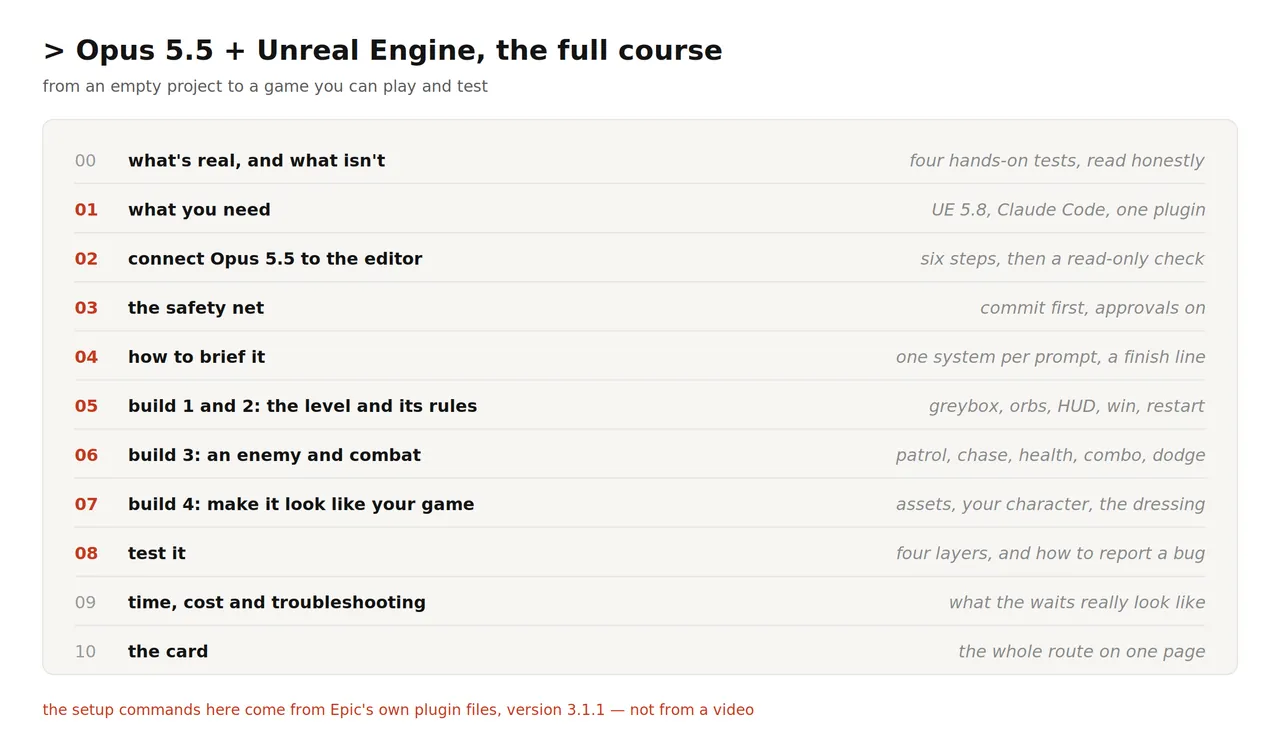
This guide follows the complete path from an empty project to a small playable slice: install the connection, protect the project from destructive edits, brief the agent with testable constraints, build a greybox level, add rules and combat, bring in visual assets, and finish with a real playtest. It is also explicit about the slow and fragile parts. The same cases that make the workflow look impressive expose its limits.
For RobotWorld readers, the relevance extends beyond game development. This is a concrete example of an agent operating a simulator through structured tools, observing state, modifying scene assets, checking logs and screenshots, and handing control back to a human for judgment. That loop is close to the infrastructure needed for embodied AI authoring, simulation content generation, and robot-scene iteration, even though the article itself is about games rather than robot learning.
What is real, and what is not
Four hands-on cases provide a fair starting point. They should be read together because they describe different models, plugins, project sizes, and levels of human intervention.
- A Souls-like prototype. One creator used Opus 5.5 to build enemy patrol, chase and attack behavior, health bars, a lock-on camera, a combo system, a dodge, and a dungeon level assembled from an asset pack. The creator used a third-party editor plugin called NeoStack and still made one manual correction to an animation setting.
- A boss fight. Another creator built a winged demon boss with three attacks. The result worked, but it took roughly half a day of waiting, the first 3D model was unusable, and the creator ran out of credits before adding particle effects.
- A fantasy exploration demo. Tripo's walkthrough builds a forest-to-town route with collectibles and a heads-up display, then replaces the default character with a custom rigged model. Its central advice is to inspect the editor after every batch of changes.
- Puget Systems' controlled attempt. The hardware lab tested Epic's MCP in July with the earlier Opus 4.8. Two simple tasks worked well. A request to change player controls left the game unplayable, and a repair attempt did not fix it. A request for a procedural city produced hand-placed meshes instead of a real procedural graph.
The pattern is consistent. The model is effective at carrying out a well-scoped instruction inside an editor where it can inspect and manipulate the current scene. It is much weaker when asked to infer a complete system from a vague sentence. It also cannot decide whether the result feels good to play.
Puget's reviewer summarized the correct expectation: use the agent to accelerate work you already understand, not to replace knowledge you do not have. A successful tool call is not a successful game. The tool can report that a Blueprint compiled; only a playtest can reveal that the player cannot turn, the camera clips through a wall, or the enemy gets stuck behind a rock.
What you need
- Unreal Engine 5.8 installed through the Epic Games Launcher. The official MCP server arrived in this version and Epic still labels it experimental. The engine installation itself is measured in tens of gigabytes.
- A project to modify. Start from the Third Person template. It already provides movement, jumping and a camera, so the level can be tested before a custom character exists.
- Claude Code with Opus 5.5. On paid plans, Opus 5.5 is the default; confirm with
/model. Its alias isopus. - Epic's Claude Code plugin. The plugin is called Unreal Engine Skills for Claude Code. It is free, MIT-licensed, and listed in Anthropic's plugin marketplace.
- Bash on Windows. Install Git for Windows or use WSL. The plugin's start-up hook is a bash script. The editor tools still work without bash, but the short project note produced by the hook is lost.
- Source control. Use Git or Perforce. This is not optional. Agent edits can be extensive and some of them cannot be undone.
Connect Claude Code to the running editor
The connection has two sides. Claude Code receives a project-local MCP configuration and an Epic-authored skill describing how to use the editor tools. Unreal Engine runs the server and the toolsets that perform the work. Neither side can act unless the editor is open and the server is running.
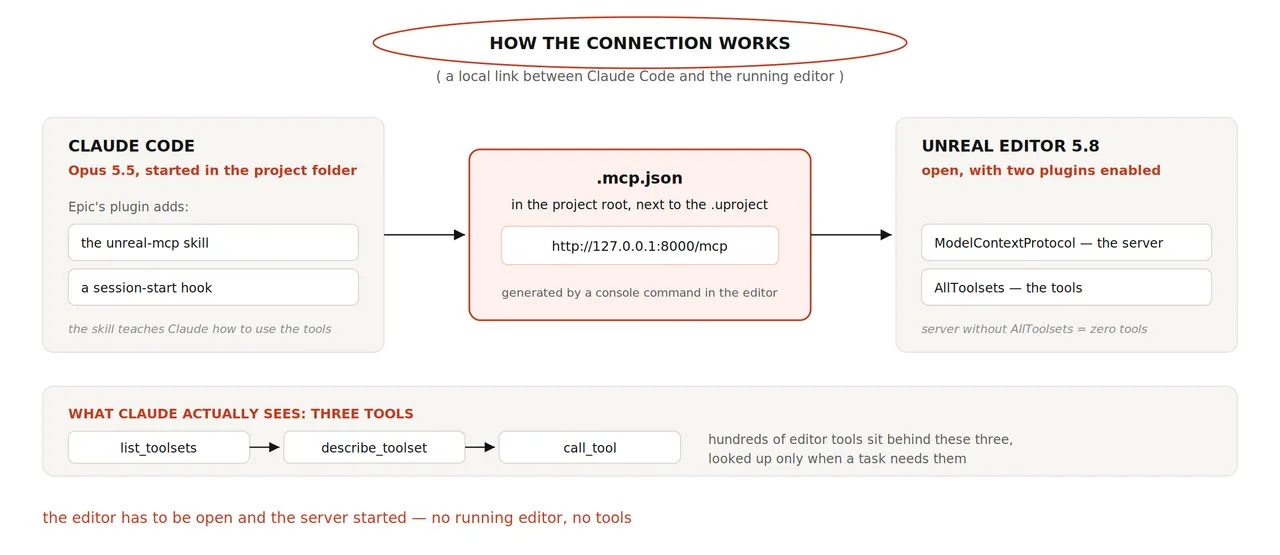
.mcp.json, and reaches the MCP server exposed by the open Unreal Editor.Step 1: Enable both editor plugins
Open Edit → Plugins. Search for Unreal MCP, whose internal name is ModelContextProtocol, and enable it. Then search for AllToolsets and enable that as well. Restart the editor when prompted.
Both plugins are required. ModelContextProtocol supplies the server; AllToolsets supplies the operations behind it. Enabling only the first produces a server that starts correctly and offers almost nothing useful.
Step 2: Start the server
Open the editor console with the ~ key and run:
ModelContextProtocol.StartServerTo avoid repeating this command, open Edit → Editor Preferences → General → Model Context Protocol and enable Auto Start Server.
The default endpoint listens on port 8000. If another process owns that port, start the server on a free port and remember the number:
ModelContextProtocol.StartServer 8010Step 3: Generate the connection file
Still in the editor console, run:
ModelContextProtocol.GenerateClientConfig ClaudeCodeThis creates .mcp.json, normally next to the .uproject file when Unreal Engine was installed through the launcher. For the default port, the generated content is equivalent to:
{
  "mcpServers": {
    "unreal-mcp": {
      "type": "http",
      "url": "http://127.0.0.1:8000/mcp"
    }
  }
}
If the port changes later, regenerate the file rather than leaving the old endpoint in place.
Step 4: Install Epic's plugin in Claude Code
/plugin install unreal-engine-skills-for-claude-code@claude-plugins-officialIf Claude Code reports that the marketplace is missing, add it first and then repeat the installation:
/plugin marketplace add anthropics/claude-plugins-officialStep 5: Start Claude Code in the project folder
This is the step most often missed. Claude Code reads .mcp.json relative to the directory where it starts. Launch it from the folder that contains the .uproject file. In a terminal, change into that directory before running claude. In the desktop app, select the same folder as the project.
Step 6: Prove that the connection is live
- Run
/plugin. The Installed tab should showunreal-engine-skills-for-claude-codeas enabled. - Run
/mcp. Theunreal-mcpserver should appear as connected. - Send a prompt that is explicitly read-only.
Inspect the open Unreal Editor project. Read only, change nothing.
Report the active level's name, the main actors in it, and whether
a Player Start and a Third Person character exist.
If the answer names real actors from the current level, the link is working. A generic answer that could apply to any Unreal project is not proof of a live connection.
There is a hands-off route for steps 1 through 3. The plugin contains setup instructions written for the agent, and Epic's City Sample guide demonstrates the approach. Start Claude Code in the project folder and send this:
This folder is an Unreal Engine 5.8 project. Set up the Unreal MCP
connection for this Claude Code session. Enable the ModelContextProtocol
and AllToolsets plugins in the .uproject, showing me the file path first.
Turn on auto-start. Tell me exactly what to run in the editor console.
Then verify with one read-only tool call. Change nothing else.
The author reports testing the plugin's session hook against a dummy project. When started from a subfolder, the hook found the .uproject, told Claude to prefer Unreal conventions and the unreal-mcp skill, and correctly reported whether .mcp.json existed. Outside a project, it stayed silent.
Two details vary across published guides. Some show the config command without its ClaudeCode argument, while Epic's plugin files use ModelContextProtocol.GenerateClientConfig ClaudeCode. Epic's documentation previously described tool calls as serial, while a September plugin update says the server accepts concurrent requests. The operational rule remains the same: operations that touch the same asset should be issued in order.
Other ways into the editor
Epic's official path is the main route for Unreal Engine 5.8, but it is not the only option. The source article lists three alternatives.
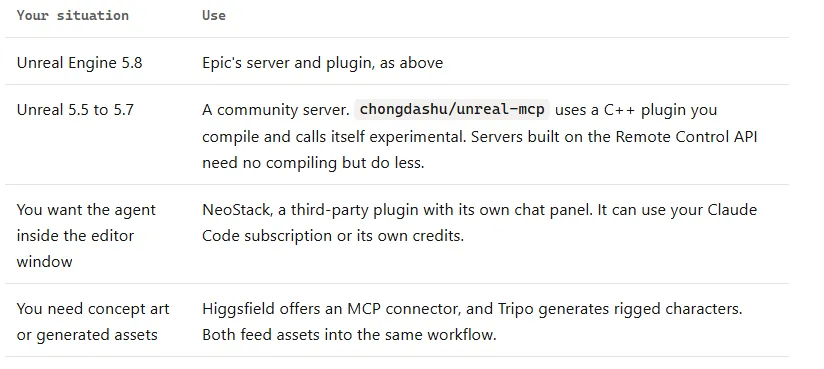
- For Unreal Engine 5.5 to 5.7, a community server such as
chongdashu/unreal-mcpcan be used, but it requires compiling a C++ plugin. Servers built on Unreal's Remote Control API may avoid that step while exposing fewer capabilities. - NeoStack is a third-party plugin with its own in-editor chat panel. It can use a Claude Code subscription or its own credits. The widely shared Souls-like demonstration used it.
- Higgsfield and Tripo provide connectors for concept art and generated assets. They complement an editor agent but do not replace the live project-editing loop.
NeoStack deserves a specific caveat. Its maker published a benchmark in which NeoStack passed three of five tasks and Epic's MCP passed one. The vendor ran each tool once and described the result as directional evidence. That is a reason to evaluate both tools on your own project, not a ranking. The model, plugin, prompt, and task definitions all differ.
The safety net
Epic's own description is blunt: installing the plugin gives Claude broad, live access to the running editor, and it should be treated like running arbitrary code because that is effectively what it is. One tool can execute Python inside the editor with full access to the project. Some changes made through that route are not undoable.
- Commit before every session. Save the project, then commit or shelve. If a result is wrong, a rollback takes seconds. Without a checkpoint, a half-day of failed work is not recoverable.
- Keep approvals enabled. Do not run Claude Code with
--dangerously-skip-permissionswhile this plugin is loaded. If you test that mode at all, use a disposable project. - Learn on a copy. Start with a project you can lose. Do not use an important production project for the first experiments.
- Stop Play mode before requesting edits. Editor tools behave differently while the game is running, and scene changes can conflict with runtime state.
- Do not prompt during compilation. Calls made while C++ or shaders are compiling can hang or fail in ways that are difficult to diagnose.
- Keep the endpoint local. The server has no login. Any process running under the same user can reach it. Do not expose port 8000 to a network or run it on a shared machine.
Source control is also the mechanism that makes the recommended workflow possible. The agent can propose a large batch of changes, but the developer still owns the acceptance gate. If the scene looks wrong, discard the branch. If a Blueprint is half-correct, inspect the diff before deciding whether a repair is worth the next round of waiting.
How to brief Opus 5.5 for engine work
Opus 5.5 always reasons before answering, but the important setting for this workflow is effort. The available levels are low, medium, high, xhigh and max. Medium is the default and is the sensible starting point. Raise it only when the agent repeatedly misses the same requirement, using /effort high. Higher effort means more checking and a much larger bill for the same task.
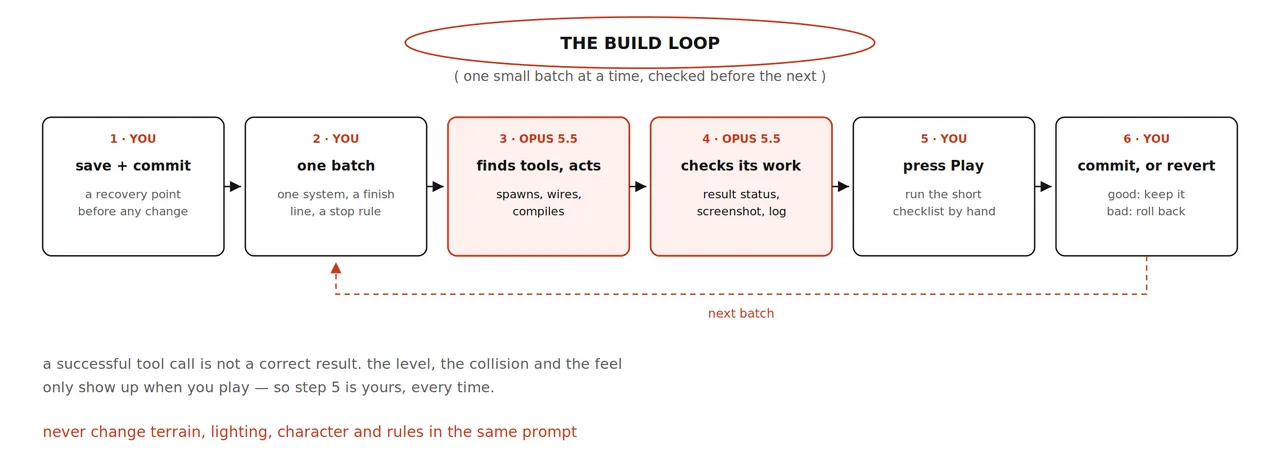
Six habits separate the strong demonstrations from vague failures.
- One system per prompt. Ask for a level layout, or a health system, or one enemy, not all three at once. The Souls-like creator added one feature per prompt and tested each result. Puget's two failures were large, loosely described requests.
- Define what done means. “Done means I can walk from the Player Start to the tower without getting stuck” gives the agent an observable acceptance condition. “Make the level better” does not.
- List what must not change. “Do not move the path or the Player Start” protects work that has already passed review.
- Ask for a report. Require every Blueprint and asset that was created or changed. The report is how the human keeps a mental model of the project.
- Forbid silent workarounds. In Puget's procedural-city test, the model quietly substituted hand-placed meshes for the requested graph. A good prompt explicitly says to stop and explain if the required tool is unavailable.
- Name the skill when needed.
/unreal-mcpusually activates when Unreal-specific work is mentioned, but naming it removes ambiguity.
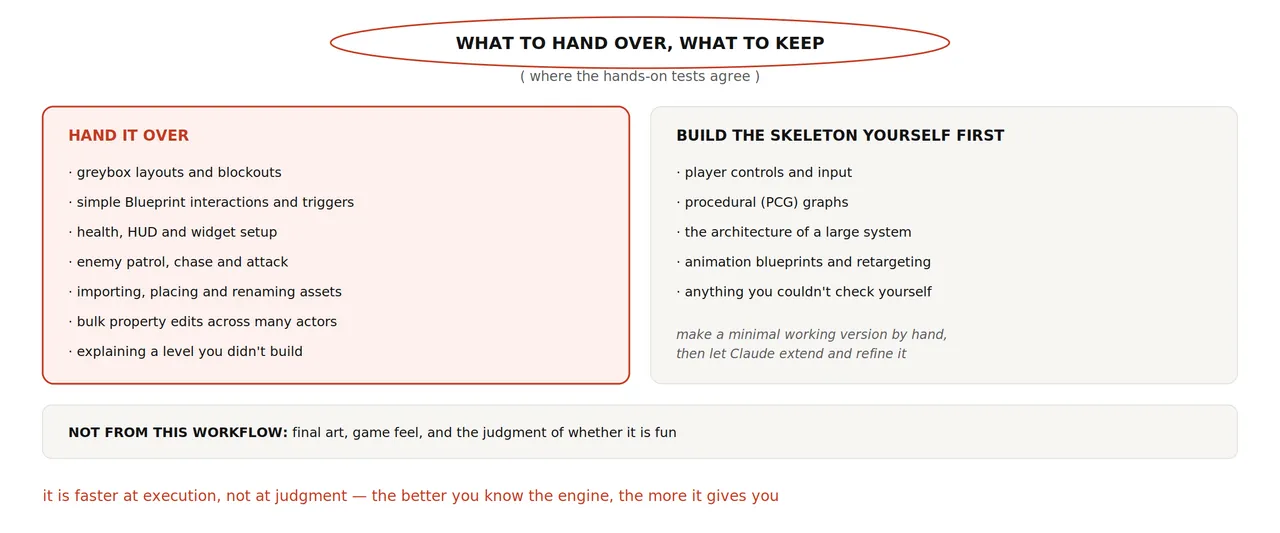
The practical boundary is not “AI can build games.” It is more specific. Hand over greybox layouts, repeatable Blueprint setup, health and HUD plumbing, enemy patrol logic, asset import, and bulk property edits. Keep player input, the core procedural graph, the high-level architecture, animation retargeting, and any system you cannot independently inspect. Build a minimal version yourself, then let the agent extend or refine it.
The route: one small game, six gates
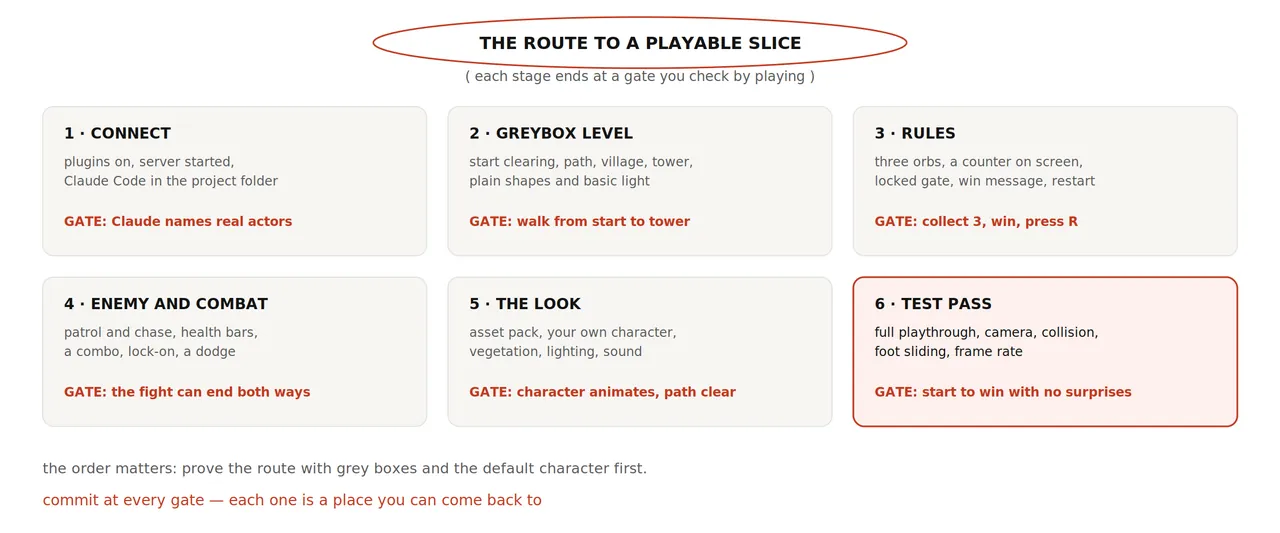
The running example is deliberately modest: a third-person character walks along a path to a village, collects three glowing orbs, defeats or avoids one enemy, reaches a locked tower, sees a win message, and can restart with R. The scope is small because the goal is to teach the loop, not to reproduce a whole commercial game.
Build 1: a level you can walk through
Create a new Third Person project and open an empty level. If the level has no player, add the template content through Add → Add Content to the Project → Third Person, then commit. The first prompt should ask the agent to inspect before changing anything, preserve the existing player start, and produce a route that can be tested immediately.
/unreal-mcp Build a greybox level in the current empty level.
First, read only: confirm the level name and that a Player Start exists.

Layout: a start clearing, a winding path about 150 metres long through
low hills, and a small walled village at the end with one tall tower
I can see from the start.
Use simple shapes and plain materials only. No final art.
Keep the path at least 4 metres wide and free of obstacles.
Add a sky, a sun and enough light to read the route.

Done means: I press Play and walk from the Player Start to the tower
without getting stuck.
When finished, list every actor and asset you created and take a
screenshot from the start looking toward the tower.
If a step fails or a tool is missing, stop and tell me.
Don't work around it silently.
In Puget's test, a comparable request for a hallway with six lit rooms returned in a little over five minutes and matched the description closely. The model even added hallway lights that were not requested. That kind of sensible extrapolation is common, which is another reason to ask for the complete actor and asset list.
Gate 1: press Play and walk the whole route. If you fall through the floor or hit an invisible wall, identify the exact location and request one targeted fix. Then commit. Do not move on while the route is still unreliable.
Build 2: add the rules
Once the route works, add the game rules without changing the geometry that already passed review.
/unreal-mcp Add the game rules to this level.
Don't move the path, the village or the Player Start.

1. Three glowing orbs along the path. Touching one collects it.
2. A counter on screen: "Orbs 0/3".
3. The tower gate stays locked until all three are collected.
   Reaching the tower after that shows "You made it" and ends the run.
4. The R key reloads the level.

Use Blueprints. Compile each one and read the compile result
before moving on.
Done means: collect 3, reach the tower, see the message, press R,
start again.
Report every Blueprint and widget you created, then give me a
five-step Play checklist.
The line about reading the compile result is essential. Epic's plugin instructions warn that some tools report failures as ordinary status data rather than raising an exception. An agent that ignores those statuses can continue as if a Blueprint compiled when it did not.
Gate 2: run the five-step checklist yourself, then try to break the rules. Collect the orbs in reverse order. Reach the tower with only two. Press R in the middle of a run. Restart after winning and after dying. Commit only when the state transitions remain correct in every order.
Build 3: add an enemy and combat
The combat section is where incremental testing matters most. Add one behavior, inspect it in Play mode, and commit before adding the next behavior. The Souls-like creator's best lesson is not the final feature list; it is the rhythm of one feature, one prompt, one test.
The enemy
/unreal-mcp Add one enemy near the village gate. It patrols between
two points. When it sees the player it chases, and in range it attacks.
Use a Behavior Tree. Add whatever navigation the level needs and tell
me what you added. Don't change the player or the rules from before.
Done means: it patrols, notices me, chases me and swings at me.
In the source video, this took a single prompt. The agent added a navigation volume on its own because the enemy could not move without one. The first attack animation looked broken. Expect that kind of rough first pass and judge the behavior separately from the polish.
Health and death
/unreal-mcp Add health to the player and the enemy. Show the player's
bar at the bottom left of the screen and the enemy's bar above its head.
Enemy hits reduce player health. At zero, show "You died" and let R
restart. Report every Blueprint and widget you touched.
The important observable conditions are not only the bars. Check that damage arrives in the correct direction, that both actors can reach zero, that input still works while the widget is visible, and that R restores a clean state rather than duplicating actors or timers.
The player's attack
/unreal-mcp Give the player an attack on the left mouse button: a
three-hit combo using the attack animations in [your folder].
Hits damage the enemy. At zero health the enemy falls and is removed
after three seconds. Keep movement and camera as they are.
This is a good place to prepare for a long wait. In the boss-fight test, a three-animation combo took Opus 5.5 about an hour, for work the creator estimated at fifteen to twenty minutes by hand. The model may still be useful for wiring the sequence, but the economics depend on whether the animation assets and state transitions are already well understood.
Lock-on and dodge
/unreal-mcp Add two things. Tab locks the camera onto the nearest
visible enemy and Tab again releases it; aim at the enemy's chest,
not the head. Left Shift makes the player dodge in the movement
direction. Add a subtle camera shake when a hit lands.
The “chest, not the head” instruction comes from the source video. Aiming the camera at the head made it sit too low and look upward. One sentence of visual feedback fixed the problem in seconds. That is how corrections should work: describe what you see, state the desired result, and limit the scope.
You may see Claude create a short Python script and ask for permission to run it. This is the plugin's scripting tool, used when several editor operations need to be combined or a single tool does not cover the task. Read the script before approving it. The boss-fight creator encountered this while building an animation Blueprint; a live editor script can modify many assets at once.
Gate 3: the fight must end both ways. You can win and you can lose, R works from either state, attacks remain directional, and the camera releases cleanly. Commit when the behavior holds. Do not add visual polish to a fight whose state transitions are still unstable.
Build 4: make it look like your game
Only after the mechanics work in grey boxes should you spend time and model credits on appearance. There are three common ways to acquire assets.
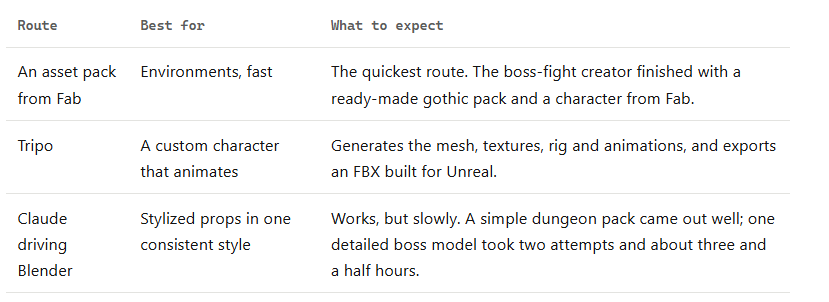
- An asset pack from Fab is the fastest route for environments. The boss-fight creator finished with a ready-made gothic pack and a character from Fab.
- Tripo generates a mesh, textures, rig and animations, then exports an FBX intended for Unreal Engine. It is the best option here for a custom animated character.
- Claude driving Blender works for stylized props, but it can be slow. A simple dungeon pack came out well; one detailed boss model took two attempts and about three and a half hours.
Bring in a custom character
- Generate the model from front, side and back views of the same character.
- Run Smart UV before texturing. Saving a new UV layout can remove existing textures.
- Generate textures with Remove Lighting enabled so baked highlights do not fight the engine's dynamic lighting.
- In Rigging, choose Humanoid and set the skeleton preset to UE5 Mannequin. This decision avoids retargeting work later.
- Preview at least one animation with real movement. Look for collapsed shoulders, reversed knees and clothing passing through the body.
- Export as FBX with the skeleton included, and keep animations in place.
In Unreal Engine, import the FBX into its own folder and confirm that it arrives as a Skeletal Mesh. For later animation files, select the existing skeleton and import animations only. Open the mesh and each animation to check scale, facing, materials and joints before attaching the character to the game. Then ask the agent to replace the mannequin while preserving the accepted controller and route.
/unreal-mcp Replace the default mannequin with the skeletal mesh in
/Game/Characters/Hero. Keep the current input, movement, camera,
Player Start and route. Build an Animation Blueprint from that mesh's
own animations: idle, walk or run by speed, and jump.
If the animations can't be used without retargeting, stop and explain
what is needed. Don't force incompatible assets.
Report every asset you changed and give me a Play checklist:
idle, walk, run, jump, turn.
Dress the level in small batches
Import the environment pack, then replace grey boxes one area at a time. A useful prompt is: “Swap the village walls and tower for the pack's pieces, keep positions and the gate's width.” Follow with vegetation “around the road, not on it, leaving room for the third-person camera,” then lighting, then sound.
Scale mistakes become obvious when the mannequin stands next to the art. The Souls-like creator found that the first dungeon was far too large for the character and rescaled the whole scene with one prompt. Compare every asset to character height before accepting the batch.
Unreal Engine's Procedural Content Generation framework is the correct tool for scattered trees, rocks and grass. It is also where the Puget test failed. Newer Epic material, including the updated City Sample, registers a skill that teaches an agent to construct PCG graphs, but the capability must be present in the project you are using. Ask first whether such a skill exists, and do not accept hand-placed meshes as a substitute when the requirement is a procedural graph.
/unreal-mcp Scatter trees, rocks and grass with a PCG graph, keeping
the path and the gate clear. If you can't build or edit a real PCG
graph here, stop and say so. Don't place static meshes by hand instead.
If no PCG skill is available, create an empty PCG graph yourself and ask Claude to work inside that structure. Puget's conclusion is useful beyond PCG: give the agent a concrete structure to extend rather than expecting it to invent the correct subsystem from a vague request.
Gate 4: the character idles, walks, runs, jumps and turns without sliding or snapping into a T-pose. Decorative objects do not block the route or camera. The village remains readable at normal play distance. Commit after the visual pass so the next debugging session can return to a known-good scene.
Test it in four layers
Testing is where a prototype becomes something trustworthy. One layer cannot replace another.
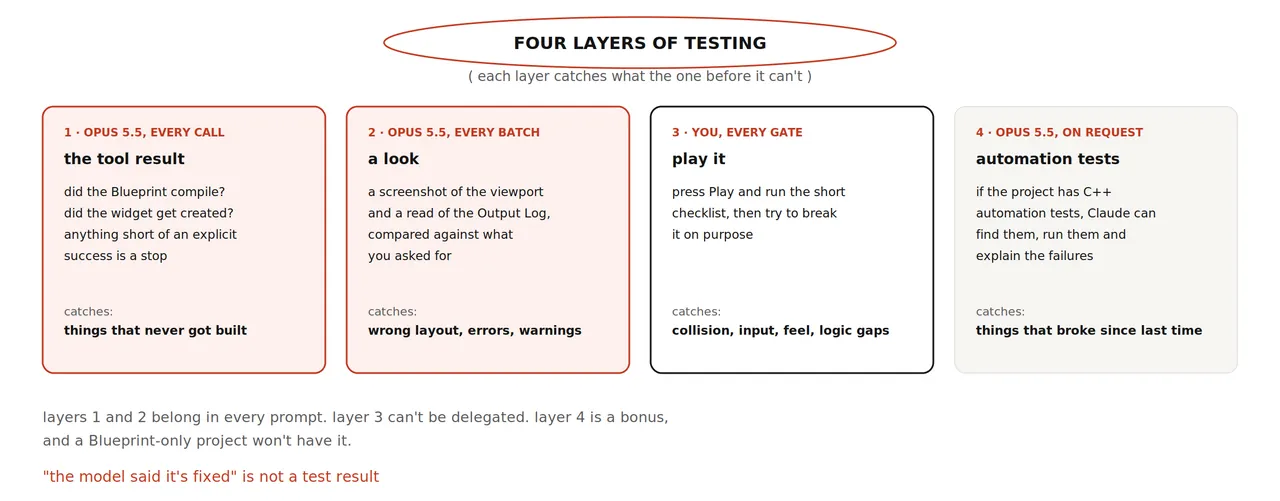
- Tool result. Claude reads the status of every editor call. Enforce this in the prompt; a tool can return a failure as data and continue unless the agent notices it.
- A look. The plugin exposes screenshots, camera control and log inspection. Ask for a screenshot after every batch and for any new errors in the Output Log. Puget's reviewer observed the model taking screenshots to judge its own changes.
- Play it yourself. This layer cannot be delegated. The Souls-like video shows a model playing through combat, but that was with another plugin. With Epic's MCP, ask what the agent can observe during Play mode, then do the hands-on pass yourself.
- Automation tests. The plugin can discover, run and inspect C++ automation tests. If the project has them, prompts such as “run the inventory automation tests and summarize the failures” are concrete and useful.
Before calling the slice finished, play from start to win and check the failures that only appear over a full run:
- The camera does not clip through walls, trees or the tower.
- The feet do not slide during walk and run.
- The player cannot leave the map or become wedged between props.
- Winning, dying and restarting work in every order.
- The frame rate remains acceptable in the busiest area.
- The Output Log contains no new errors after a complete run.
Do not skip the unglamorous endings. In the boss-fight test, everything worked until the boss died, at which point the ragdoll behavior glitched badly. The player's victory path is part of the game logic, not a cleanup detail.
How to report a bug the agent can fix
Puget's broken-controls test demonstrates the trap. The reviewer could only say that it still did not work. The model spent another fifteen minutes, claimed a fix, and nothing changed. A useful report separates observation from inference.
/unreal-mcp Bug: after the enemy dies, pressing R does nothing.
Steps: Play, kill the enemy, press R.
Expected: the level reloads.
Actual: nothing happens and the Output Log shows no message.
Read the Output Log and the restart Blueprint first and tell me
the cause. Then fix only that, and tell me what you changed.
The structure is important: reproduction steps, expected behavior, actual behavior, existing evidence, and an instruction to diagnose before editing. If the model proposes a broad rewrite, reject it. If two attempts fail, stop. Roll back to the last commit and ask for a smaller change, or raise effort for that one task. A third speculative fix applied on top of two failures is how a project becomes impossible to reason about.
Time and cost
The honest cost of the workflow is waiting. Puget's reviewer found five to fifteen minutes per request disruptive to the normal edit-test-adjust rhythm. The boss-fight creator spent roughly half a day mostly watching progress. Queue a batch, work on something else, and return when the result is ready.
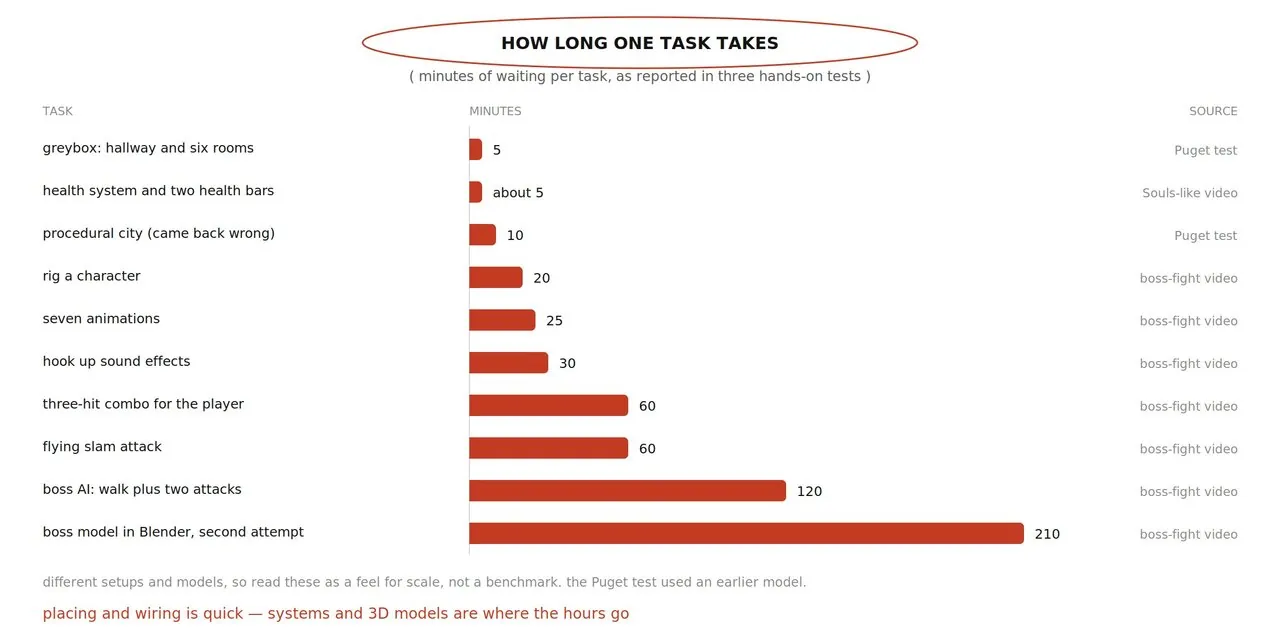
The reported times ranged from about five minutes for a simple greybox or health UI, to twenty to thirty minutes for rigging, animations and sound hooks, to around an hour for a combo or a flying slam attack, and roughly two hours for boss AI with two attacks. A second attempt at the boss model took about three and a half hours. Placing and wiring assets is comparatively quick; custom systems and 3D models dominate the wait.
Usage limits are the other cost. The source reports Opus 5.5 pricing at four dollars per million input tokens and twenty dollars per million output tokens through the API. A morning of small experiments reportedly consumed about 15 percent of a weekly team allowance in Puget's July test. The boss-fight creator ran out of credits before finishing. At the high end, one developer's thirty-six-hour multiplayer RPG build used an entire weekly limit on the largest plan, equivalent to about 2,400 dollars at API prices.
- Stay on medium effort. One review cited in the source measured the same hard task at roughly 0.55 dollars on low, 1.34 dollars on medium and 5.98 dollars on max. Raise effort for one stubborn problem, then lower it again.
- Write the brief once, well. A clear specification saves more than a higher effort setting usually does.
- Set a time box. Decide in advance how long a task gets before you roll back and do it manually.
- Do five-minute jobs yourself. Moving one actor or changing one value is faster by hand than through a prompt.
Troubleshooting
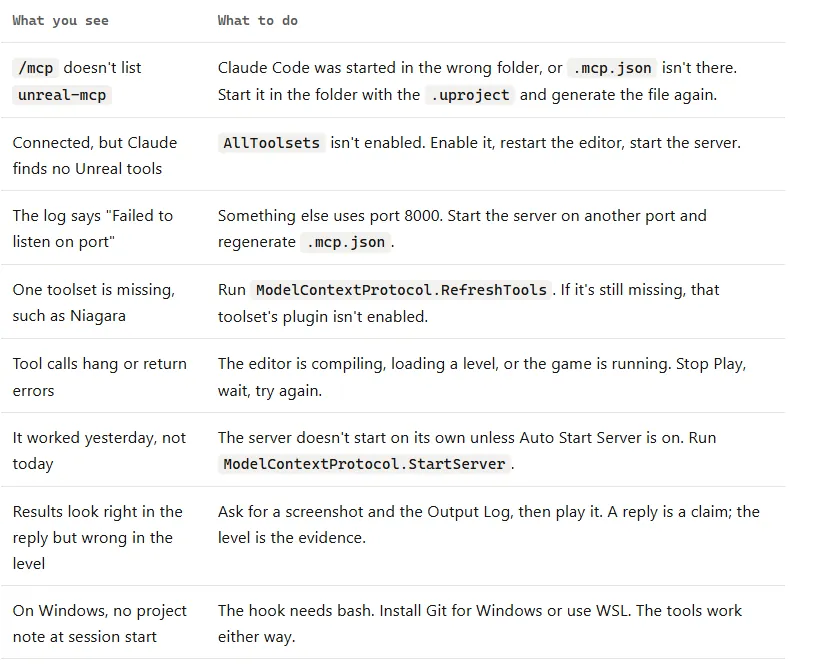
Most early failures come from one of three states: Claude Code is in the wrong directory, the editor does not have both plugins active, or Play mode and compilation are interfering with tool calls.
/mcpdoes not listunreal-mcp. Claude Code was started in the wrong folder, or.mcp.jsonis absent. Start it beside the.uprojectand regenerate the file.- The server is connected but no Unreal tools appear.
AllToolsetsis disabled. Enable it, restart the editor, and start the server. - “Failed to listen on port.” Another process owns port 8000. Start the server on another port and regenerate
.mcp.json. - One toolset is missing. Run
ModelContextProtocol.RefreshTools. If it remains absent, verify that the toolset's plugin is enabled. - Tool calls hang or return confusing errors. The editor may be compiling, loading, or running Play mode. Stop Play, wait for compilation, and retry.
- It worked yesterday but not today. The server does not start automatically unless Auto Start Server is enabled. Run
ModelContextProtocol.StartServer. - The reply looks right but the level is wrong. Ask for a screenshot and the Output Log, then play the result. A model's claim that it fixed something is not evidence.
- Windows has no project note at session start. The hook requires bash. Install Git for Windows or use WSL; the editor tools still work either way.
The one-page card
- Install Unreal Engine 5.8, create a Third Person project, and put it under source control.
- Enable
ModelContextProtocolandAllToolsets, restart, start the server, and enable auto-start. - Run
ModelContextProtocol.GenerateClientConfig ClaudeCode. - In Claude Code, run
/plugin install unreal-engine-skills-for-claude-code@claude-plugins-official. - Start Claude Code in the project folder with Opus 5.5 on medium effort. Check
/mcp, then send a read-only prompt. - Commit. Build in order: greybox level, rules, enemy and combat, then the visual pass.
- Use one system per prompt with a finish line, a “do not change” list, an asset report, and no silent workarounds.
- After every batch, inspect the tool result, screenshot, logs, and then play it yourself. Commit at every gate.
- Report bugs with steps, expected behavior, and actual behavior. Two failed fixes means roll back.
- Finish with a full playthrough covering camera, collision, foot sliding, restart, frame rate, and the Output Log.
The smallest useful version of this workflow fits into an evening: connect the editor, build a greybox, add three collectible orbs and a win message, then play the level from start to finish. Everything after that is the same loop with more ambition and a larger review budget.
The larger lesson is about control, not autonomy. The agent is useful because it can inspect the simulator, use tools, and execute a bounded change. The developer remains responsible for architecture, permissions, evidence, and the final judgment of whether the result is any good.
Source: This bilingual adaptation is based on rewind's X Article, “How to Build your own Game in Unreal Engine with Claude Opus 5.5 (Full Course),” published on 5 October 2026. Epic's plugin repository is EpicGames/unreal-engine-skills-for-claude-code-plugin.