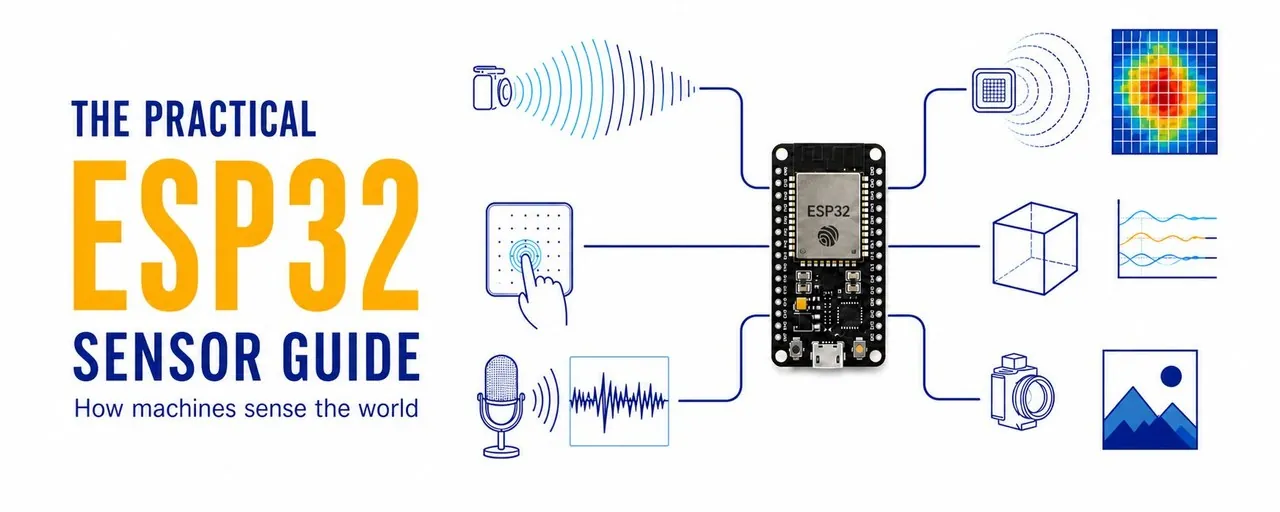
How Machines Sense the World: A Practical ESP32 Sensor Guide
From a dusk-light LDR circuit to a multi-sensor rover, one ESP32-S3 guide connects GPIO, ADC, I2C, SPI, hysteresis, persistence, and fail-safe sensing into a testable perception loop.
A machine does not need a camera to understand anything useful about the physical world. It can notice dusk, detect a nearby object, feel a bump, or wake when a room changes. The hard part is not buying a sensor. It is turning a noisy electrical signal into a decision that remains safe when the reading is wrong.
A hobby drone can use a range sensor to keep away from a wall without carrying a camera, although range alone is not enough for safe autonomous flight. A rover can record that it has hit an obstacle. A desk device can wake when somebody walks past. A small board can measure heat, vibration, sound, light, tilt, and distance.
All of these systems begin with the same sequence. A physical change becomes a signal, software cleans and interprets that signal, and an output changes something in the real world.
physical world -> sensor reading -> filtering -> decision -> actionThe ESP32 makes this loop inexpensive enough to build at a desk. The transferable skill is not memorising a catalogue of breakout boards. It is learning how to select a meaningful signal, connect it without damaging the board, define what should count as an event, and make the device fail into a harmless state.
This guide follows that progression from a single light-dependent resistor to a small multi-sensor rover. Every project uses the same architecture, so a new sensor changes the input rather than forcing you to relearn the whole discipline.
Start with one board and one question
The complete starter build uses an ESP32-S3-DevKitC-1, a breadboard, jumper wires, a light-dependent resistor (LDR), a 10 kOhm resistor, an LED, and a 220-330 Ohm resistor for the LED. On the DevKitC-1, GPIO4 can be used as an ADC input and GPIO5 is a general-purpose digital output. Both are exposed on labelled headers, which makes the circuit easy to inspect. The board's official documentation is the authority for its pin map: ESP32-S3-DevKitC-1 reference.
The broader ideas apply across the ESP32 family, but memory, built-in touch support, ADC behaviour, and header layouts differ between chips and boards. Use the exact pin map in this article only with the named DevKitC-1. With another board, keep the architecture and replace the wiring using that board's official pinout.
A sensor gives a machine one clue, not the whole situation
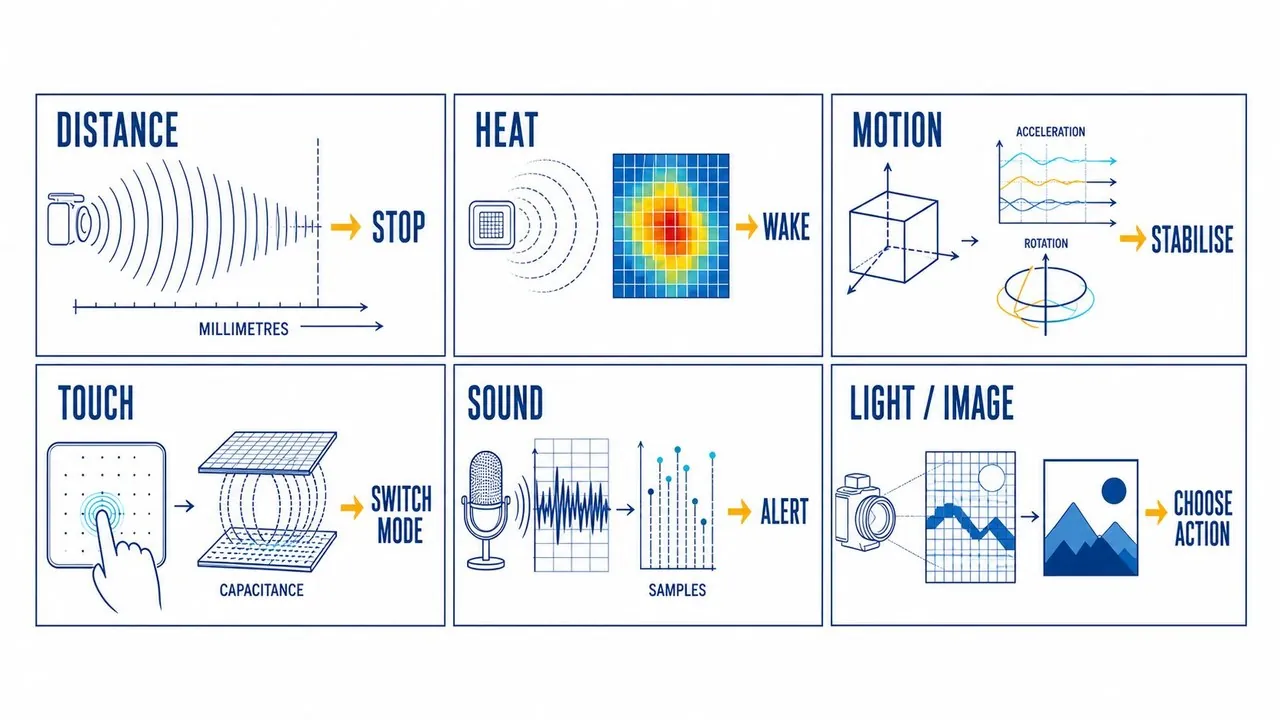
A distance sensor can report that something is close. It cannot tell you whether that object is a chair, a hand, or a wall. An accelerometer can report acceleration and rotation. It cannot decide that a robot is falling until the program defines the pattern that counts as a fall.
That limitation is useful. It keeps a first prototype small enough to test. Pick the signal that directly supports a decision instead of choosing the most impressive module available.
| What the device should notice | Reasonable starting sensor | First useful action |
|---|---|---|
| Darkness or bright light | Light sensor or LDR | Switch on a low-power LED or indicator |
| An object approaching | Time-of-flight or ultrasonic distance sensor | Slow or stop a motor |
| Nearby motion or a warm object | PIR or thermal sensor | Wake a display or show a local prompt |
| Tilt, shake, or a possible fall | Inertial measurement unit (IMU) | Change mode or record an event |
| Touch or pressure | Button, capacitive pad, or pressure sensor | Start or stop a routine |
| A sustained loud sound | Microphone | Log or signal a sound event |
| A visual pattern | Camera | Capture an image or run a supported vision task |
Three questions to answer before buying a sensor
1. What physical change matters?
"I want a smart room" is too broad to build and test. "I want the lamp to come on when the desk becomes dark" is concrete. "I want a rover to stop before it reaches a chair leg" is also concrete.
Write the event as one sentence:
When [measurable change] happens for [long enough],
the device should [safe action].
Examples make the missing details visible:
When an object stays within 250 mm for 300 ms, the rover stops.
When the desk has been dark for two minutes, the lamp turns on.
When the IMU detects a sharp impact followed by stillness, record a possible fall.
Duration matters because real signals move around. A single reading should rarely command a motor, relay, lock, or alarm. State the persistence requirement together with the event.
2. How quickly must the device react?
Room temperature can be sampled every few seconds. A balancing robot needs a much faster loop. That requirement affects the sensor choice, the code structure, the power budget, and whether an ESP32 is the right controller.
Start with the slowest sampling rate that still makes the interaction feel correct. Continuous high-rate sampling is an optimisation to add when the application proves it needs one, not a badge of engineering seriousness.
3. What happens when the reading is wrong?
Every sensor can be blocked, miscalibrated, badly placed, or confused by its environment. Decide what the device does when it cannot provide a trustworthy answer.
In a first build, uncertainty should produce a harmless outcome: show an indicator, record an error, pause motion, or request another sample. A prototype should not unlock a door, switch mains voltage, or move an actuator that could hurt somebody.
Four ways a sensor can talk to an ESP32
The module interface determines how the board receives a signal. You do not need to master every protocol for the first project.
| Interface | What it carries | Good first examples | What to watch |
|---|---|---|---|
| GPIO / digital | A high or low state | Button, basic motion module | Debounce, pull-up configuration, false triggers |
| ADC / analog | A changing voltage converted to a number | LDR voltage divider, analog pressure sensor | Calibration, electrical noise, valid input range |
| I2C | Addressed data from several devices on two shared wires | Distance, temperature, and IMU breakouts | Address conflicts, pull-ups, wire length |
| SPI | Faster data across several signal wires | Displays, some IMUs, faster converters | Chip-select wiring and board-specific pin choices |
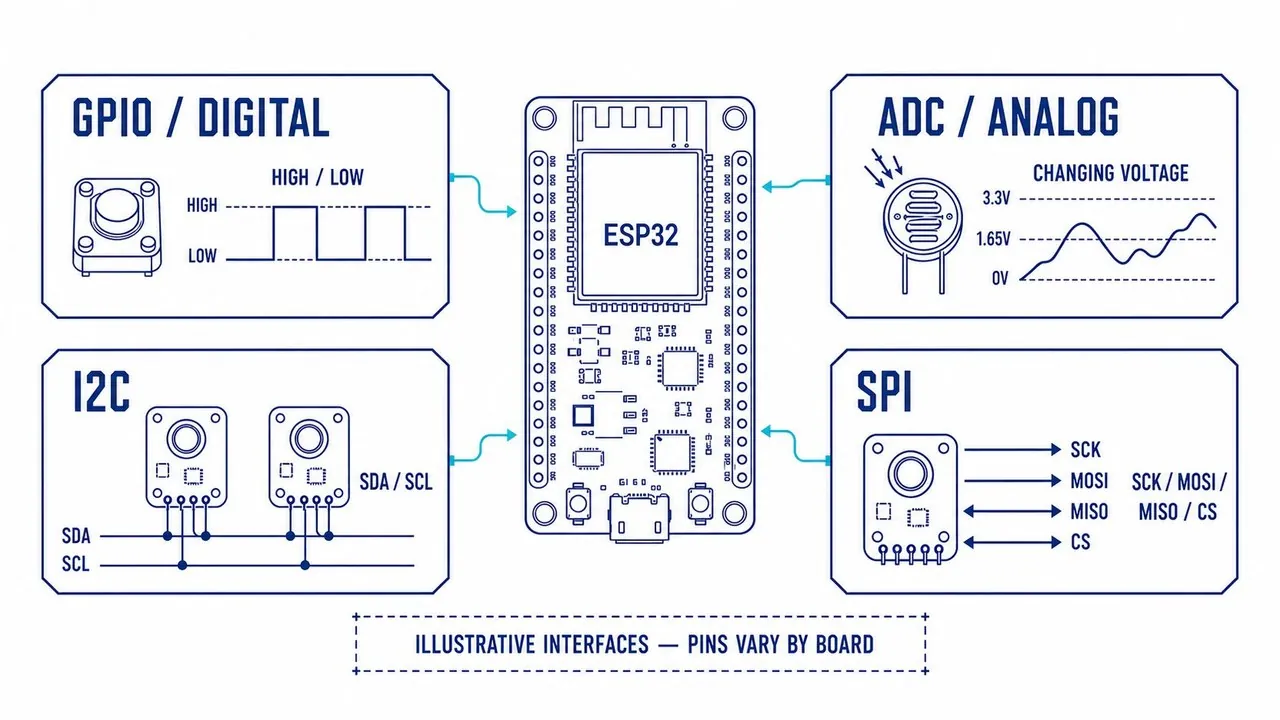
Before wiring anything: ESP32 GPIO and ADC pins use 3.3 V logic. Never send a 5 V signal into a GPIO or ADC pin. Breakout-board power and logic levels can differ even when the module looks familiar, so read the labels and documentation for the exact board in front of you. Every connected module needs a common ground. Keep mains-powered lamps, relay modules, large motors, and pumps out of this beginner build.
An analog input is a number produced from a voltage. The ESP32 ADC converts the voltage, but raw values vary between chips and can contain noise. Espressif documents both ADC calibration and noise reduction through measures such as multisampling. Treat a raw number as a starting point, not an exact physical measurement. See the ESP-IDF ADC overview and the ADC calibration guide.
I2C is convenient when several smart breakout boards share one data line and one clock line. Each device usually has an address. Many breakouts already contain pull-up resistors, and adding several boards can make the combined pull-up stronger than intended. Start with one module, short jumpers, and an I2C scanner before building a larger bus. The ESP-IDF I2C guide documents the protocol and controller configuration.
Build a complete loop: a dusk-light indicator
The first project lets the ESP32-S3 measure light and switch on a low-power LED when the room becomes dark. The LED demonstrates the full decision loop without introducing mains electricity. This build uses only 3.3 V logic and a USB-powered board. It does not control a household lamp, relay, motor, or pump.
Parts
- ESP32-S3-DevKitC-1 and a USB data cable;
- breadboard and jumper wires;
- one LDR or photoresistor;
- one 10 kOhm resistor;
- one LED;
- one 220-330 Ohm resistor for the LED.
Wiring
| Connection | Connect to |
|---|---|
3V3 | One leg of the LDR |
| Other LDR leg | GPIO4 and one leg of the 10 kOhm resistor |
| Other 10 kOhm resistor leg | GND |
| GPIO5 | 220-330 Ohm resistor, then LED long leg (anode) |
| LED short leg (cathode) | GND |
The LDR and fixed resistor form a voltage divider. With this wiring, more light normally produces a higher raw ADC reading. The actual values depend on the LDR, the resistor, the board, and the room, so the sketch prints measurements before asking the LED to make a decision.
On the breadboard, place the free LDR leg, one leg of the 10 kOhm resistor, and the jumper to GPIO4 in the same connected row. That row is the measurement node.
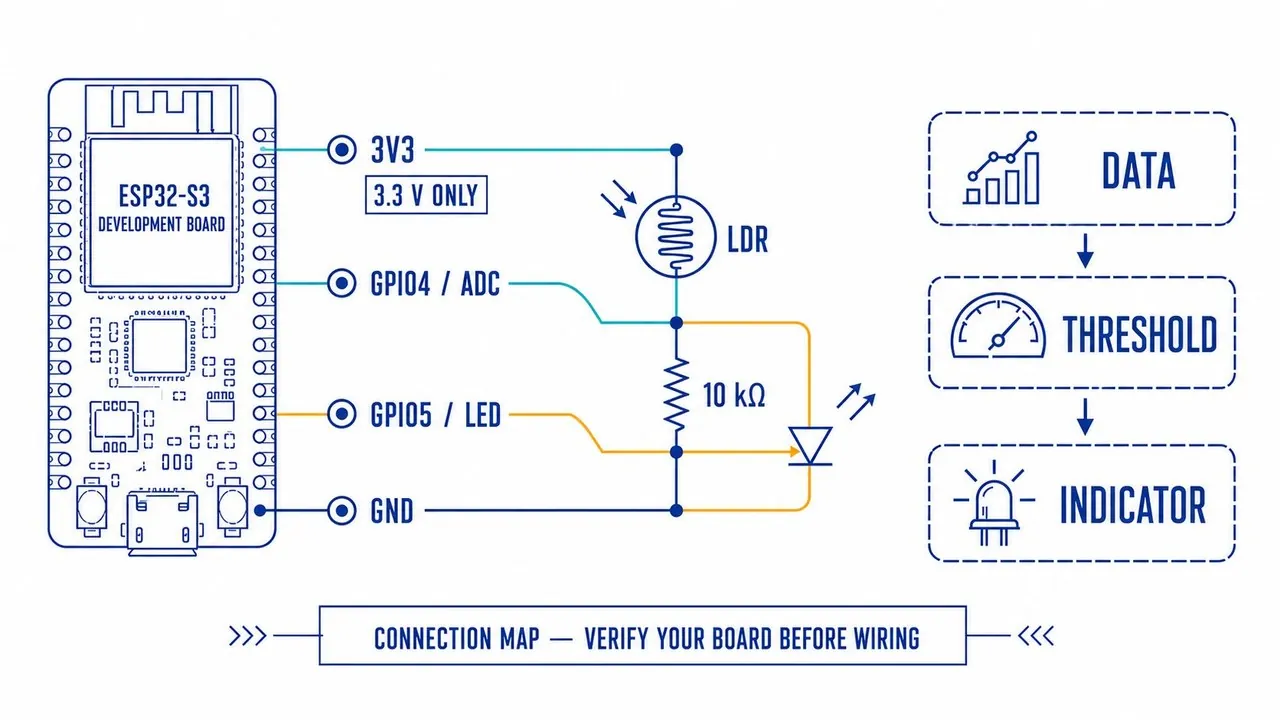
The diagram explains the signal path. It is not a physical breadboard layout and does not replace checking the labels on the exact board. Disconnect USB power while changing the circuit, and inspect the LDR/resistor node and both ground connections before reconnecting it.
Upload the sketch
Install the current esp32 platform from the Arduino IDE Boards Manager, select ESP32S3 Dev Module, and choose the board's USB port. Leave other board settings at their defaults unless the board documentation says otherwise. If uploading does not begin, hold BOOT, start the upload, and release BOOT once the connection starts. Espressif maintains the Arduino-ESP32 installation guide.
const int LIGHT_PIN = 4;  // GPIO4 / ADC1_CH3 on ESP32-S3-DevKitC-1
const int LED_PIN = 5;

const int DARK_ON = 1200;   // replace after measuring your room
const int LIGHT_OFF = 1600; // higher value prevents flicker
bool indicatorOn = false;

int averageLightReading() {
  long total = 0;
  for (int i = 0; i < 10; i++) {
    total += analogRead(LIGHT_PIN);
    delay(10);
  }
  return total / 10;
}

void setup() {
  Serial.begin(115200);
  pinMode(LED_PIN, OUTPUT);
}

void loop() {
  int light = averageLightReading();
  Serial.println(light);

  if (!indicatorOn && light < DARK_ON) {
    indicatorOn = true;
  } else if (indicatorOn && light > LIGHT_OFF) {
    indicatorOn = false;
  }

  digitalWrite(LED_PIN, indicatorOn ? HIGH : LOW);
  delay(150);
}
Open Serial Monitor at 115200 baud. Cover the LDR and note the range of readings, then uncover it and note the other range. Set DARK_ON between the two ranges, and set LIGHT_OFF a little above it.
For example, covered readings around 400-650 and uncovered readings around 2400-3000 make DARK_ON = 1200 and LIGHT_OFF = 1500 reasonable first settings. Test at the light level where the indicator should actually switch. The two observed ranges should barely overlap. If they overlap heavily, move the LDR or change the divider resistor before relying on the result. If covering the sensor makes readings rise rather than fall, reverse the threshold comparisons instead of inventing a different explanation for the same wiring.
If Serial Monitor stays empty, check the selected port and confirm that the USB cable carries data. If every reading is zero or fixed, recheck the shared LDR/resistor/GPIO4 node and ground. If the LED never lights, reverse its orientation and verify that the resistor is in series.
Turn a raw reading into a stable event
The useful engineering happens between taking a reading and acting on it. Imagine a distance sensor mounted on the front of a slow indoor rover. This rule is fragile:
if distance < 250 mm: stopA reading can be wrong because of the target material, its angle, the measuring range, ambient conditions, or the sensor's own limits. A more dependable first rule has four stages:
read several samples
        |
        v
discard impossible readings
        |
        v
calculate a small average or median
        |
        v
require the condition to persist before acting
The code can remain simple:
distanceMm = readDistanceMm(); // supplied by the sensor library

if (distanceMm > 0 && distanceMm < 250) {
  closeReadings++;
} else {
  closeReadings = 0;
}

if (closeReadings >= 3) {       // readings must be spaced in time
  stopMotors();
}
This is deliberately a pattern, not drop-in firmware. The correct library, pins, sample interval, valid range, motor speed, and stopping distance depend on the hardware. Measure the rover's stopping distance in the environment where it will operate and choose a threshold with margin. The transferable lesson is to make a decision from a short history of readings instead of one moment.
Use hysteresis so the device does not flicker
If an automatic lamp turns on below 300 and off above 300, tiny changes around the boundary can make it chatter. Give the two transitions different thresholds:
light below 280  -> lamp on
light above 340  -> lamp off
between them     -> keep the current state
This is called hysteresis. It is useful for distance, temperature, touch, and sound-level projects that make a binary decision from a noisy quantity. Some systems need timing rules, a state machine, or an adaptive baseline instead. The right question is not "which filter is best?" but "what history and context does this decision require?"
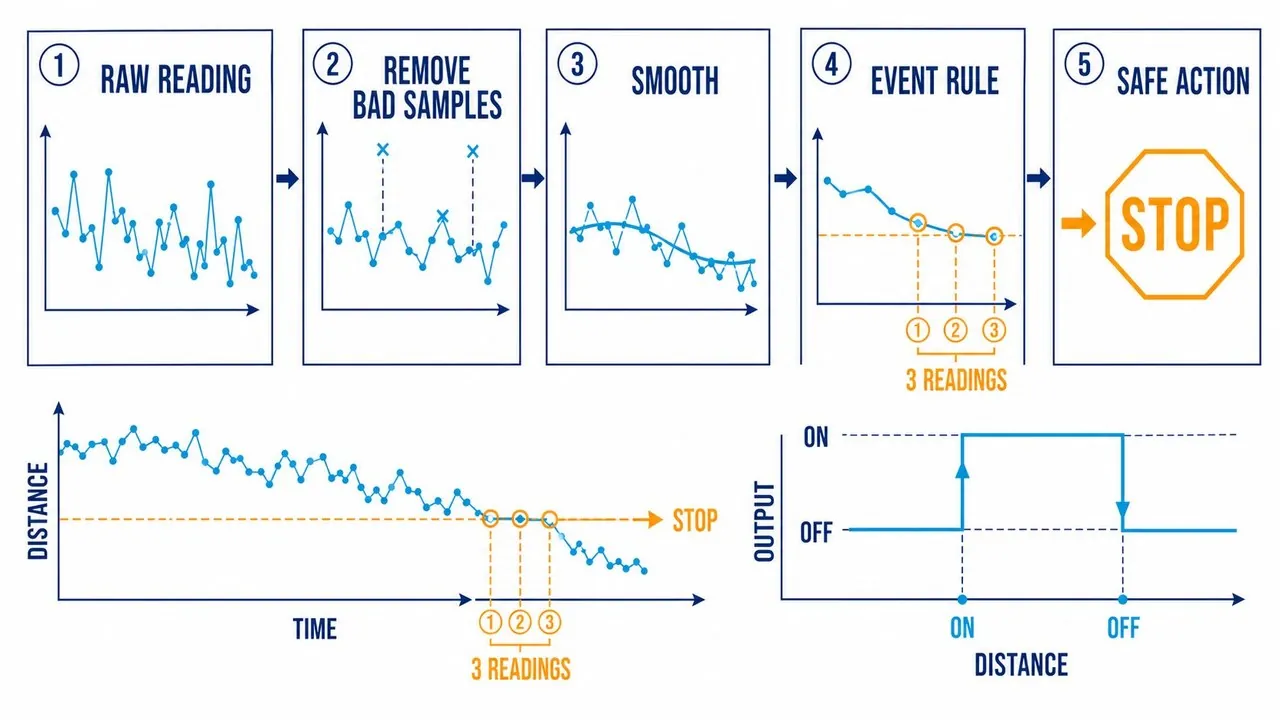
The two thresholds and the time requirement solve different problems. Hysteresis prevents the output from toggling when a stable signal sits near one boundary. Persistence prevents a brief spike from triggering the output at all. A robust first prototype often needs both.
One sensor reacts; several sensors create context
A camera is powerful, but it is not the only way to build a machine that adapts to its surroundings. Small robots often combine simpler signals because each signal covers a different failure mode.
Consider a slow indoor rover without a camera:
front distance sensor  -> obstacle proximity
left/right distance    -> choose an open direction
IMU                    -> detect a bump or unexpected tilt
wheel encoder          -> estimate wheel rotation
timed motor command    -> rough movement assumption
The rover still has limits. Shiny, soft, angled, or distant objects can confuse one type of distance sensor. A timed motor command does not prove that a wheel actually moved. Behaviour becomes more reliable when the program compares signals instead of trusting one reading completely.
At this stage, call the approach combining sensor rules: use more than one imperfect clue before making an important decision. Formal sensor fusion is a deeper topic that estimates a shared state from sensors with known error models. A Kalman filter is not required to begin. A useful starter rule might pause the rover when the front sensor is close, then compare left and right clearance to choose the safer turn.
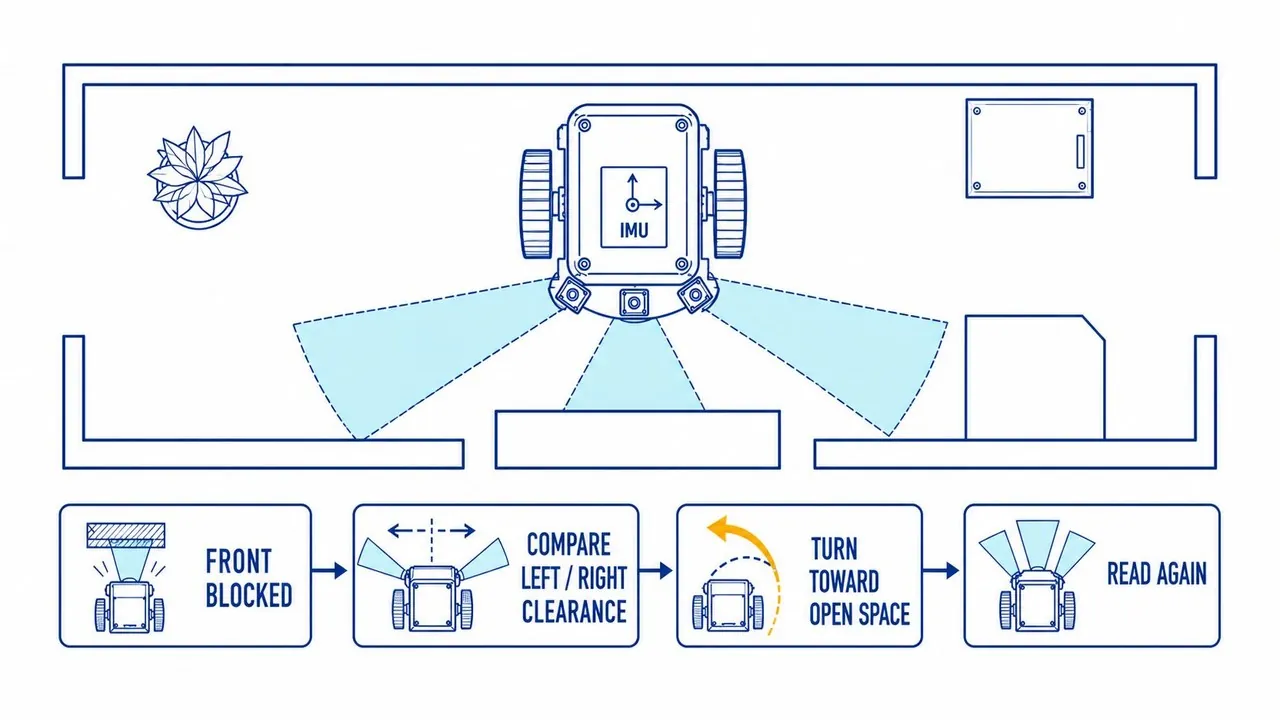
The sequence matters. Stop first, compare clearance second, turn third, and measure again fourth. The robot never commits to a turn using stale information. Each stage also produces a state that can be logged and tested separately.
Seven projects that scale from simple to surprising
| Project | Sensor idea | First version | Upgrade path |
|---|---|---|---|
| Dusk lamp | Light level | An LED switches on in dim light | Add a relay only after electrical safety and isolation are understood |
| Parking or proximity indicator | Distance | LEDs show how close an object is | Add a buzzer and a small display |
| Desk activity display | PIR motion sensor | The screen wakes after nearby motion | Add time-of-day rules and local logging |
| Tilt controller | IMU | Tilt moves an on-screen cursor | Control a servo with conservative limits |
| Sound-level signal | Microphone level | A light shows sustained loud sound | Classify a narrow sound pattern after collecting examples |
| Plant monitor | Capacitive soil moisture and light | Display readings and alert on dry soil | Keep alerts; a pump needs a separate low-voltage driver and power design |
| Obstacle-avoiding rover | One distance sensor | Stop before an obstacle | Add side sensing, IMU context, and controlled turns |
Every project uses the same architecture. Change the input and preserve the discipline: prove the reading first, add a visible indicator second, and add a physical actuator last. Avoid water, mains electricity, large motors, and relays until you can independently verify the required power, isolation, driver, and failure behaviour.
Touch, sound, and vision are sensors too
The boundary between a "sensor project" and an "AI project" is softer than it looks.
An ESP32-S3 can measure capacitance changes on supported touch pins. A conductive touch surface can be connected to a supported GPIO after checking the chip and board documentation. The DevKitC-1 does not provide a ready-made touch pad, so the carrier, wiring, and calibration determine how reliable the interaction feels. See Espressif's capacitive-touch documentation.
A microphone begins as a stream of amplitude samples. A camera begins as a frame of pixels. The first useful project may only estimate volume or detect motion. More advanced work can recognise a wake word, classify vibration, identify a gesture, or detect an object, but camera-based QR decoding or recognition requires compatible hardware, enough memory, controlled lighting, and the right software stack.
Keep the layers separate:
sensor hardware -> clean signal -> simple rule
                -> trained model, if needed -> action
That order makes debugging possible. If the device behaves badly, you can determine whether the fault is in wiring, placement, noisy data, a weak rule, or the model itself. A sophisticated model cannot repair a saturated input or an unreliable ground connection.
Build the first loop before building the system
Start with one sensor and one harmless output. Make the output observable: print the reading, change an LED, or draw a bar on a display. Test it in the real environment where the device will live.
Then answer five questions in a notebook or text file:
- What reading appears in the normal state?
- What reading appears during the event?
- How much do the readings vary?
- Which false event happens most often?
- What action remains safe when the sensor is wrong?
Those answers are more valuable than a complicated wiring diagram copied from a random project page. They define the device's operating envelope and expose the cases that a successful demo hides.
A practical bring-up sequence is equally simple:
- Confirm power, ground, and logic levels with the output stage disconnected.
- Read the sensor and print raw values before making any decision.
- Add smoothing, validity checks, and persistence.
- Test the decision logic with synthetic values, including bad input.
- Connect the final low-voltage output and repeat the tests in the real environment.
The physical world is messy. Good embedded projects leave room for that mess: they sample more than once, use conservative thresholds, log what happened, and change one variable at a time.
The loop is the foundation
Pick one signal that matters in your space. Measure it. Make an LED or display respond. Then give that response a real job.
That small loop is the beginning of a sensor-driven device: a rover that respects distance, a room that notices light, a tool that detects vibration, or a local interface that responds when a person is actually there. The next sensor does not require a new philosophy. It requires another clearly defined physical change, a compatible interface, a testable event, and a safe response when the reading is wrong.
Sources and production notes
- "How Machines Sense the World - A Practical ESP32 Sensor Guide" by ard (@ardchain) on X, published 2026-08-30.
- Espressif, ESP32-S3-DevKitC-1 user guide.
- Espressif, ADC overview and ADC calibration.
- Espressif, I2C guide.
- Espressif, Arduino-ESP32 installation guide.
- Espressif, ESP32-S3 capacitive-touch documentation.
The diagrams are explanatory illustrations prepared for this edition. The wiring table, board labels, component ratings, and official documentation take precedence over any visual layout. The numeric threshold examples are starting points to test, not universal calibration values.
Source:ard (@ardchain) on Xhttps://x.com/ardchain/status/2094142902842589217