
OPEN SOURCE DEEP DIVE
assistant-ui: production-grade React chat UI for AI coding assistants
assistant-ui provides composable React primitives and runtime adapters for production chat, tool calls, approvals, sessions, and generative UI.
assistant-ui is a TypeScript and React frontend library for AI conversation products. Its important contribution is not a prettier message bubble. It turns what an agent is doing into composable interface contracts: how text and reasoning stream into view, how tool calls are represented, how a permission request pauses execution, how a human decision travels back to the backend, and how one session remains coherent across different runtimes.
The boundary matters. assistant-ui does not run the model and does not execute file edits, terminal commands, or external tools for the application. The backend agent owns model execution, tool implementations, final authorization, and authoritative session storage. assistant-ui supplies the frontend runtime, message projection, and interaction surface. It can be the product shell for an AI coding assistant, but it is not itself an autonomous coding agent.
From chat components to an agent interface layer
The smallest documented setup creates a runtime, passes it to AssistantRuntimeProvider, and composes interface primitives such as Thread. The more consequential part is the abstraction behind that runtime. The default useChatRuntime can connect to the Vercel AI SDK, while other adapters cover LangGraph, AG-UI, A2A, Google ADK, OpenCode, data streams, and custom HTTP backends.
This arrangement gathers a set of production chat concerns that normally have no shared answer: streaming, auto-scroll, retries, attachments, Markdown, code highlighting, voice dictation, keyboard operation, and accessibility. Applications still own branding and business data, but they do not have to rebuild a streaming conversation state machine before they can test their actual agent.
Layering defines replacement points
| Layer | Responsibility | Why it matters |
|---|---|---|
| Core and state | Message model, runtime interfaces, thread state, message parts, external-store bridges | Product UI is not tied to one model provider |
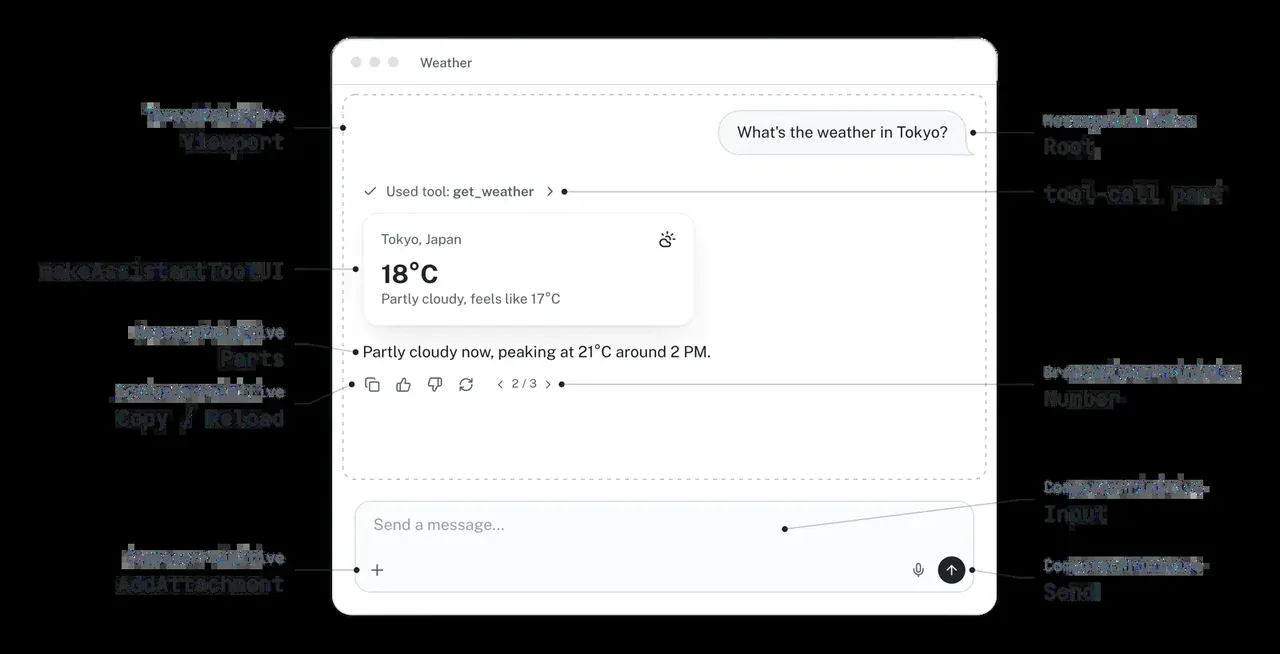
| React primitives | Thread, Message, Composer, ThreadList, ActionBar, and related parts |
Teams can keep their design system or start from a generated theme |
| Backend adapters | Map protocol streams, tool calls, approvals, and state into common message parts | The agent implementation can change without replacing the whole UI contract |
| Tooling and optional cloud | Scaffolding, copied theme source, thread history, telemetry, and file storage | Capabilities can grow from prototype to production |
The CLI commands create and init reduce integration time, but their longer-term benefit is that the generated component source belongs to the application. A team can keep the Base UI or Radix flavor, replace a section, or redesign the full surface. That is a better fit for products expected to evolve than a black-box chat widget with a fixed set of props.
The runtime contract carries real agent behavior
A normal chat may need only text deltas. A coding assistant produces much more: streamed reasoning, file reads and writes, terminal output, patches, approvals, tests, and potentially child agents. assistant-ui represents these as message parts, allowing each part to have a dedicated UI instead of collapsing every event into an opaque string.
The runtime also owns conversation-level transitions. When a user changes threads, the interface must know which response is active, which tool calls have not settled, and which approvals remain actionable. Cancel must reach the backend while clearing local pending state. External-store runtimes connect the thread list and message loading to application persistence.
The central pattern is projection. Backend events become frontend parts, and human actions travel through the runtime back to the agent. assistant-ui keeps presentation and interaction state in the browser, while the selected backend remains authoritative. That distinction prevents a polished approval button from being mistaken for the security boundary itself.
Coding assistants need tools, not longer prose
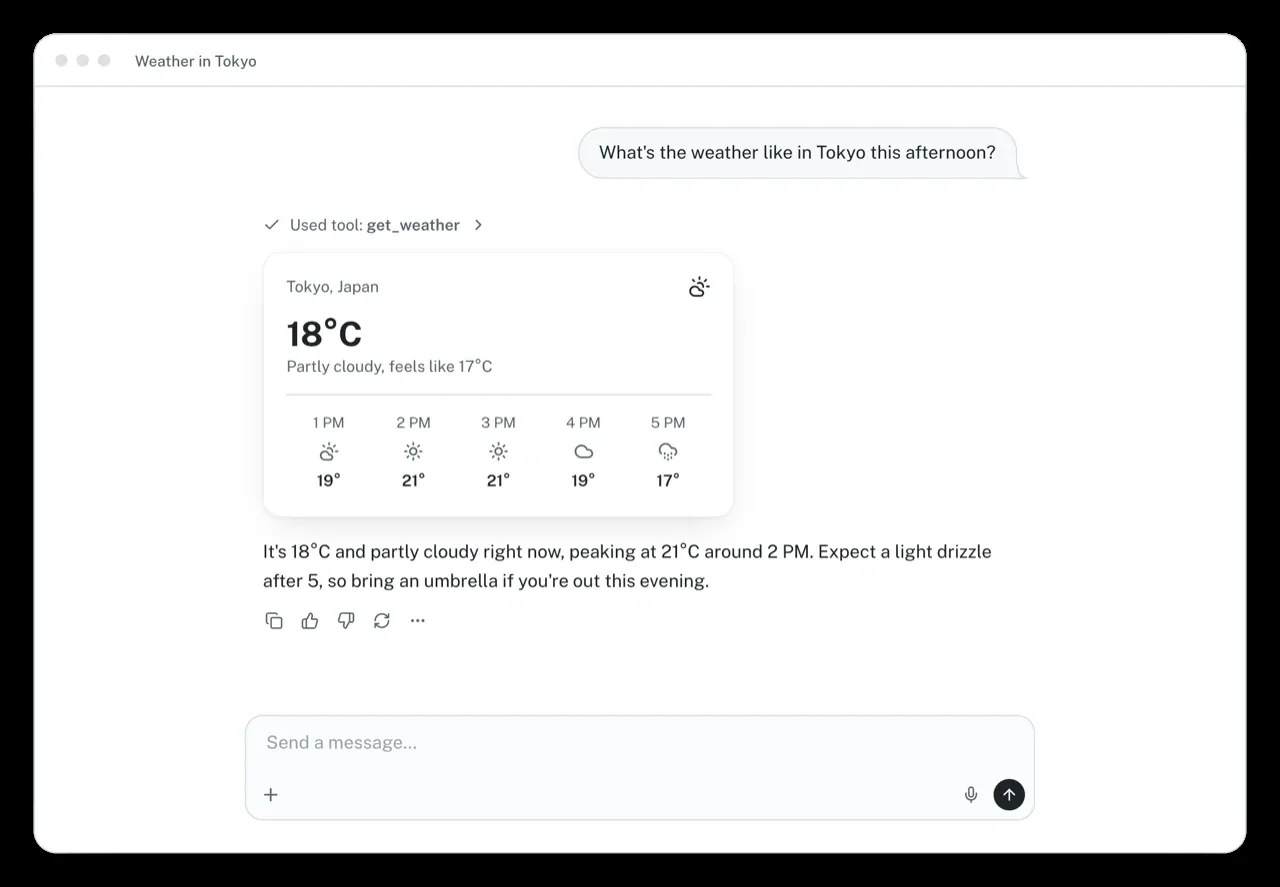
In coding work, the most useful signal is often the tool result. A file read needs a path and range, search needs hit locations, a terminal needs both output streams, an edit needs a readable diff, and a test run needs failure summaries that can be scanned. Composable tool renderers let an application design specific views for each kind of evidence.
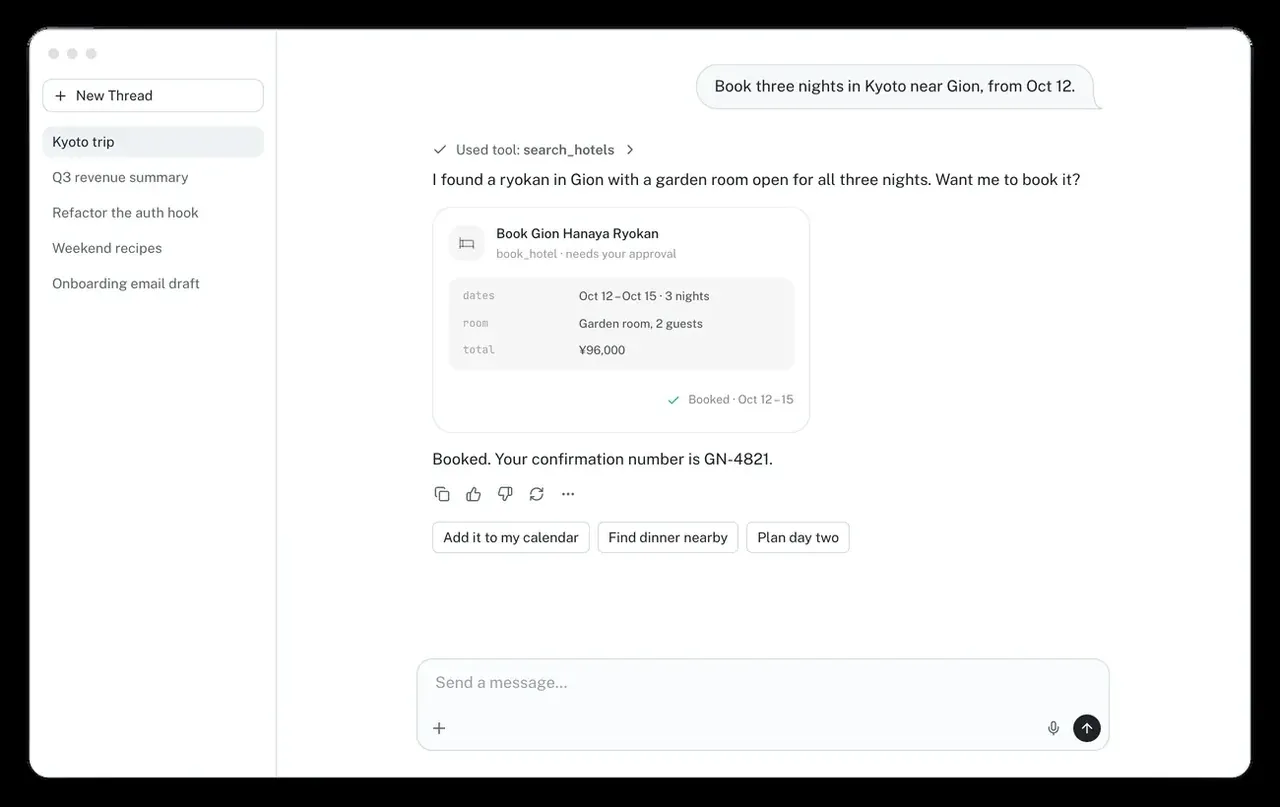
Approval is another interface contract. A write or command request should show the tool, target, and enough risk context for the user to decide. The UI can offer allow once, always allow, or reject. The backend still enforces the decision. assistant-ui makes “waiting for a human” a first-class conversation state instead of an unrelated browser dialog.
OpenCode maps agent sessions into UI operations
@assistant-ui/react-opencode is the adapter closest to a coding-agent workflow, but it is explicitly experimental. It connects through an OpenCode client and projects messages, parts, permissions, questions, child agents, and branch operations into an assistant-ui thread.
Its runtime extras go beyond sending a prompt. They expose cancel, refresh, permission replies, question answers or rejection, fork, revert, and unrevert. Permission choices cover once, always, and reject. Question requests appear as interaction UI and return the selected answers. Those states fit tasks that require scope clarification, implementation choices, or confirmation before a destructive action.
OpenCode sessions also support attachments, event reconnection, streamed parts, title synchronization, and child sessions. Fork lets the user explore another path from a message. Revert moves the visible state back and unrevert advances it again. These operations depend on the backend session model; the frontend adapter invokes and presents them but does not invent the semantics.
One source-level detail matters during integration. The current type definition and runtime implementation use baseUrl, while the package README still shows the older apiUrl. That drift is a practical warning about an experimental adapter: follow the type-checked source and add end-to-end coverage around the exact protocol version. The package marker makes upgrades a compatibility exercise, not a routine version bump.
ACP offers a stricter and narrower contract
@assistant-ui/acp connects Agent Client Protocol v1 to assistant-ui. It is private and unpublished, and its API may change. JSON-RPC traffic runs over a bidirectional WebSocket, but ACP has finalized only stdio transport; WebSocket remains a draft, so an application needs an agent or bridge that exposes this custom transport.
The mapping covers sessions, prompts, cancellation, text and reasoning chunks, tool calls, permission requests, plans, session titles, modes, commands, config, and usage. Tool names are chosen in a stable order: the protocol’s programmatic name first, then the tool kind, then a human-readable title. This keeps renderer lookup stable while updates arrive.
The limitations deserve more attention than a feature list. Browser clients advertise no filesystem or terminal capabilities, so a conforming agent must not issue fs/* or terminal/* calls; any such request receives an unsupported-method response. The agent owns the transcript. The frontend cannot edit history, reload it, delete it, or switch branches because those actions would change the view without changing the agent’s authoritative record. After a dropped connection, session/load is used only when the agent advertises support; otherwise the user must start a new thread.
Permission policy has only ask and auto-allow modes. Auto-allow selects the agent’s first allow-family option. That may be useful in a controlled environment, but it should not be the default for a tool that edits source code and executes commands. Authentication, mode setting, config setting, and unstable protocol updates are also not implemented. These are selection criteria, not hidden implementation details.
Generative UI is constrained by a component library
assistant-ui does not let the model emit arbitrary HTML. The application declares a typed React component library, then exposes a present tool. The model returns a { _type, ...props } tree. _type selects a registered component, a schema validates its props, and only then does the renderer execute.
By default, a component renders after all props arrive, so the renderer does not act on incomplete data. A component can opt into streamProperties and branch on the injected $status while properties are partial. A second tool, prompt_user, turns structured questions into forms and choices that wait for human input.
The same JSON tree can be converted to Slack Block Kit, Microsoft Teams Adaptive Cards, or an inbound A2UI surface through React-free paths suitable for server actions, workers, and webhooks. Unsupported components are dropped with warnings. Cross-surface reuse is therefore bounded by a shared vocabulary; it is not automatic deployment of arbitrary React code to every channel.
VS Code makes browser constraints concrete
@assistant-ui/vscode runs assistant-ui inside an extension webview. The webview cannot reach an ordinary backend directly, so the package tunnels fetch over postMessage to the extension host. Existing route handlers run in the host and stream responses back. Request aborts, server disposal, and streams left behind by a reloaded page have explicit cleanup paths.
CSP is part of the integration, not a deployment afterthought. The strict default blocks arbitrary connections, gives scripts a fresh nonce, and blocks remote images and media because a URL in model output can load as soon as the message renders and leak chat data. External-link interception permits only configured schemes. The documentation warns against adding command:, vscode:, or file:, since model-generated links could otherwise run a command or open a local file.
Threads can persist through VS Code Memento storage, and theme tokens follow editor colors and contrast modes. The package is still at version 0.0.1, but the repository includes an extension test bed and probes for the fetch bridge, abort behavior, frontend-tool human-in-the-loop, CSP, themes, external links, and persisted threads. That is a meaningful foundation, while the early version still calls for application-specific extension testing.
Choosing assistant-ui without overselling it
assistant-ui is a strong fit when a team is building a developer or knowledge-worker agent and needs control over branding, layout, and tool cards. It handles the combination of streaming text, tool activity, approvals, attachments, multiple threads, and structured output. An existing model backend can enter through an adapter or external-store runtime instead of rebuilding the message-part protocol.
It may be unnecessary for a product that genuinely needs only a simple question box. If the core workflow relies on deep branching, editable history, or a customized protocol, check the chosen adapter’s limits before assuming that all assistant-ui runtimes have the same capabilities. OpenCode and ACP demonstrate that what the frontend can show is constrained by the backend protocol and its authoritative session model.
| Area | Maturity signal | Adoption guidance |
|---|---|---|
| React primitives and general runtime | Primary project path with broad component and example coverage | Use for a product prototype, then replace the visual layer with your own design system |
| OpenCode adapter | Marked experimental, with source and README already out of sync | Use with version pinning and tests for sessions, approvals, and reconnection |
| ACP adapter | Private and unpublished, with transport and protocol limitations | Fit for infrastructure teams building a bridge, not a stable public dependency |
| VS Code integration | Early version with CSP, bridge, and persistence test infrastructure | Start from the template and verify behavior in the target extension environment |
The value of assistant-ui is that it treats an AI coding assistant as an interface protocol: what can be shown, what can be approved, who owns the transcript, which state can be restored, and which action must return to the backend. It does not reduce the backend agent’s responsibility. It makes that responsibility easier to expose, constrain, and audit. The project uses the MIT license, and its CLI plus main React runtime are practical starting points. OpenCode, ACP, and VS Code deserve separate evaluation according to the maturity labels in the repository.