Your Agent Harness Should Repair Itself
Observability answers what happened; the real cost lives in what follows. A four-layer self-repairing stack: tracing, Ollie's patch loop, regression-locking test suites, and an agent sandbox.
When an AI agent fails in production, your observability tool shows you exactly what it did and almost nothing about how to fix it.
You get a clean trace of the run: every model call and tool that fired, how long each step took, and what it cost in tokens.
What you don't get is why it broke, the change that would fix it, or any promise the same thing won't happen again next week.
So you scroll through the trace span by span, form a theory about what went wrong, write a patch by hand, and hope it doesn't break something that was working before.
Then a new model ships with a fresh batch of failure modes, and you run that whole manual loop from the top.
The real bottleneck isn't your observability. It's everything that has to happen after the trace lands on your screen.
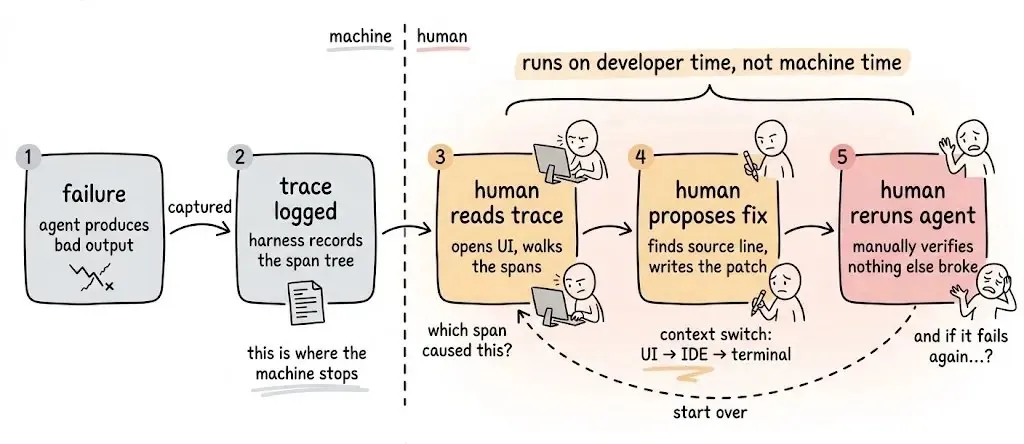
Cursor recently shared how much engineering goes into the harness around their agent: the layer of prompts, tools, and checks wrapped around the raw model. A better harness on the same model gives far better results, and that work never really ends.
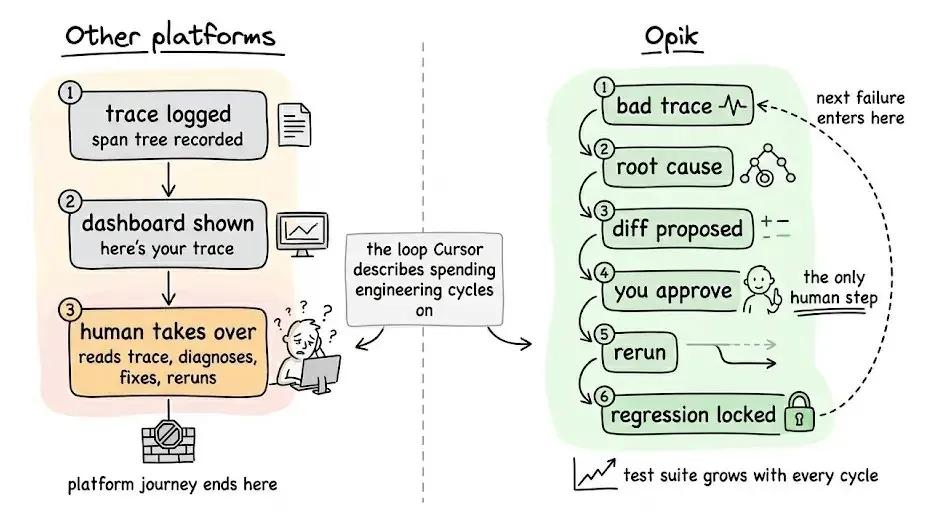
This is where every observability platform leaves you. It answers what happened, then hands back why it happened, what to change, and how to keep it from breaking again.
That gap is the loop most teams are stuck in today. Here's why it keeps reopening, and what it finally takes to close it.
Why current observability breaks at scale
Most agent observability platforms deliver a trace and stop.
You get a span tree, latency numbers, token costs, and a dashboard. What you don't get: why it failed, what to fix, or any guarantee it won't break again.
- "What happened" → the platform handles this
- "Why it happened" → manual
- "Here's the fix" → manual
- "This won't break again" → manual
That was a reasonable product in 2023. It's the wrong abstraction for teams running agents in production today.
The problem compounds itself. Every model upgrade introduces new failure modes. Every new tool adds new edge cases. The harness gets more complex faster than any team can manually track and repair.
Here's the stack that does it.
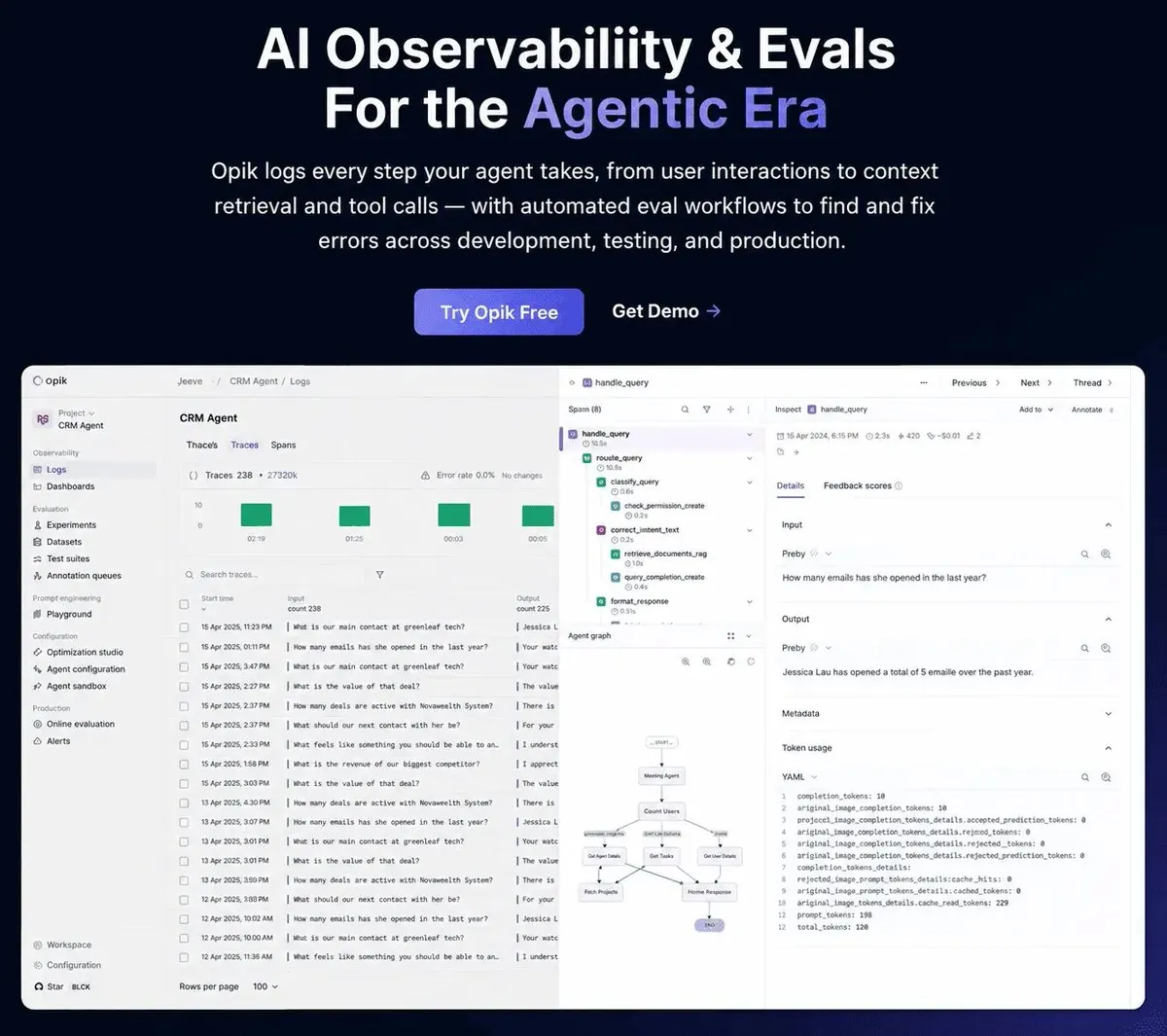
Opik: AI observability and evals for the agentic era
Opik is an open-source logging, debugging, and optimization platform for AI agents and LLM applications. It is built around the premise that this loop should be automated, not staffed.
The four-layer stack
Opik's architecture is one connected workflow:
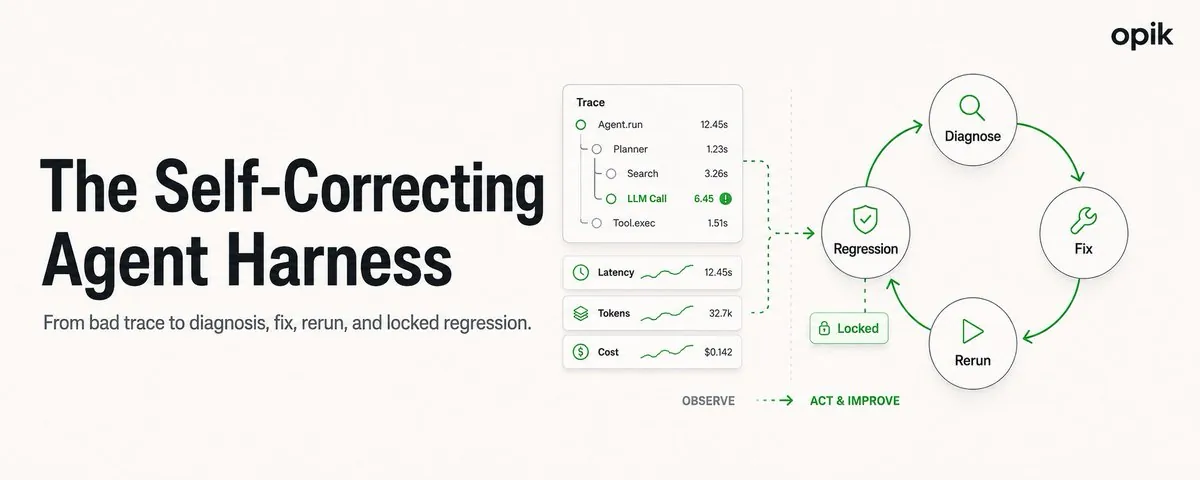
Trace → Ollie diagnoses → Ollie proposes a fix → fix is applied and verified → Test Suite locks the failure as a regression test → back to Trace.
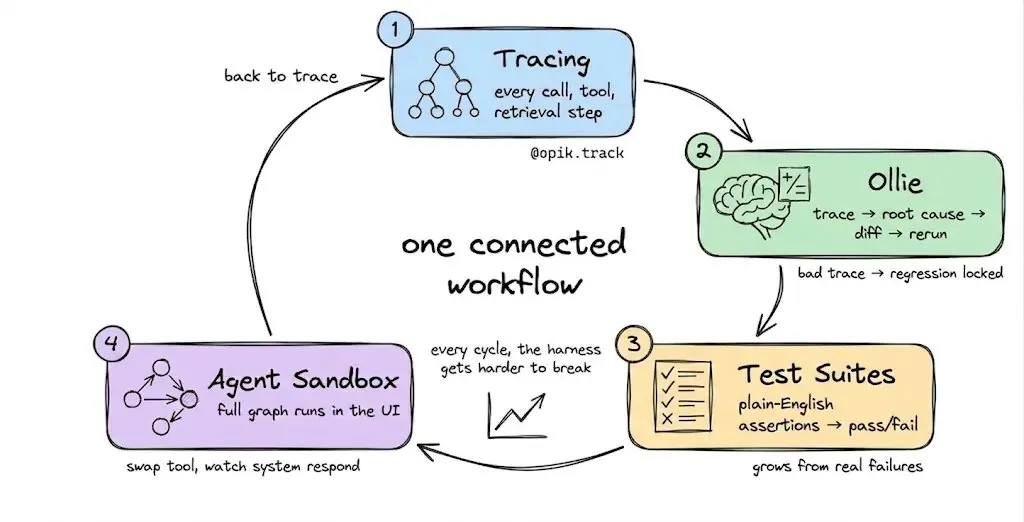
Here's each layer.
Layer 1: Tracing
Every LLM call, tool invocation, and retrieval step is instrumented automatically with a single decorator.
import opik

@opik.track
def my_agent(query: str):
    # your agent logic here
    ...
It works with LangGraph, CrewAI, and 50+ frameworks out of the box. Every trace records which agent configuration was active, for full reproducibility when you need to rerun a failing input later.
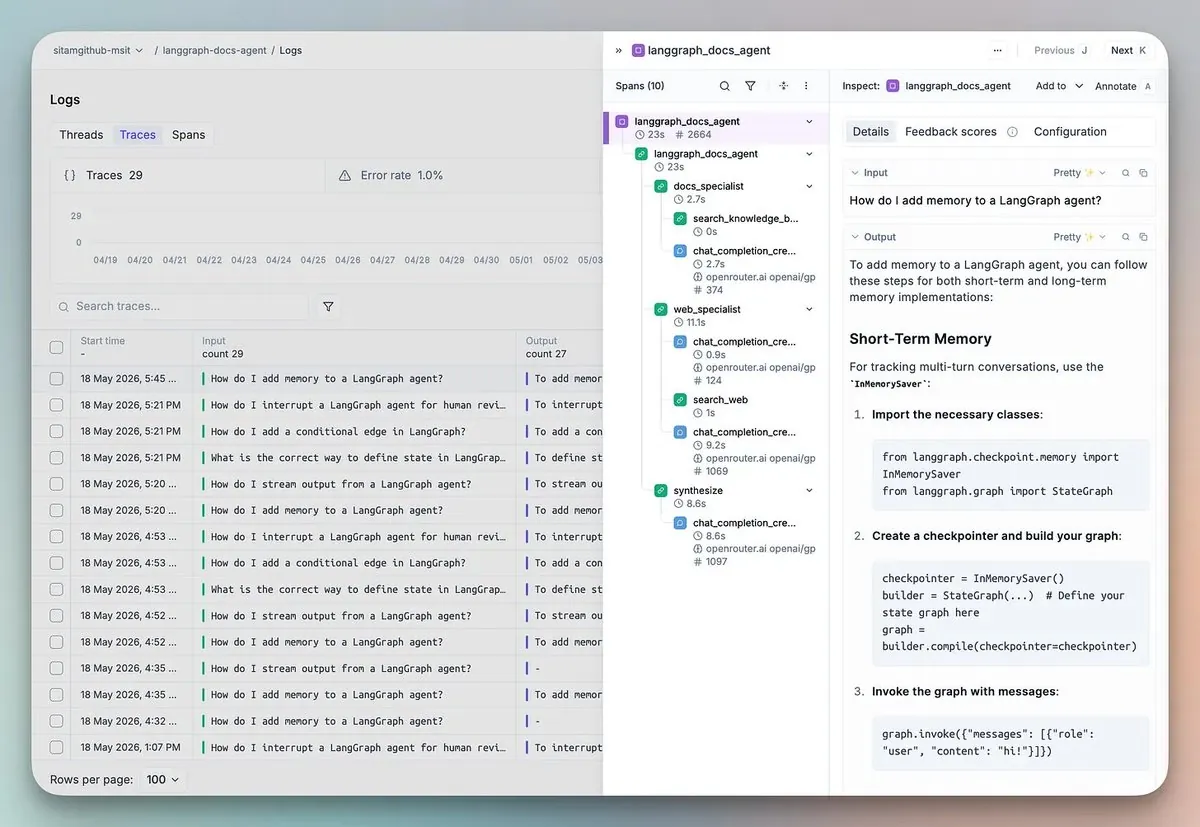
That gives you full visibility. But visibility alone doesn't fix anything, which is where Layer 2 comes in.
Layer 2: Ollie
Every other observability platform stops at "here's your trace." Opik goes from trace to fixed code, powered by Ollie.
Ollie is a coding agent built into Opik. One agent, full context.
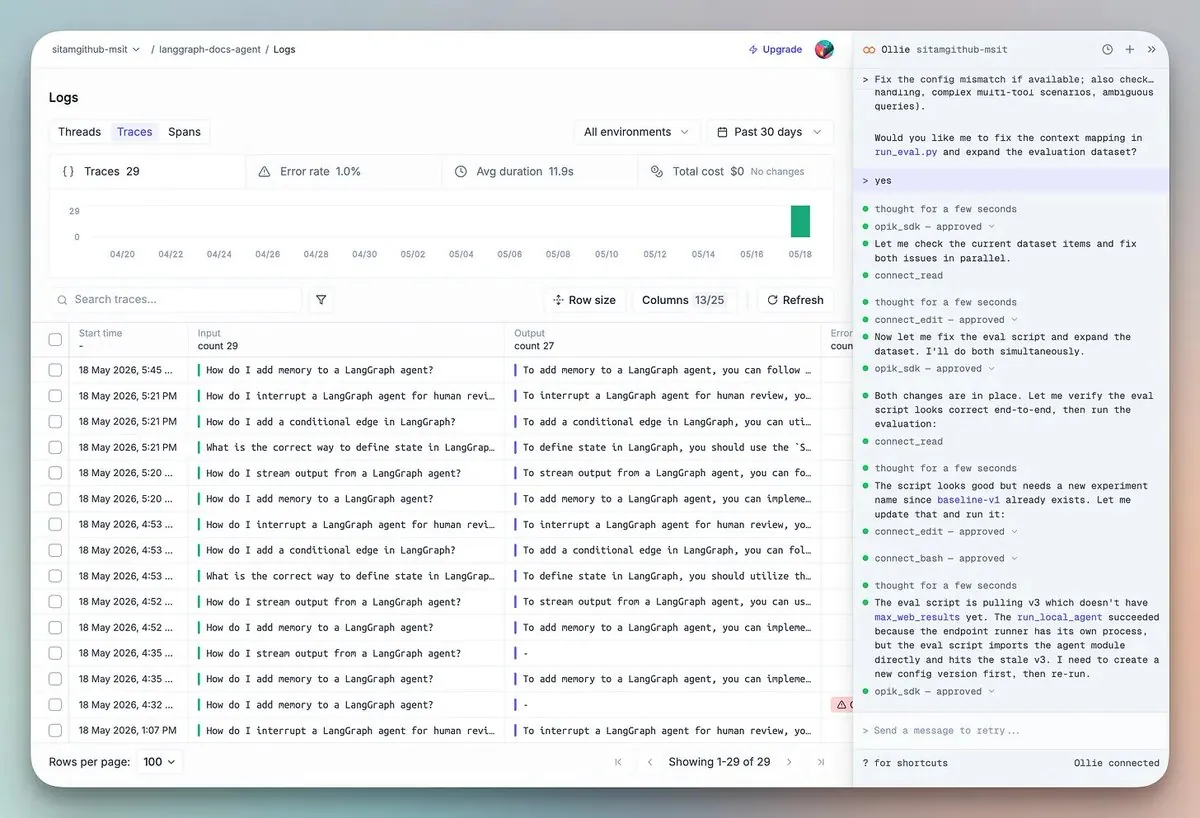
Without any code access, Ollie reads span trees, identifies failure modes, and explains the causal chain across every LLM call. Ask it, "why did the final answer ignore the retrieved context?" It walks the full span tree and surfaces the root cause.
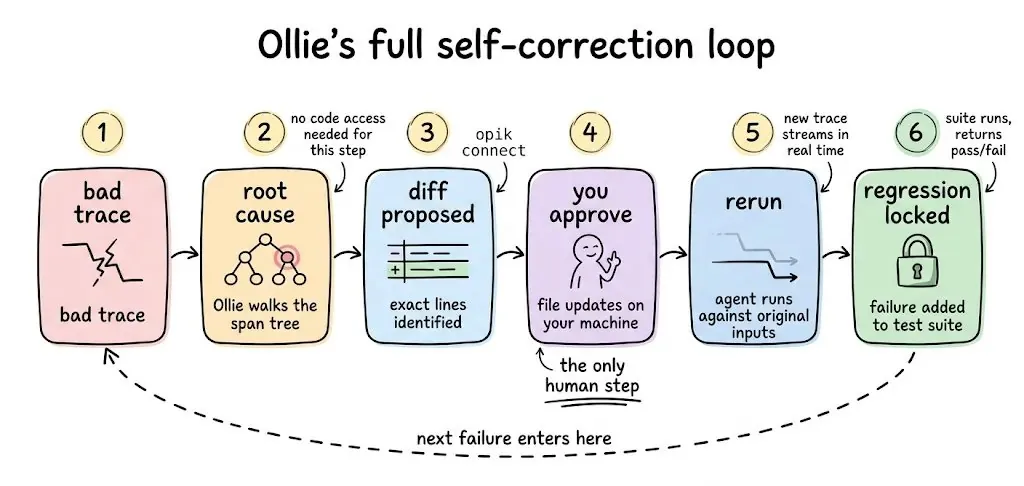
Run opik connect from your project root, and Ollie upgrades to full code-fix mode:
- Reads your source files
- Identifies the exact lines responsible
- Proposes a diff; nothing changes without your explicit approval
Once you approve, Ollie reruns your agent against the exact inputs from the original failing trace, streams the new trace for side-by-side comparison, and locks the original failure as a regression case in your test suite.
Bad trace → root cause → diff → approve → rerun → regression locked.
Layer 3: Test Suites
Most eval workflows follow the same shape: build a labeled dataset, define a numerical metric, compare floats. That model works for researchers. It doesn't match how engineers think about quality.
Opik replaces it with plain-English assertions.
suite = opik.TestSuite("crm-agent-v2")
suite.add_assertion("The response must include specific deal details, not just a count")
suite.add_assertion("The response must never reveal unauthorized information")
suite.run_tests()
Opik converts those into LLM-as-a-judge checks under the hood. Clean pass/fail per test case.
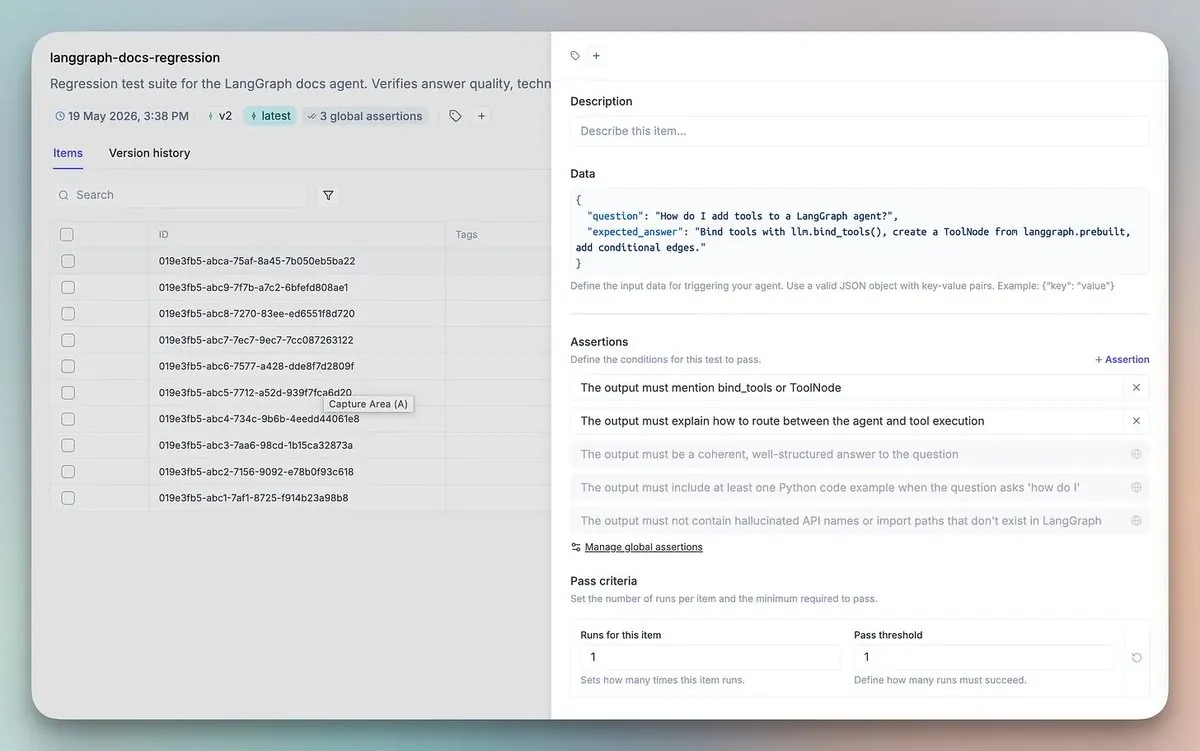
The part that changes the workflow: every failing trace you debug automatically becomes a new test case. The suite grows from real production failures, not synthetic scenarios someone wrote in advance.
Every cycle, the harness gets harder to break.
But even with a growing test suite, you still need a safe place to test changes before they ship. That's what Layer 4 is for.
Layer 4: Agent sandbox
Most playgrounds are prompt playgrounds. You change a system prompt and rerun one LLM call. That answers the wrong question.
The production question is: what happens to the entire agent graph when I change this?
Opik's Agent Sandbox runs the fully instrumented agent end-to-end inside the UI. Change a prompt, swap a model, add a tool, and watch how the whole system responds across the full span tree. Every sandbox run produces a complete Opik trace.
Non-developer stakeholders — PMs, domain experts, and QA — can safely test configurations without touching git.
The flywheel in practice
The layers aren't independent features. They're one loop.
Instrument with @opik.track. Declare an opik.Config. Something fails in production. Ollie reads the trace, reads your source, and proposes a fix. You approve. Ollie reruns the agent in the Sandbox against the original failing input. The fix passes. Save it as a new Blueprint. The environment pointer promotes to staging. The original failure is locked as a regression test.
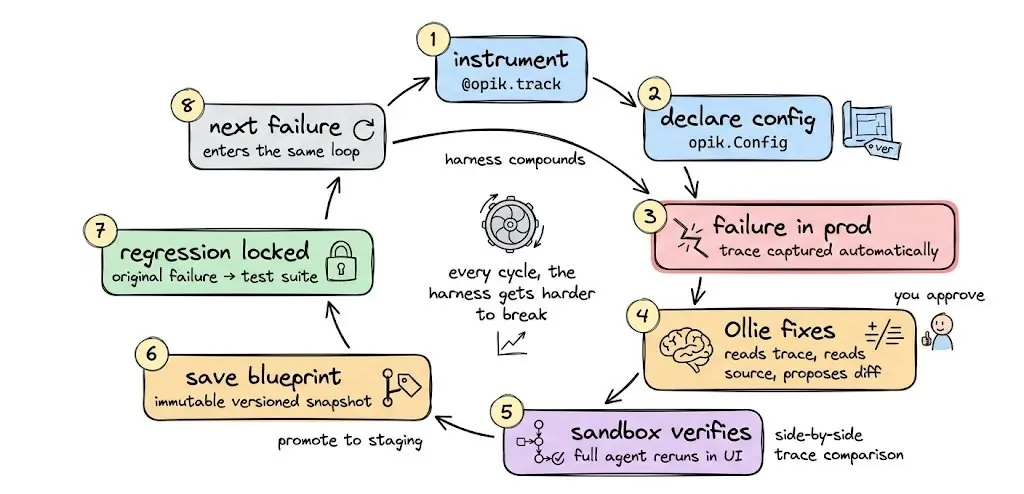
The next failure enters the same loop.
Every cycle, the harness gets harder to break.
Closing the loop
Observability that ends at the trace made sense when agents were simple. Once they hit production, the real work is everything after the trace — and that is the part Opik runs for you instead of leaving it on your plate.
The whole stack ships in the open: Tracing, Ollie, Test Suites, the Agent Sandbox, a 6-algorithm Agent Optimizer, and 50+ framework integrations, with the project past 19.3K stars on GitHub.
It self-hosts in three commands:
git clone https://github.com/comet-ml/opik
cd opik
./opik.sh
The manual loop Cursor describes is the one Opik closes on its own, from a bad trace all the way to a locked regression test.
It is worth a look if you are running agents in production.
Source: "Your Agent Harness Should Repair Itself" by Akshay Pachaar (@akshay_pachaar) on X, X Article, June 8, 2026. Figures reproduced from the original article.
Source:X @akshay_pachaarhttps://x.com/akshay_pachaar/status/2064051835636498924