Mundo: From Seeing a Place to Simulating What Happens There
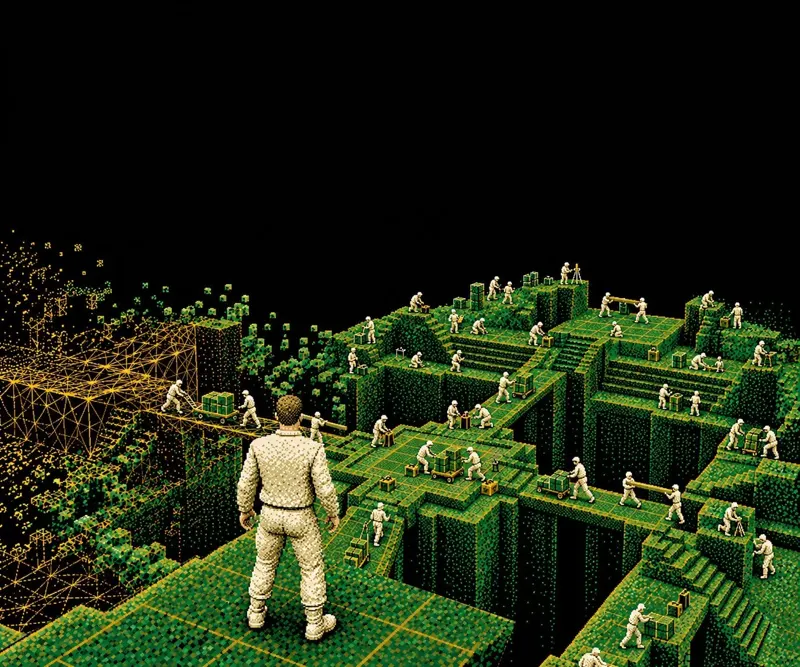
A few photos become a world you can explore, edit and simulate: a 3D proxy plus a code scene program drive simulation while a video model renders it, supporting new views and Real-to-Sim robotics.
Mundo goes where he pleases!
Take a few photos of a room, and Mundo turns them into a world you can explore and simulate. You can explore the room from any viewpoint, make a drawer slide open and an apple fly out, or have a robot walk in and set a bag on the bed. Mundo renders what happens as a video of that room.
Project page · Turn a few views of a place into a world you can explore, edit, and simulate.
TL;DR
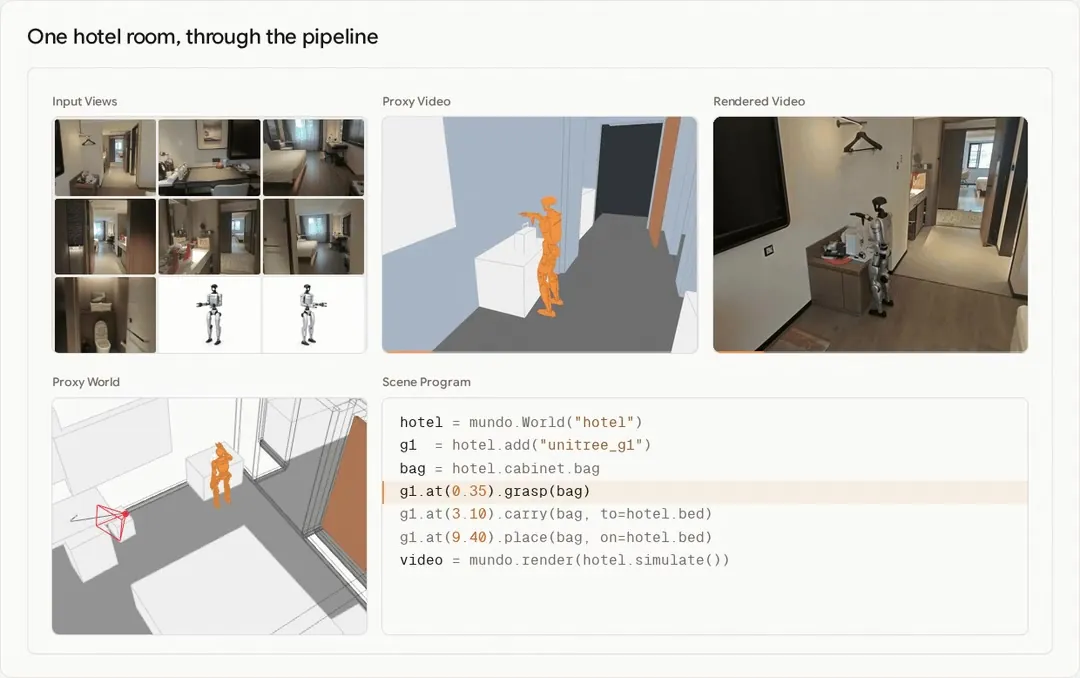
World models capture the structure, appearance, and dynamics of environments to support reconstruction and simulation. Mundo builds such a world from images of a specific place. It represents the scene's layout and objects in a 3D proxy and defines their physical properties in a scene program. A simulator computes how the objects move and interact, while a video model renders the results using the input images as visual context. You can explore this environment from new viewpoints, modify its objects, and simulate robot tasks within it.
How Mundo works
Given multi-view images or a video, Mundo reconstructs the scene and represents its layout and objects as an explicit 3D proxy. A code world [1] [2] maintains and updates this proxy state as the simulation runs. The simulated state is rendered into proxy frames, which guide a video model in generating the scene's appearance and motion.
1. Building the proxy world
Mundo represents the scene with 3D bounding boxes that approximate the objects' shapes while closely matching their positions and sizes in the input views. It builds this proxy world in two stages. First, a 3D foundation model [3] [4] [5] [6] can recover camera poses and dense geometry from the input views. Mundo uses a 3D detector [7] to get an initial bounding box for each main object. A Vision-Language Model (VLM) agent then refines the proxy world through an analysis-by-synthesis loop [8]. The agent edits the scene program in a render engine [9], renders the proxy from the input camera viewpoints, and compares the renders with the original images to decide what to change next.
Why an agent
3D detectors often miss objects or assign the wrong labels, and their boxes lack high spatial fidelity. For some scenes, such as outdoor scenes or scenes with dense objects, we may also need to define what a box should contain. Visual reasoning can help with this.
We compare Boxer [7], SpatialLM [11] and Mundo on the same hotel room, using the same input geometry. The figure shows each reconstruction in 3D and overlaid on one of the input views. In this example, Boxer and SpatialLM miss some objects and place some boxes away from the objects they represent. Mundo's boxes align more closely with the objects in the image.
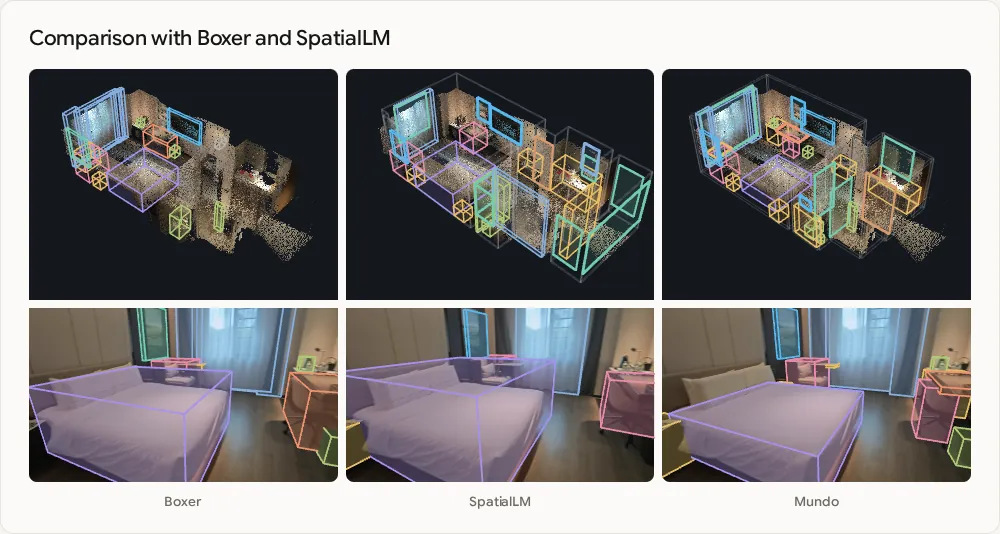
We use an agent to combine visual reasoning with numerical optimization. A VLM reliably spots missing objects, boxes that cover two objects, or doors that swing the wrong way, but it cannot place a box edge to within a few centimetres. Numerical optimization can fit the box precisely, but it can also fit it to clutter or the wrong edge.
The agent decides what to fix and which evidence to trust. It marks object edges in several views, and an optimizer fits the box's position, size and yaw to those edges. We keep the fit only if it also matches the object in a view that was not used for fitting.
After each round of edits, a separate reviewer agent checks the proxy world against every input view without modifying it. The loop stops if the reviewer accepts the result, the geometry no longer improves, or the edit or time limit is reached. Otherwise, the editing agent uses the reviewer's findings to guide the next round. We are glad to see agent capabilities improve rapidly in recent months, which has greatly strengthened visual reasoning.
Why bounding boxes
A bounding box is a good representation of physical 3D placement, whereas dense, fine-grained object reconstruction usually introduces redundancy. For spatial exploration in Mundo, boxes are usually enough, so we can leave out fine geometric details. Boxes also provide a simple representation for rigid-body simulation. This works when the interaction does not require detailed contact geometry.
In most cases, only objects involved in fine-grained interaction need more detailed geometry. The agent can build a rough model of these objects or use a 3D generator such as TRELLIS [12]. When adding new objects to the simulation, Mundo can also retrieve assets from an existing library. For example, it can load a simulation-ready R1 robot model with its physical properties.
2. A world that runs on code
Mundo keeps the world as code. The scene program is a code world model [1] [2] that explicitly records the objects, their poses and their physical properties. It also defines the rules for updating this state over time. The program can read and modify the state to simulate motion and interactions in the reconstructed scene.
Mundo runs most of its simulations in MuJoCo [10]. However, other simulation engines or custom scripts could serve a similar role. The agent reads the scene and derives the physical parameters needed for the simulation, including mass, friction and applied forces. It then writes the scene program using these parameters. The simulator computes motion and interactions under gravity, including collisions, contact and robot manipulation. These results guide the video model's rendering.
Most edits to the world happen through the same scene program. You can add an object, change its physical properties, move a camera or mount one on a robot. The program below is simplified for reference, and the actual program is much more involved.
office  = mundo.World("office")      # 9 photos
drawer  = office.pedestal.drawer(3)
apple   = office.add("apple", inside=drawer, mass=0.20)
monitor = office.monitor              # 4.2 kg

t = office.timeline()
t.at(0.60).run(drawer.open(0.28))
t.at(1.90).run(apple.float_to(front_of=monitor))
t.at(3.20).playback(rate=0.2)  # display only
t.at(3.45).run(apple.throw(at=monitor.top, speed=13.5))
t.at(5.00).freeze(7.5)  # bullet time
t.at(15.40).playback(rate=1.0)

sim   = office.simulate(engine="mujoco", hz=960)
video = mundo.render(sim, office.camera("dolly"),
steps=50)3. Proxy frames and the renderer
Mundo renders proxy frames from the simulated world using the chosen camera. In these frames, objects are shown in flat colours according to their categories, as on the left of the figure above. The context frames, together with the proxy video under the target camera trajectory, are injected into a video diffusion model for rendering. We align the context views and target camera trajectory to the camera coordinate system of the first context view.
We encode the proxy video and context views with the video VAE. We append the resulting tokens to the target video's token sequence as reference tokens. For camera information, we add a camera encoder. The camera encoder converts the camera parameters of each proxy frame and context view into Plücker rays. It adds the resulting embedding to the corresponding tokens before the first transformer block. Reference images without camera information receive a learned embedding instead.
Formally, our rendering pipeline can be written as
$$S_{t+1} = f(S_t, a_t)$$
$$x_{1:T} \sim p_\theta\big(\cdot \mid \pi(S_{1:T}, c_{1:T}),\ \{(I_k, c_k)\}_{k=1}^{K},\ y\big)$$
| Symbol | Meaning |
|---|---|
| $S_t$ | world state at step $t$, with its objects, poses and physical properties |
| $a_t,\ f$ | the action at step $t$, and the transition the code world executes, by script or by simulation |
| $\pi,\ c_t$ | the proxy renderer and the camera of frame $t$ |
| $I_k,\ c_k$ | context view $k$ and its camera |
| $y,\ \theta$ | the text description, and the parameters of the video model |
| $x_{1:T}$ | the generated frames |
Why a proxy video
The proxy video is how the results of the 3D simulation reach the video model. Object motion, the timing and location of collisions, and camera viewpoints are all computed in 3D. The proxy video renders this information into frames that the 2D video diffusion model can follow. In our experiments, conditioning on the proxy video gives more precise camera control and higher fidelity to the scene than using camera embeddings alone.
Long videos in chunks

For long videos, the renderer runs streaming inference in chunks of 124 frames. The last 34 frames of each chunk are re-encoded as a fixed prefix for the next chunk. This keeps motion continuous between chunks.
For very large scenes or inputs with many context views, we select the context views separately for each chunk. As the camera moves, we update the selection to cover the upcoming camera path.
4. Training
Mundo's renderer is trained on pairs of videos: a real or rendered video and the proxy video of the same scene. Our training data includes about 40k pairs from multiple datasets covering real indoor scans, synthetic indoor scenes, driving, hand-object interaction, single objects and game footage, as well as data we render ourselves. On this data, we finetuned MiniMax-H3's Ref2VA [13] with clips of 124 frames at 640×480 resolution.
For the data we render ourselves, we choose the camera trajectories, interactions and context views. We can also include additional references, such as an image of an object that enters the scene.
What the world supports
The examples below show what you can do with Mundo. More examples are available on the project page.
Spatial exploration. Given 1 to 12 context images of a real place, Mundo generates new views along a camera path you specify. It uses the input images as visual context and infers areas they do not show.
More context images give Mundo more evidence about the scene. They can also reveal previously unseen areas, reducing how much the model needs to infer. Areas not covered by any input view still have to be inferred.
Physical interaction. See how objects move and collide in scenes reconstructed from input images. Explore interactions across environments.
Dynamic simulation and robotics. Mundo simulates robot navigation and object interactions in the environment reconstructed from the context images. This supports robot testing and training in Real-to-Sim workflows. The 3D proxy records what each object is and where it is. A robot can use this information to plan a route between a semantically specified start and goal.
Limitations
Mundo has some limitations.
- Speed. Mundo is not fast in its current version. For scenes like those in Exploring real places, reconstruction usually takes ten to twenty minutes. Video rendering from the proxy runs at roughly 1.5 frames per second on eight A800 GPUs with 20 inference steps. We have not yet accelerated video model inference. Techniques such as StreamRender-H3 [14] may help improve rendering speed.
- Fine-grained interaction. Small objects tend to float in the reconstructed scene. The video model is also prone to hallucinations when rendering interactions that involve handling small objects.
- Memory. Mundo has no long-horizon memory mechanism yet. Although the context views help preserve the static scene, Mundo may fail to preserve scene details consistently after extended dynamic changes, or when a previously occluded area comes back into view.
Overall, Mundo shows promising results for customized world models. Even so, it is worth looking at the problem from other angles. Where will real intelligence come from, and will it be omni in form? That is an interesting question, and one worth calming down and thinking through slowly.
Feel free to see Mundo on the project page.
References
- Yiwen Chen, Guosheng Lin, Chi Zhang. Code World Model: Coding Agent as World Brain. arXiv:2608.25927, 2026. arxiv.org/abs/2608.25927
- MirroS Team. AgentGarten: Code Worlds for Evolving Agents. Blog post, 2026. mirros.ai/blog/worlds-for-evolving-agents
- Yihang Luo, Shangchen Zhou, Yushi Lan, Xingang Pan, Chen Change Loy. 4RC: 4D Reconstruction via Conditional Querying Anytime and Anywhere. ICML, 2026. arxiv.org/abs/2602.10094
- Yifan Wang, Jianjun Zhou, Haoyi Zhu, et al. π³: Permutation-Equivariant Visual Geometry Learning. ICLR, 2026. arxiv.org/abs/2507.13347
- Jianyuan Wang, Minghao Chen, Nikita Karaev, et al. VGGT: Visual Geometry Grounded Transformer. CVPR, 2025. arxiv.org/abs/2503.11651
- Haotong Lin, Sili Chen, Junhao Liew, et al. Depth Anything 3: Recovering the Visual Space from Any Views. ICLR, 2026. arxiv.org/abs/2511.10647
- Daniel DeTone, Tianwei Shen, Fan Zhang, et al. Boxer: Robust Lifting of Open-World 2D Bounding Boxes to 3D. ECCV, 2026. arxiv.org/abs/2604.05212
- Kirill Mazur, Nikita Karaev, Matthew Chang, Jitendra Malik, Nur Muhammad Shafiullah. AgentSTAR: Agentic Shape Tracking and Reconstruction from Monocular Videos. arXiv:2609.24487, 2026. arxiv.org/abs/2609.24487
- Blender Foundation. Blender: The Free and Open Source 3D Creation Software. www.blender.org
- Emanuel Todorov, Tom Erez, Yuval Tassa. MuJoCo: A physics engine for model-based control. IROS, 2012. doi.org/10.1109/IROS.2012.6386109
- Yongsen Mao, Junhao Zhong, Chuan Fang, et al. SpatialLM: Training Large Language Models for Structured Indoor Modeling. NeurIPS, 2025. arxiv.org/abs/2506.07491
- Jianfeng Xiang, Zelong Lv, Sicheng Xu, et al. Structured 3D Latents for Scalable and Versatile 3D Generation. CVPR, 2025. arxiv.org/abs/2412.01506
- MiniMax. MiniMax-H3. Software, 2026. github.com/MiniMax-AI/MiniMax-H3
- Yanzuo Lu, Tian Ye, Yitong Li, et al. StreamRender-H3: Interactive Coding Worlds with Real-time Streaming Diffusion Render. Blog post, 2026. nvlabs.github.io/Sana/Sol-Engine/StreamRender-H3
Citation
@misc{luo2026mundo,
  author = {Yihang Luo and Zunnan Xu and Shangchen Zhou and Yushi Lan and
            Kang Liao and Zerui Gong and Xiaoming Wu and Qingyi Tao and
            Zhonghua Wu and Bixuan Jin and Fei Wang and Zhi Hou and
            Xiaogang Wang and Xingang Pan and Chen Change Loy},
  title = {{Mundo}: Customized World Model},
  year = {2026},
  url = {https://mundo-world-model.github.io/}
}
Source: Mundo: From seeing a place to simulating what happens there, Hugging Face Blog, October 23, 2026. Reproduced and adapted with full translation; media from the authors' project assets.
Source:Hugging Face Bloghttps://huggingface.co/blog/Luo-Yihang/mundo-world-model