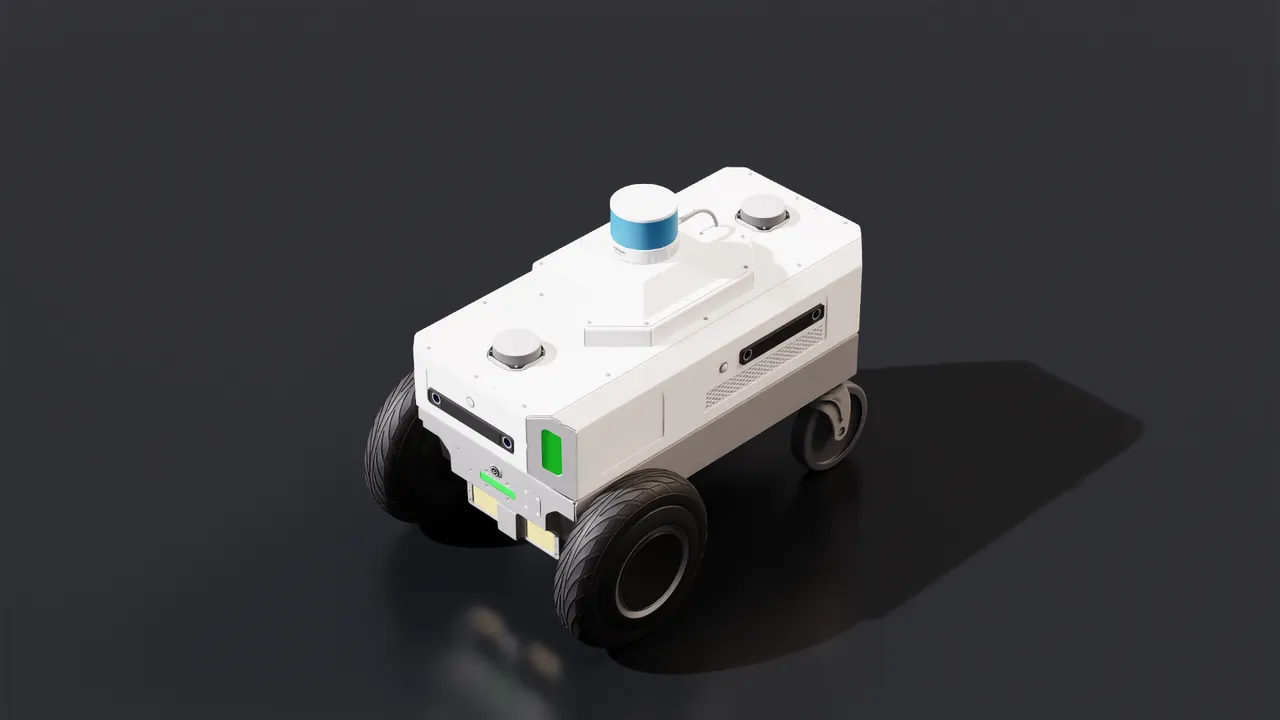
Inside NVIDIA Isaac Sim Agent Skills: 38 Robot-Simulation Workflows Encoded for AI Coding Agents
NVIDIA ships 38 Isaac Sim Agent Skills with the distribution: procedures, handoff contracts and acceptance thresholds in SKILL.md teach coding agents to finish and validate robot sims like engineers.
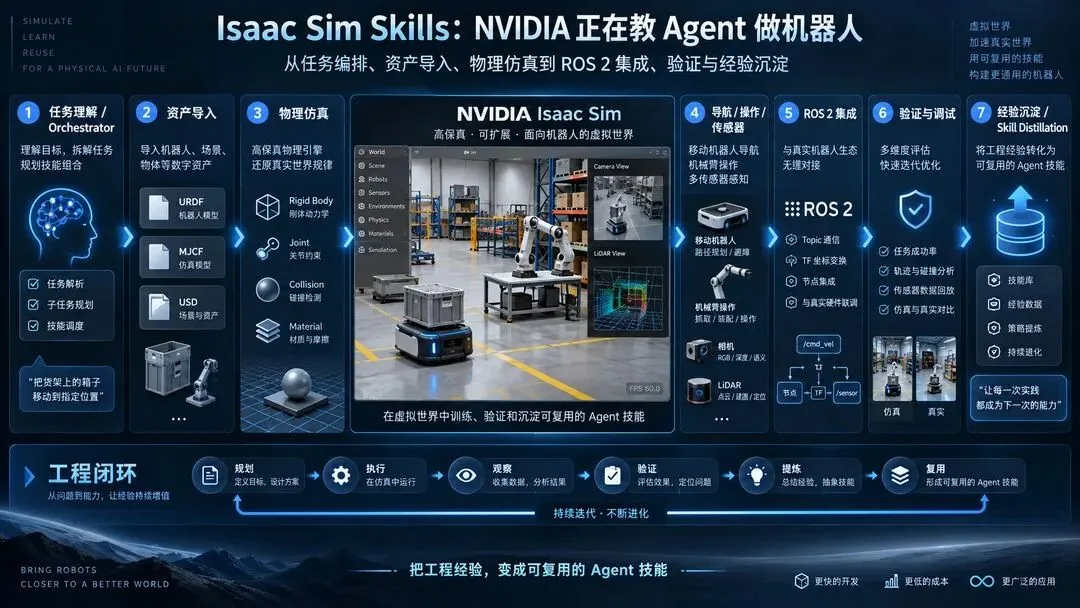
NVIDIA has shipped a set of Agent Skills for Isaac Sim inside the official distribution. The documentation lists 38 skills that let coding agents such as Codex and Claude Code carry out robot asset import, physics configuration, ROS 2 integration, simulation debugging and result validation along established engineering procedures.
This is not a new motion-control algorithm for robots. It is AI agents learning how robot simulation engineers work.
Agents could already write Isaac Sim Python code. But why the robot falls over after import, why the camera renders black, why ROS 2 never receives a message, and how to decide that a task is genuinely finished remained a large pile of engineering problems.
NVIDIA is now writing that experience into Skills. More interestingly, after validating and debugging, the agent can distill what was valuable and leave it behind for the next task.
The most worthwhile thing to study in this skill set is not how much code it helps an agent write. It is that NVIDIA has started telling the agent what "done" actually means for a piece of robot development work.
01 What exactly are Isaac Sim Skills?
Start with a concept that is easy to get wrong.
An Agent Skill is not a robot's motor skill. It is an AI agent's engineering skill.
navigation-primitives, for example, is not a trained navigation policy; it teaches the agent how to build navigation features from occupancy grids, A*, robot footprints and kinematics components. physics-simulation is not a new physics engine; it teaches the agent how to configure PhysX, Newton, colliders, joints and contact parameters correctly.
At the core of every skill is a SKILL.md file, optionally accompanied by runnable scripts and reference material. The basic layout is:
skills/
  physics-simulation/
    SKILL.md
    scripts/   references/
  navigation-primitives/
    SKILL.md
    scripts/   references/
  isaac-sim-ros2-bridge/
    SKILL.md
    scripts/   references/
The SKILL.md tells the agent when this skill should be used, what preconditions must hold, which steps to follow, how to spot errors and how to judge whether a result is trustworthy. The YAML frontmatter carries name and description; the agent reads the description to decide when to load the skill. The Markdown body holds the procedure, code snippets, reference tables and known gotchas, and is read only when the task matches the description. scripts/ holds reusable executables; references/ holds longer API notes and technical detail. The design spares the model from re-searching documentation, guessing interfaces and regenerating whole programs from scratch on every request.
The official two layers: Repo-native and Robotics-sim
NVIDIA actually splits the skills into two layers. One targets building, debugging and profiling Isaac Sim itself (Repo-native); the other targets engineers who use Isaac Sim to develop robot applications (Robotics-sim). The former helps agents maintain and debug the simulation development environment, and some of its capabilities depend on in-repo tooling. The latter helps agents create scenes, configure physics, integrate robots, generate data and validate results.
| Layer | Purpose |
|---|---|
| Repo-native | Build, test, debug and profile the Isaac Sim source repository itself. These skills call in-repo tooling (build.sh, tools/, benchmark scripts, the python_server socket), so they are most useful in the source-build workflow. |
| Robotics-sim | Build, render and validate Isaac Sim simulations as a downstream user. These skills drive a built Isaac Sim from a Python script (SimulationApp, isaacsim.core.experimental.*, USD authoring), so they apply to all three install workflows: source, pip and binary. |
Both layers provide reusable engineering knowledge, but not every helper tool has the same executability across source, pip and binary install environments.
The important change: Skills ship with Isaac Sim
These skills require no extra assembly. NVIDIA's documentation states explicitly that they ship with the Isaac Sim source build, the pip packages and the binary package, and that they support skill-aware coding agents such as Codex CLI, Claude Code and Cursor. A skill-aware agent entering an Isaac Sim development environment can immediately use the engineering procedures NVIDIA encoded.
Compared with traditional software development, the change is not "a few fewer lines of code". It is that engineering knowledge finally has a carrier an agent can discover, execute and reuse.
02 Thirty-eight skills across the whole robot development pipeline
NVIDIA's documentation organizes the 38 skills into 11 categories. For intuition we regroup them into seven clusters following the actual robot development process. This section is a capability map, not a user manual.
Cluster 1: install, debug, and accept
This is the cluster most easily overlooked, and one of the most valuable in practice.
isaac-sim-installation: environment checks, compatibility validation and multiple install paths, including license confirmation and warmup gates. isaac-sim-remote: connect to a running Isaac Sim, execute Python, inspect prims, control physics, read logs, capture frames. profile-isaac-sim: profiling with the benchmark tooling and Tracy to diagnose where time goes. validation-diff-gifs: pixel-level diffs between simulation captures and golden images to locate visual regressions.
The process quintet: isaac-sim-orchestrator for task orchestration; meta-skills for skill design and composition; isaac-sim-validator for delivery checks; isaac-sim-troubleshooting for fault diagnosis; skill-distillation for experience capture.
This cluster answers one question: an agent must not only generate programs, it must know why a program failed and when the work counts as finished.
Cluster 2: actually understand robot assets
Many robot simulation tasks stall at step one: model import. The robot may originally be described in URDF or MJCF, while Isaac Sim expresses scenes and physics in OpenUSD. urdf-mjcf-to-usd-conversion handles that conversion path, covering joints, drives, collision models and reinforcement-learning-friendly asset configuration; usd-articulation organizes and validates multi-link, multi-joint structures; physics-simulation establishes rigid bodies, collisions, masses, materials and joint drives. usd-pipeline, usd-composition-architecture and spatial-reasoning can be read together as a USD toolchain: asset discovery and measurement, layered organization of physics and visual assets, spatial coordinates and bounding-box management.
One engineering detail deserves expansion. A model that renders is not yet a correct physical robot. Whether the scene uses centimeters or meters, whether the articulation root is right, whether colliders are sane, whether joint drives are stable can each decide whether a simulation runs at all. These checks, which used to live in engineers' experience, are being written into Skills.
Cluster 3: let the robot move in the scene
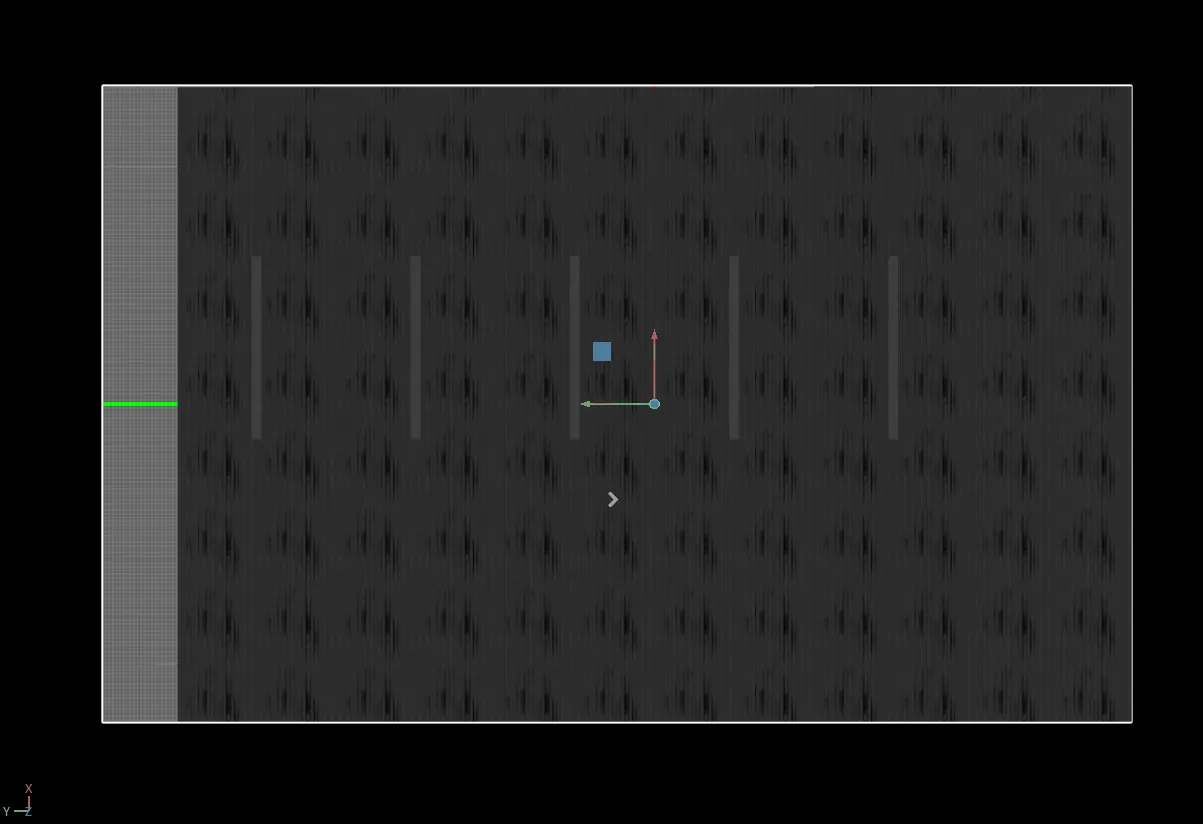
The mobile-robot group contains four skills. navigation-primitives provides occupancy maps, A* path planning, differential and omnidirectional kinematics and robot footprint computation; occupancy-map converts USD scenes into ROS-compatible maps, preferring physical colliders and falling back to geometric projection when collision data is unavailable - the fallback is only a substitute and does not guarantee agreement with the real collision space, and what is generated today is mainly a 2D grid; isaac-sim-robot-navigation handles navigation control while the simulation runs.
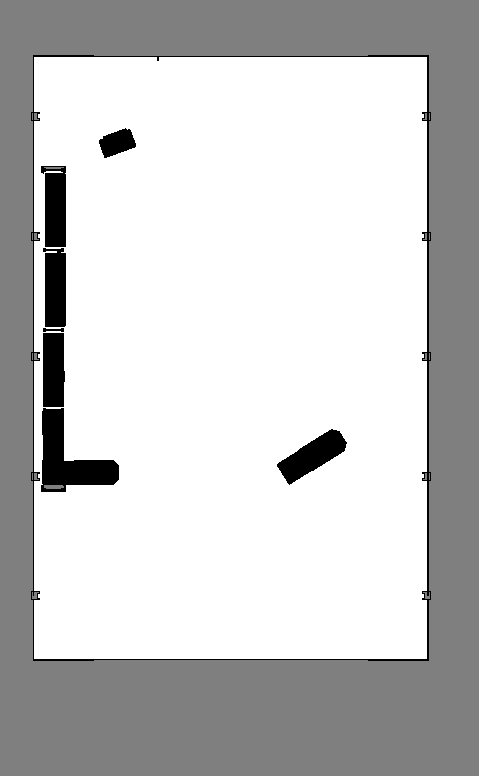
occupancy-map: a ROS-compatible 2D occupancy grid generated from a USD warehouse scene, black regions being shelves and walls. It is the substrate Nav2 plans on, but the geometric-projection fallback used when collision data is missing does not guarantee agreement with the true collision space.mobility-gen deserves separate emphasis: record trajectories first, then replay and render sensor data. Robot motion, trajectory logging and expensive image rendering do not have to be coupled in one real-time loop. For large-scale robot data production, that decoupling has real value.
Cluster 4: manipulation and motion planning
manipulation-ik covers inverse kinematics, grasp frames, joint-space control and contact validation; motion-generation, present in the main-branch index, further covers obstacle-avoiding trajectories from motion-generation controllers, with reference implementations involving cuMotion and RMPflow. The point is not that NVIDIA invented a new IK algorithm. It is that the agent learns when to choose IK, when a planner is required, and how to verify after a grasp that the object actually moved.
Cluster 5: sensors and spatial perception
isaac-sim-sensor covers RGB, depth, semantic segmentation, LiDAR, IMU and contact sensors; isaac-camera handles camera parameters, render products, annotators and lens distortion. Three more skills lean toward digital twins: place-camera-aim-at finds unoccluded viewpoints around a target object; place-camera-max-coverage places infrastructure cameras over an area with a coverage-driven greedy solver; calibrate-metropolis-camera extracts intrinsics, extrinsics and field-of-view regions of already-placed cameras. These skills suit visual-system validation for industrial yards, warehouses, production lines and smart campuses. The greedy strategy does not guarantee a global optimum, but it turns camera siting - previously a manual adjust-and-check loop - into something an agent can attempt, measure and correct automatically.
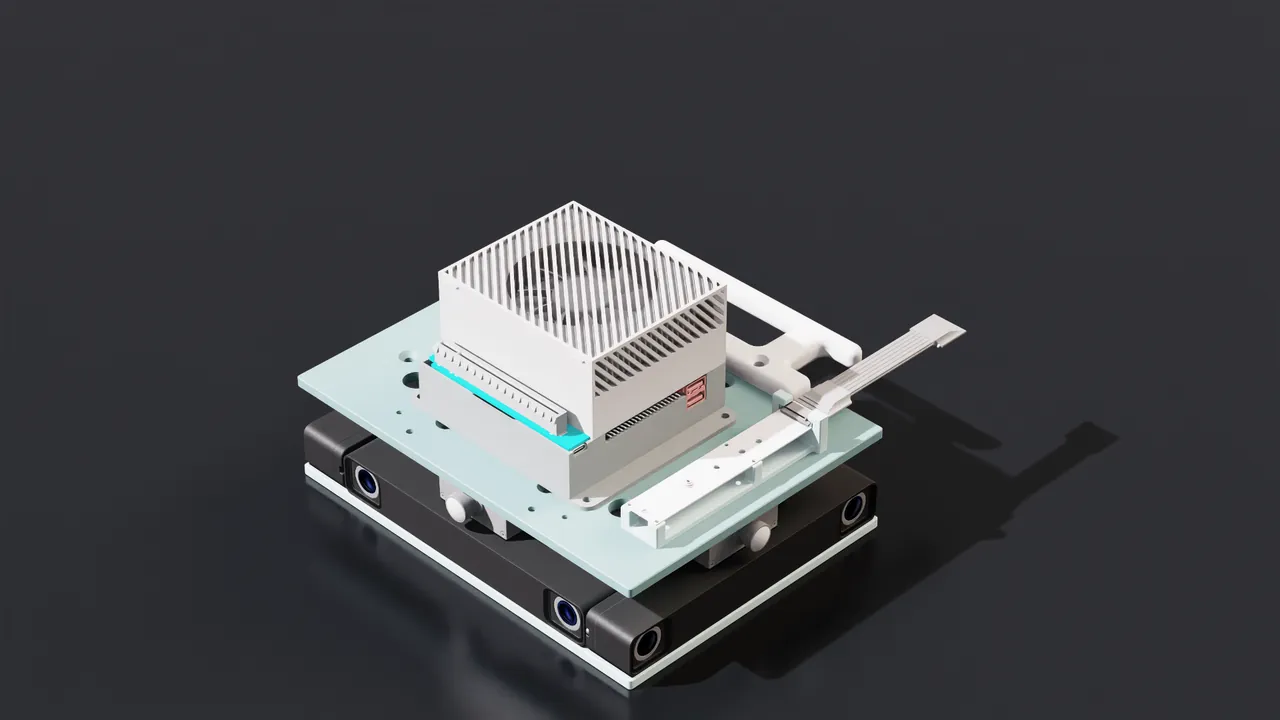
isaac-sim-sensor and isaac-camera address exactly this class of mounting and calibration problems (figure: NVIDIA Isaac Sim documentation).Cluster 6: synthetic data, and harder physical events
This cluster shows NVIDIA's overall Physical AI layout most clearly. data-collection-sim targets Replicator data generation for static scenes; actor-sdg-sweep-config generates schema-validated parameter configuration variants for repeatable batch experiments; action-and-event-data-generation organizes scene objects, moving entities, behaviors, physical events, cameras and annotations into one pipeline.
behavior-tree-generation: an LLM-driven planner turns scene tasks into behavior-tree structures, providing an organization form for simulated human behavior, robot actions and event responses. But generating a behavior tree is not the same as obtaining a stable, reliable control policy; the example actions still need integration and validation.
generate-incident-config and run-incident-events: configure and execute simulated events such as toppled goods, fire and liquid spills, and record incident reports. Deliberately toppling cargo in a warehouse and watching whether the robot perceives the changed obstacles is closer to a real engineering question than testing navigation only in ideal static scenes.
vlm-scene-captioning: build scene graphs from 3D ground truth, then use NVIDIA NIM models to generate scene descriptions or question-answer data. The basis for a caption is not only the image but also objects, spatial relations and semantic labels, so the comparatively explicit structured ground truth of 3D simulation becomes textual supervision for VLM training.
object-bin-packing: dense packing of boxes and parcels into bins, pallets and containers.
Connected, this cluster does more than generate pretty pictures: it can construct training and test scenes with behavior, events and semantic annotations. Note that behavior-tree generation and scene captioning depend on model services and API credentials; not every data-generation task can run fully offline.
Cluster 7: rendering, headless deployment and ROS 2
isaac-sim-rendering handles ray tracing, path tracing, lighting and frame capture; isaac-sim-headless-deployment guides windowless runs and batch processing; actor-sdg-generate-lighting-variations produces different lighting conditions through reproducible USD lighting override layers without modifying the base scene.
isaac-sim-ros-workspaces builds the related ROS workspaces via native builds, Docker, Pixi and so on, but it does not install a whole ROS 2 distribution; isaac-sim-ros2-bridge establishes ROS 2 communication through OmniGraph, covering topics, TF, Nav2 and multi-robot namespacing. The latter matters especially: the agent does not have to put all control logic inside Isaac Sim, and the simulation can keep using the same software interfaces as the physical robot.
The official table: 38 skills in 11 categories
The seven clusters build intuition, but actual routing to a skill relies on the official categories and the description in each SKILL.md frontmatter. The table below lists all 38 skills under the documentation's 11 categories:
| Official category | Skill | What it does |
|---|---|---|
| Repo-native | isaac-sim-installation | Install public Isaac Sim builds from a standalone archive, Docker image or Python package with system preflight, compatibility, approval and warmup gates; reports the install location without launching the app |
isaac-sim-remote | Drive a running Isaac Sim over the isaacsim.code_editor.python_server TCP socket: run code, open stages, inspect or modify prims, screenshot, step physics, read logs; works headless | |
profile-isaac-sim | Profile and optimize with in-repo benchmark scripts and Tracy: compare runs, diff frame times, isolate hot zones | |
validation-diff-gifs | Pixel-difference GIFs comparing a validation capture against golden data - the fastest way to triage benchmark image failures | |
| Foundations and operating loop | isaac-sim-orchestrator | Top-level dispatcher that turns a natural-language request into a runnable simulation and declares the environment-variable contract every other skill assumes |
meta-skills | Composition patterns and the Meta-Skilling Framework; read first to learn how to navigate, compose and author skills | |
skill-distillation | The final step of every request: capture what you learned before delivering | |
isaac-sim-validator | Final quality gate before delivery; rejects black frames, hardcoded user paths, deprecated imports and missing lights | |
isaac-sim-troubleshooting | Hang, freeze and performance reference for large USD stages | |
| Robot asset pipeline | urdf-mjcf-to-usd-conversion | Convert URDF and MJCF descriptions to USD for Isaac Sim and Isaac Lab; every new robot starts here |
usd-articulation | Validate and assemble multi-link and multi-arm articulations, and flatten them before deployment | |
| Physics simulation | physics-simulation | Single source of truth for physics scene configuration and per-prim setup: rigid bodies, collisions, joint drives, contact materials, Newton-versus-PhysX solver selection |
| Mobile robot navigation | navigation-primitives | Shared substrate for mobile-robot work: occupancy maps, A* planning, robot footprints and chase-camera math |
occupancy-map | Generate ROS-compatible occupancy maps from USD warehouses | |
isaac-sim-robot-navigation | Runtime navigation in custom scripts, including RL policies and large-stage memory management | |
mobility-gen | Two-phase synthetic-data generation for mobile robots: record trajectories, then replay and render sensors | |
| Manipulation | manipulation-ik | Differential inverse kinematics, grasp frames, and hybrid IK with joint-space control |
| Sensors and perception | isaac-sim-sensor | Replicator sensor suite (RGB, depth, segmentation, LiDAR, IMU, contact) plus the vendor LiDAR and radar catalog |
isaac-camera | Camera setup, render products, intrinsics, annotators and lens distortion | |
place-camera-aim-at | Ring cameras around a single target with unoccluded views using the circular placement solver in the RTX sensor placement extension | |
place-camera-max-coverage | Lay out infrastructure cameras across a floor area until a target coverage ratio is met, using the coverage solver | |
calibrate-metropolis-camera | Extract per-camera intrinsics, extrinsics, homography and field-of-view polygons for placed cameras into a calibration file, with an orthographic top-view reference image | |
| Synthetic data generation | actor-sdg-sweep-config | Generate deterministic, schema-validated Actor SDG configuration variants, optionally previewed or run as a sequential batch |
data-collection-sim | Static-scene Replicator synthetic-data generation with the standard writers | |
action-and-event-data-generation | Entry point for the Action and Event Data Generation reference application: extension stack, launcher, configuration version rules, stage ordering and sub-skill routing | |
vlm-scene-captioning | Generate image-caption pairs and scene graphs for VLM training with the IRC extension: standalone, via CaptionAPI, or as a per-frame writer | |
behavior-tree-generation | Turn a natural-language scenario into behavior-tree output with the LLM-driven omni.ai.behavior_tree_gen planner | |
generate-incident-config | Author and validate the IRI event configuration file defining topple, fire and spill incidents, their targets and triggers | |
run-incident-events | Tag scene items and drive IRI incidents on a loaded stage through the isaacsim.replicator.incident.core API, then record the incident report | |
object-bin-packing | Densely pack boxes, parcels and cartons into a bin, pallet or container and render the result with the IRO bin_pack harmonizer, gravity-stable | |
| Rendering and lighting | actor-sdg-generate-lighting-variations | Generate deterministic USD lighting override sublayers for Actor SDG without changing the base stage |
isaac-sim-rendering | Headless production rendering: Replicator capture, ray-traced versus path-traced modes, tone mapping and lighting recipes | |
isaac-sim-headless-deployment | Headless --no-window usage: launch modes, CLI flags and the SimulationApp batch pattern | |
| USD pipeline | spatial-reasoning | Transform math: meters-per-unit conversion, bounding boxes, placement ordering, look-at and collision-free grids |
usd-pipeline | Asset discovery, measurement, placeholder-to-asset placement and headless render compatibility | |
usd-composition-architecture | NVIDIA's layered USD pattern (root plus physics plus appearance payloads) and load-time optimization | |
| ROS 2 integration | isaac-sim-ros-workspaces | Clone, configure and build IsaacSim-ros_workspaces with native ROS, Docker, custom interfaces or Pixi |
isaac-sim-ros2-bridge | OmniGraph ROS 2 nodes, Nav2 integration and multi-robot namespacing |
Version note: the 38 entries above come from the official Isaac Sim Agent Skills documentation. At the time of our check, the IsaacSim GitHub main branch's skills/SKILLS.md additionally lists isaac-sim-assets, isaac-sim-migration, isaac-sim-workflow and motion-generation, bringing the main-branch index to 42 and adding asset access, version migration, demo task definition and motion planning. The GitHub main branch and the released install packages are not necessarily in sync; rely on the skills and APIs present in your installed version.
03 From writing code to doing engineering: where the real value is
Reading the skills one by one, it is easy to mistake them for a more convenient robot API reference. Reading the source shows the design goal is larger. Four core mechanisms carry NVIDIA's thinking.
Orchestrator: make the agent work in engineering order
isaac-sim-orchestrator does not perform each specialty itself. It identifies the capabilities a task needs, selects the right skills and prescribes the integration order. The source organizes the end-to-end flow into stages - asset import, physics setup, sensor attachment, validation and delivery - each with an explicit delivery contract. In the physics stage, for instance, the Orchestrator defines a concrete handoff condition: the robot must hold its pose under gravity for 200 consecutive frames before sensor integration may begin. That is not a general proof of physical correctness; it is a specific, executable engineering gate.
| Stage | Skills invoked | Handoff contract to the next stage |
|---|---|---|
| Stage 1 - Asset import | urdf-mjcf-to-usd-conversion, usd-pipeline, usd-composition-architecture | USD files on disk, prim paths known; make_instanceable: true for RL workloads |
| Stage 2 - Physics setup | physics-simulation, usd-articulation | Simulation plays without crashes; robot holds pose under gravity for 200 frames |
| Stage 3 - Sensor attachment | isaac-sim-sensor, isaac-camera, isaac-sim-remote | At least one frame of non-zero sensor data: depth > 0, non-empty point cloud, IMU reporting gravity |
| Stage 4 - Validate and deliver | isaac-sim-validator, isaac-sim-rendering | No deprecated imports, no hardcoded paths, lights present, render not black |
flowchart LR
  S1["Stage 1\nAsset import"] --> G1{"USD on disk\nprim paths known"}
  G1 --> S2["Stage 2\nPhysics setup"]
  S2 --> G2{"Holds pose under gravity\n200 consecutive frames"}
  G2 --> S3["Stage 3\nSensor attachment"]
  S3 --> G3{"One frame of\nnon-zero sensor data"}
  G3 --> S4["Stage 4\nValidate and deliver"]
It also requires validating each stage in isolation first, then integrating incrementally and re-checking existing behavior after every added capability. The principle behind it is plain: introduce few changes at a time so each failure is easier to locate. If an agent is allowed to emit a thousand lines of simulation code at once and the launch then crashes, the model can rarely tell whether assets, rendering, physics or software interfaces are at fault. Decomposing the problem into independently verifiable capabilities is what makes complex tasks finishable. The source even carries a direct warning: do not try to produce more than 200 lines of script in one turn; write to files incrementally.
Remote: not just running scripts, but observing and editing repeatedly
isaac-sim-remote lets an agent connect to a running Isaac Sim and execute Python directly. We checked its source: the default connection is 127.0.0.1:8226, backed by the TCP interface of isaacsim.code_editor.python_server; code runs inside the Kit process, returns status, output and exception information, and Python state persists within the same session.
A typical debugging session therefore becomes: the agent checks whether a robot prim exists, reads its joint structure; finds a physics attribute wrong, edits the configuration, runs a few physics steps, reads the state again; then captures a frame to confirm the actual motion matches expectations. It does not have to regenerate the whole program and restart the simulator each time. The source also records very specific rendering triage experience: when headless mode produces a black screen, check scene lights, render mode and warmup state, and tune DomeLight and friends to the actual scene.
One thing must be stated plainly: this remote interface provides in-process Python execution inside Kit. Its privilege is extreme and it is not a security sandbox. The source positions it as a local developer control plane whose trust boundary equals the operating-system user that launched Isaac Sim, and it requires loopback-only binding with the port never exposed. The official documentation is blunter: binding the
python_serverhost to0.0.0.0lets any machine on the network execute arbitrary Python in your session; the real security boundary is an OS-level sandbox around the Isaac Sim process.
Validator: turn acceptance into a step the agent must run
Previously an agent could finish writing code, see no exception, and declare the task complete. In robot simulation a zero exit code does not mean a correct scene. isaac-sim-validator converts common delivery defects into checks: deprecated APIs, hardcoded paths, missing lights, wrong render modes, black or underexposed frames. It even requires inspecting the beginning, middle and end of demo videos, so nobody delivers a clip where the robot is occluded or the camera lost its target.
Checks come in three levels. Levels 1-2 are static only (import namespaces, lights, paths, render mode, frame energy). Level 3 actually runs the target script under timeout with the calling user's full privileges, with no container or firejail isolation, so it requires an explicit --confirm-execute (or CONFIRM_EXECUTE=1) opt-in. The thresholds in the source are concrete:
| Check | Pass condition | On failure |
|---|---|---|
| Lights present | DomeLight intensity >= 100 and DistantLight >= 500 | Reject: no lighting, render will be black |
| Final render | >= 150 KB and mean_RGB > 30 | Reject: black or low-energy, check lighting |
| Mean RGB | 80-160 | Below 20: reject, too dark, add lights |
| Render file size | 1-4 MB | Around 82 KB means black frame, reject |
| Sim duration | >= 3 s of physics | Reject: physics has not settled |
| Render mode | RayTracedLighting for iteration, PathTracing only for hero shots | Reject: PathTracing too slow for iteration |
| Import namespace | isaacsim.*, not omni.isaac.core | Reject: old namespace is deprecated |
These checks mostly guarantee baseline quality of scripts and presented results. True physical correctness still needs extra testing: run logs, joint states, sensor data validity, and task-level goal reach rate, collision counts and terminal error. Whether a manipulator really grasped must be judged from the object's final position, grasp state and contact information; whether a mobile robot really navigated must be judged from goal arrival, collisions, trajectory and ROS feedback, not merely from the fact that it moved.
Skills tell the agent how to work, the Validator checks whether the deliverable is acceptable, and the physical task itself still needs its own evaluation mechanism. Image quality, program correctness and physical task success are three different layers of acceptance.
Skill Distillation: keep the lessons from failure
If the capabilities above teach the agent to do things, skill-distillation starts answering another question: can the same mistake be avoided next time? In meta-skills, NVIDIA defines a task loop: ORIENT, PLAN, EXECUTE, VALIDATE, DISTILL, DELIVER - understand the task, make a plan, execute, validate, distill experience, deliver.
flowchart LR
  O["ORIENT\nunderstand task"] --> P["PLAN\nmake a plan"]
  P --> E["EXECUTE"]
  E --> V["VALIDATE"]
  V --> D["DISTILL\ncapture lessons"]
  D --> DEL["DELIVER"]
  D -. "proposed, written to the skill library\nonly after user confirmation" .-> O
Suppose that in one simulation the robot keeps falling through the floor after import, and after several rounds of triage the agent finds the collision attributes and initial height were configured incorrectly. Fixing only the current task ends the episode. Skill-distillation instead wants the specific problem distilled into a general check: after importing a robot, verify colliders, ground height and initial pose, and run a short physics stability test. That is the experience worth keeping for future tasks.
The source explicitly separates one-off facts from reusable procedures: a one-off fact ("that table had dual RigidBodyAPI so it exploded") goes to MEMORY.md, not into the skill library; only reusable procedures ("check X after import, before running") qualify as skills. And persistent updates require user confirmation rather than letting the agent silently rewrite its own skills. The constraint matters: a single failure may be coincidence, and if the agent distills a wrong attribution into a long-lived rule it will keep manufacturing new problems in future tasks. The source's own words: skill files are persistent memory - what is not written down does not exist next session, and what is written without review can poison future sessions.
Skill Distillation is therefore closer to supervised accumulation of engineering experience than to autonomous evolution of model weights. But it does provide a path from one-off programming toward continuously accumulated professional capability.
04 How one robot simulation task calls on many Skills
How do these skills cooperate? Consider a concrete task:
Create a warehouse scene in Isaac Sim 6.1, deploy a Nova Carter mobile robot, connect ROS 2 and Nav2, navigate the robot from a start point to a designated shelf, and record reproducible test results.
This is not a benchmark NVIDIA guarantees can be completed with one click. It is a representative case that its Skills can organize.
Step 1 - Define the task and acceptance criteria. If the installed version provides isaac-sim-workflow, first pin down the deliverables: a runnable USD scene, ROS 2 configuration, launch scripts, test logs and a demo video. Define success conditions before touching anything.
Step 2 - Prepare the robot and physics environment. Use usd-pipeline, usd-articulation and physics-simulation to check robot dimensions, joints, colliders, gravity and drives; first prove the robot stays stable on the ground and responds sensibly to basic velocity commands. The exit condition of this step is the Orchestrator's gate: pose stable under gravity for 200 consecutive frames.
Step 3 - Build the map and navigation substrate. Use occupancy-map to generate a ROS-compatible map, then navigation-primitives to check the robot's real footprint, obstacle inflation and planned path. Collision relationships among shelves, walls and the robot need separate verification.
occupancy-map; the path and velocity commands come from Nav2 (figure: NVIDIA Isaac Sim documentation).Step 4 - Connect ROS 2. Use isaac-sim-ros2-bridge to establish the necessary topics and TF relations, for example clock, odom, scan and cmd_vel, then bring in Nav2 and verify the robot receives velocity commands from navigation goals and reports its own state correctly. On the Nav2 side this is itself a composition of nodes: a Waypoint Follower hands waypoint sequences to a BT Navigator, whose behavior tree schedules Recovery, Controller and Planner servers, ending at a Robot Base Controller that emits cmd_vel.
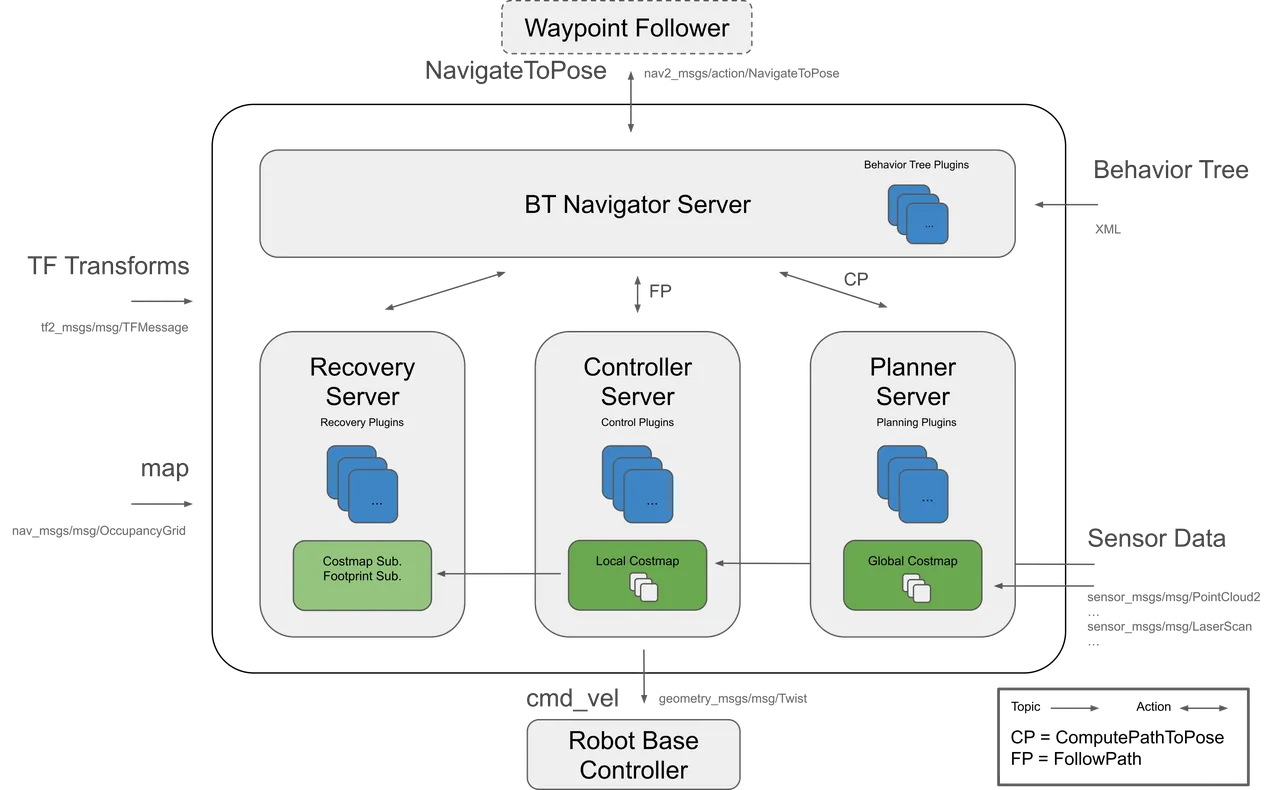
cmd_vel via the Robot Base Controller (figure: NVIDIA Isaac Sim documentation).Step 5 - Run the simulation and collect evidence. Observe simulation state, adjust parameters and record problems through isaac-sim-remote. Tests should cover at least: whether navigation goals are reached, whether collisions occur, whether the trajectory matches the plan, whether ROS 2 data keeps publishing normally, and whether results stay stable across different initial states.
Step 6 - Produce the demo, then distill experience. Record the simulation with isaac-sim-rendering, check delivery quality with isaac-sim-validator, and finally let skill-distillation summarize common issues and update the relevant skills after review.
In the end, what the agent delivers should not be merely a video of a robot moving. It should be a reproducible simulation task: the robot leaves a specified start point, receives a Nav2 goal, completes path planning and motion control, and outputs goal-arrival status, collision records, ROS 2 communication logs and a re-runnable scene file. If the task fails, the agent should locate the cause from logs and simulation state instead of merely re-aiming the camera and re-recording.
One task thus connects assets, physics, navigation, ROS 2, sensors, validation and experience accumulation. To extend it, add MobilityGen for trajectory data or the incident tools for toppled-cargo anomalies. But note that the workflow still requires an agent with tool-execution capability plus a genuinely working Isaac Sim, ROS 2 and navigation software environment; the Skills themselves do not provide a complete autonomous navigation system.
05 Putting Codex and Claude Code to work
For Isaac Sim 6.1 developers the most direct route is the Skills bundled in the install package. First locate skills/ in the install directory:
export ISAAC_SIM_DIR=/path/to/isaac-sim
export WORKSPACE_DIR=/path/to/my-project/workspace
ls "$ISAAC_SIM_DIR/skills"
With a binary install the skills usually sit under the install root; with pip, pip show isaacsim reveals the package location. Next, make the coding agent discover them:
| Agent | Discovery mechanism |
|---|---|
| Cursor | .cursor/rules/agent_skills.mdc points the agent at every SKILL.md under skills/ |
| Claude Code | CLAUDE.md plus symlinks under .claude/skills/ feed native skill discovery |
| Codex CLI and other AGENTS.md-aware tools | AGENTS.md instructs the agent to read every SKILL.md under skills/ at session start |
The skills also rely on a shared shell-variable contract, using variables instead of hardcoded paths to locate installs and outputs:
| Variable | Purpose | Example |
|---|---|---|
ISAAC_SIM_DIR | Isaac Sim install root or built repository path | <repo>/_build/linux-x86_64/release (source) or the install root (pip or binary) |
ISAAC_LAB_DIR | Isaac Lab checkout, when present | $ISAAC_SIM_DIR/IsaacLab |
WORKSPACE_DIR | Per-agent outputs, scratch and caches | A project-local path or ~/.cache/isaacsim |
CIP_ROOT (Windows) | Content-pipeline install, when used | C:\_Data |
One practical detail: setting ISAAC_SIM_DIR alone does not mean the agent automatically discovers all skills. The skill directory or the pointer files must be exposed to the agent. For a source build, open the repository as the agent's workspace root. For pip or binary installs, open the directory containing skills/, AGENTS.md and CLAUDE.md as the workspace root, or copy/symlink skills/ into your own project and agent skill directory (for example ~/.claude/skills/). Note that published packages do not bundle the Cursor rules under .cursor/rules/, but AGENTS.md is sufficient for Cursor.
With the environment ready, a task prompt like this can go straight to the agent:
Read the Skills index and the relevant SKILL.md files in the current Isaac Sim install directory.
Goal: create a basic mobile-robot simulation in Isaac Sim 6.1.
Validate robot assets and physics stability first, then attach sensors and ROS 2.
Output a check result for each stage; when an error appears, locate the cause before moving on.
Finish with reproducible scripts, logs and run screenshots.
This is worth more than a few extra install commands, because readers can try it directly. Keep in mind that shipping with the distribution does not mean every capability runs fully in every install mode: Repo-native skills such as profile-isaac-sim and validation-diff-gifs depend on in-repo tooling, and their executability differs in pip or binary environments - the documentation states the limitation explicitly.
For a first run, do not start with a complex multi-robot project. Let the agent finish one small, checkable task: import one robot, configure correct physics attributes, run for a few seconds, output screenshots and logs. Once that chain is stable, add ROS 2, navigation, sensors and synthetic data step by step.
06 What Skills can do, and what is still missing
In embodied agent systems, Skills often appear alongside MCP and Harness, but the three are not the same thing. NVIDIA also provides a dedicated Isaac Sim MCP Server, which mainly offers semantic search over Isaac Sim extensions, examples, settings and development knowledge.
| Layer | Responsibility | In one line |
|---|---|---|
| MCP | Provides a tool or knowledge access interface | Lets the agent reach capabilities |
| Skill | States how to combine and use those capabilities for a concrete task: execution order, cautions, error triage | Lets the agent know how to use capabilities |
| Harness | The agent's runtime environment, tool execution, session state, permissions and feedback mechanisms | Keeps capabilities working inside a constrained runtime |
MCP lets the agent access capabilities, Skill lets the agent know how to use them, and Harness keeps them working inside a constrained runtime. But adding Skills to an agent does not mean the robot runs autonomously. Entering the physical world still requires body-state management, control interfaces, real-time execution, safety constraints, fault recovery and outcome validation - precisely the difference between an embodied agent and an ordinary coding agent.
At the same time, the boundaries of this skill set must be seen clearly.
Skill quality still depends on the underlying programs and simulation models. If asset collision configuration is wrong, a perfectly correct A* can still plan routes that are physically impassable; if physics parameters are unreasonable, a beautiful grasp animation proves nothing about real transferability.
A general Validator cannot replace task-level evaluators. Black-frame checks, run logs and API compliance are necessary engineering quality control, but navigation success rate, collision counts, grasp success rate and sim-to-real performance gaps need each task's own metric system.
Version consistency needs explicit management. Isaac Sim versions differ in APIs, extensions and asset paths, and skills on the GitHub main branch may reference interfaces newer than your installed package. Engineering practice should pin the Isaac Sim version, asset versions and Skills version, and keep reproducible run configurations.
Security boundaries need explicit management. The Python Server used by isaac-sim-remote can execute code inside the Isaac Sim process, and the official guidance requires keeping it in a trusted environment; the Validator's Level 3 may execute the target Python script with no OS-level sandbox. For real robot systems, whether an agent can generate code and whether it is authorized to execute physical actions must be strictly separated.
Closing: from accumulating engineering skills to accumulating physical experience
Isaac Sim Skills shows a new way of developing robots: the agent no longer starts from zero each time, searching docs, writing scripts and fixing errors, but calls on existing engineering knowledge and gradually accumulates reusable development experience.
What NVIDIA's skill set accumulates is mainly three kinds of engineering capability: task execution procedures, fault-diagnosis experience and result-acceptance rules. For an embodied agent to truly grow, another kind of accumulation is needed: experience gained from interacting with the physical world - when the robot slips, which grasp poses are more stable, why the current path collides, how to adjust the control policy under disturbance. The former makes the agent better at developing robots; only the latter can make robots better at completing physical tasks. They are not opposites; they are two different layers of learning.
So learning to develop robots and robots learning to act in the physical world are not yet the same thing. What is genuinely worth anticipating next is connecting engineering experience with physical-interaction experience: an agent that not only knows how to build, run and validate a robot system, but also keeps improving from the robot's successes, failures and environmental feedback.
From accumulating engineering skills to accumulating physical experience - that may be one of the important paths for embodied agents to keep growing.
Source: the original Chinese article "Isaac Sim Skills in depth" by the WeChat account Embodied Agent / Jushen Agent (mp.weixin.qq.com/s/QGcGSR1ZciNbkZ_iNEE77g, 2026-10-09), fully translated and adapted here. All technical claims were re-verified against NVIDIA's official documentation and the IsaacSim repository source: Isaac Sim Agent Skills documentation (docs.isaacsim.omniverse.nvidia.com), the skills/SKILLS.md composition index (github.com/isaac-sim/IsaacSim), the Isaac Sim Python Server (python_server), the Isaac Sim MCP Server (isaac_sim_mcp) and the NVIDIA skills ecosystem repository (github.com/NVIDIA/skills). The opening panorama is the original article's figure; remaining figures are screenshots from NVIDIA Isaac Sim documentation.
Source:具身Agent (WeChat)https://mp.weixin.qq.com/s/QGcGSR1ZciNbkZ_iNEE77g