OPEN SOURCE DEEP DIVE
Midscene.js: A Vision GUI Agent and E2E Testing Framework
ByteDance Web Infra open-source vision GUI agent and E2E testing framework. It locates elements from screenshots instead of selectors and drives Web, Android, iOS, HarmonyOS and desktop through one API, shipping YAML cases, TypeScript nodes, replayable reports and CLI skills for coding agents. An agent-harness layer, not an AI-coding tool.
What It Is
Midscene.js is an open-source vision-driven GUI agent and end-to-end testing framework from ByteDance's Web Infra team, published at web-infra-dev/midscene under the MIT license and written mainly in TypeScript. Its tagline is "See interfaces like a human. E2E testing in natural language." Every action and assertion mirrors how a person uses software: look at the screen, act on what you see, then check the result that actually renders.
Unlike most automation tools, it does not read the page structure, rely on selectors, or require extra annotations. A screenshot goes straight to a multimodal model, and the model decides where to click, what to type, and whether the outcome is correct. At the time of capture the repository had roughly 15,200 stars, 1,187 forks, and 70 watchers, with the first commit in July 2024 and daily activity since. It does not drive physical robots; it serves the software agents that operate web, mobile, and desktop apps on a human's behalf, and it addresses how those agents see an interface, execute reliably, and turn the process into a maintainable testing asset.
At a Glance
| Item | Value |
|---|---|
| Repository | web-infra-dev/midscene (MIT, TypeScript) |
| Stars / Forks / Watchers (snapshot) | 15,208 / 1,187 / 70 |
| Created / last updated | 2024-07-23 / 2026-10-14 |
| Branch version at capture | v1.15.3 |
| Homepage | midscenejs.com |
| Platforms | Web, Android, iOS, HarmonyOS, desktop (macOS / Windows / Linux), custom interfaces |
| Core APIs | aiAct, aiTap, aiInput, aiAssert, aiQuery |
| Repository topics | browser-use, computer-use, e2e-testing, gpt-operator, gui-agent, javascript, phone-use, testing |
The Problem It Solves: Treat the Visible Interface as the Only Source of Truth
The fragility of conventional UI automation is common knowledge. Scripts read the document object model and bind to selectors or semantic annotations. Change the hierarchy or rename a class and the entire case breaks. Worse, many real controls simply have no stable selector: icon-only buttons, custom-drawn canvases, elements inside cross-origin iframes, and native mobile screens.
Midscene makes a blunt choice: if a user can only see the interface, then let the agent depend only on the interface. The screenshot is the single input. Element positions are inferred from appearance and relative placement, and actions follow from there. The documentation lays out the payoffs of this route point by point.
| Dimension | What the pure-vision route buys |
|---|---|
| Cross-platform consistency | Browser canvas, Android, iOS, and desktop apps share one method, so task descriptions and interaction patterns carry over |
| Verify what users see | It inspects colors, selection highlights, layout, and visual feedback directly, including canvas and native screens |
| Decoupled from the rendering stack | No selectors and no extra semantic annotations are needed |
| Controllable cost | Token use tracks image resolution and task complexity, not the number of nodes in the document |
The trade-off is stated plainly in the docs: pure-vision localization requires a model with genuine visual-grounding ability, and not just any large model will do. In other words, it exchanges a higher model bar for cross-platform consistency and lower UI maintenance cost. When structured extraction or page comprehension is needed, DOM data can still be opted in per request; that is an option, not the default path.
Why This Belongs to the Agent Harness, Not to AI Coding
Two capability domains need to be separated first. AI coding collects coding agents and models that generate, repair, refactor, and take on repository-level software-engineering tasks. The agent harness collects what an agent runs on: plugin and tool interfaces, skill systems, execution orchestration, long-horizon memory, and self-improvement. Midscene neither generates nor edits code and performs no repository-level engineering. It lets an agent execute actions inside a graphical interface and assert the results.
What it supplies is exactly that runtime layer: a unified task executor (observe, plan, locate, act, replan), an explicit division of labor across models, a full set of action and query APIs, execution records and reports that thread through every step, and command-line skills that expose the capability to external coding agents. Those are harness responsibilities, not coding-agent responsibilities.
Its primary domain therefore lands on the agent harness, with the agent domain as a secondary facet. The contrast with neighbors in the same section makes this concrete: a headless-browser kernel solves how an agent reaches the web cheaply and controllably; Midscene solves how an agent sees and operates any graphical interface and turns that into a maintainable test. Both sit at the tool-interface layer, so both belong to the harness.
Pure-Vision Localization and the Three Model Roles
There are two mainstream routes for element localization in UI agents: feeding DOM data together with annotated screenshots to the model, or using screenshots alone for pure-vision localization. Midscene takes the latter, letting the model inspect a screenshot and locate the target directly. That choice also dictates how picky it is about models. The "deep locate" option (deepThink), for instance, works only with models that support visual grounding — the docs name Qwen2.5-VL as an example — and models without it, such as gpt-4o, cannot use the feature.
By default a single multimodal model handles planning, localization, and page understanding together, which covers most scenes with minimal setup. When a task grows complex, two specialist models can be added alongside that default.
| Role | Responsibility |
|---|---|
| Default model | The baseline: element localization and any work not assigned to the planning or insight model |
| Planning model | Strengthens planning for complex goals, multi-step tasks, and branching scenarios |
| Insight model | Strengthens data extraction, assertions, and page understanding |
The guidance is deliberately restrained: start with the default model and add a specialist only when a clear capability bottleneck appears, because every extra model raises latency and token use. Supported multimodal models include Qwen3.x, Doubao Seed 2.1, DeepSeek V4 Flash, GLM-4.6V, gemini-3.5-flash, and UI-TARS, with self-hostable open-source options among them.
Execution Architecture: Planning, Locating, Insight, Actions, and Replanning
Reading the source yields a clean skeleton. The core package is @midscene/core. The entry point agent/agent.ts holds a task executor, the model configuration, a report generator, and execution records. The actual loop lives in the TaskExecutor inside agent/tasks.ts; task-builder.ts translates the actions produced by planning into executable tasks, and execution-session.ts manages the session lifecycle. The model workflows are split by responsibility into four directories: grounding, insight, planning, and recorder-generation.
A single aiAct call unfolds as a loop of observe, plan, locate, act, replan. The model plans the next step from the current screenshot; the executor splits "locate" and "act" into separate tasks — locate results are cacheable, and a deep-locate strategy can tighten accuracy — then takes a fresh screenshot after acting, judges whether the goal is met, and replans if not. The loop has firm limits to keep tasks from stalling: 20 rounds by default, 40 for UI-TARS, and 100 for AutoGLM, all overridable by parameter or environment variable. Exceeding the limit raises an explicit error rather than silently skipping.
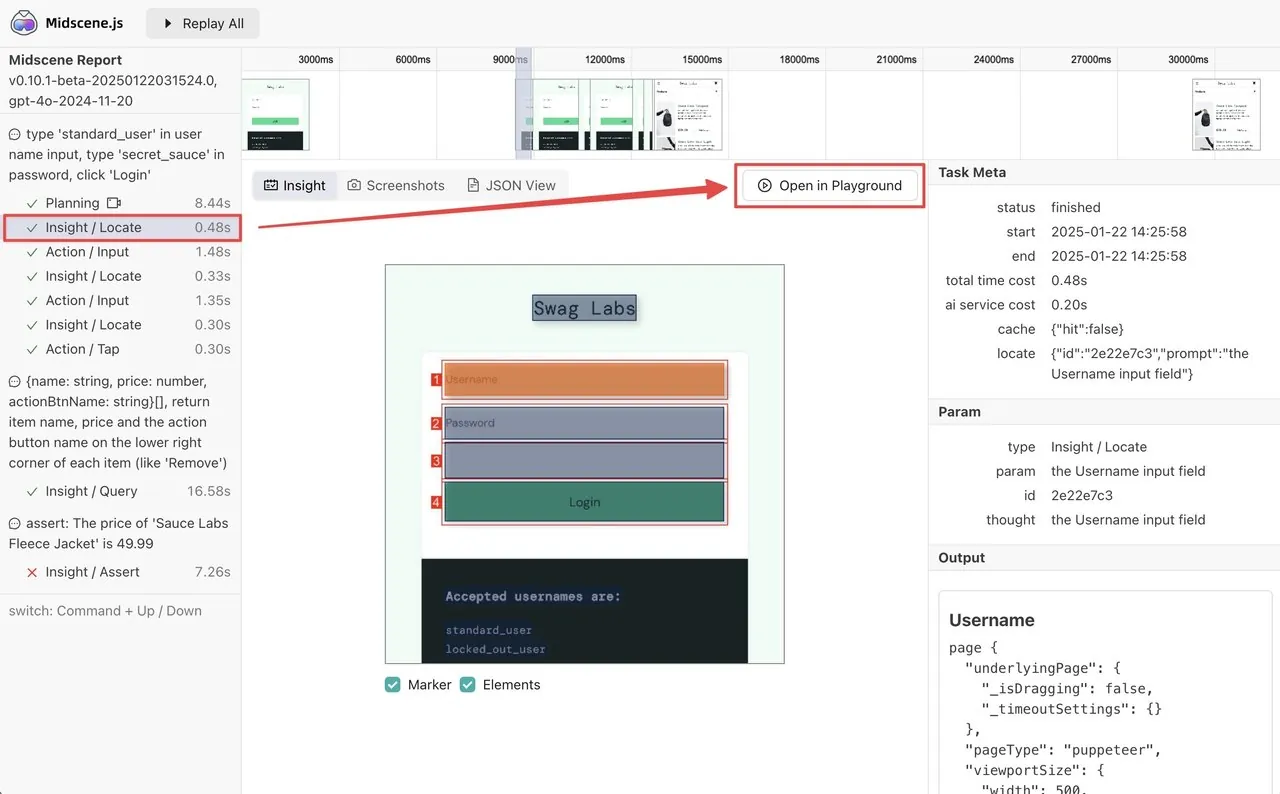
Beyond that autonomous-planning interface, it offers instant actions: aiTap, aiInput, aiKeyboardPress, aiScroll, and others execute a specified action directly, with the model responsible only for the easier locating work, which makes them faster and more predictable. Deep locate is a two-stage strategy that first finds a region containing the target and then re-locates within it to sharpen the coordinates. Meanwhile aiAssert and aiQuery run through the insight workflow for assertions and structured extraction. Every step lands in a report — screenshots, element locations, model decisions, and action and assertion results are all replayable.
Midscene Test: Declarative YAML Cases, TypeScript Extensions
@midscene/test is the framework's take on testing for the AI era, currently marked Beta. Its design philosophy balances "declarative semantics" against "deterministic engineering": write test intent in declarative YAML, and put API calls, data preparation, and cleanup into reusable TypeScript nodes. The canonical example is a refund test that prepares an order through an API, requests the refund through the UI, and verifies the result — each leg playing its own role.
People write YAML for business intent while nodes handle the deterministic engineering. The midscene-test nodes command exports the registered official and custom nodes, together with their validation rules (Zod schemas), as a Markdown node spec, so that people and coding agents see the same accurate view of a project's capabilities and co-maintain the cases. The framework also ships scaffolding, platform presets, lifecycle hooks, retries, and execution-environment isolation. The older tasks/flow declarative path is now maintenance-only, kept for compatibility and necessary fixes, while new projects and cases use Midscene Test.
One API Across Web, Mobile, Desktop, and Custom Interfaces
The same agent APIs work across platforms; what changes is how you connect, not how you call them.
| Platform | Connection |
|---|---|
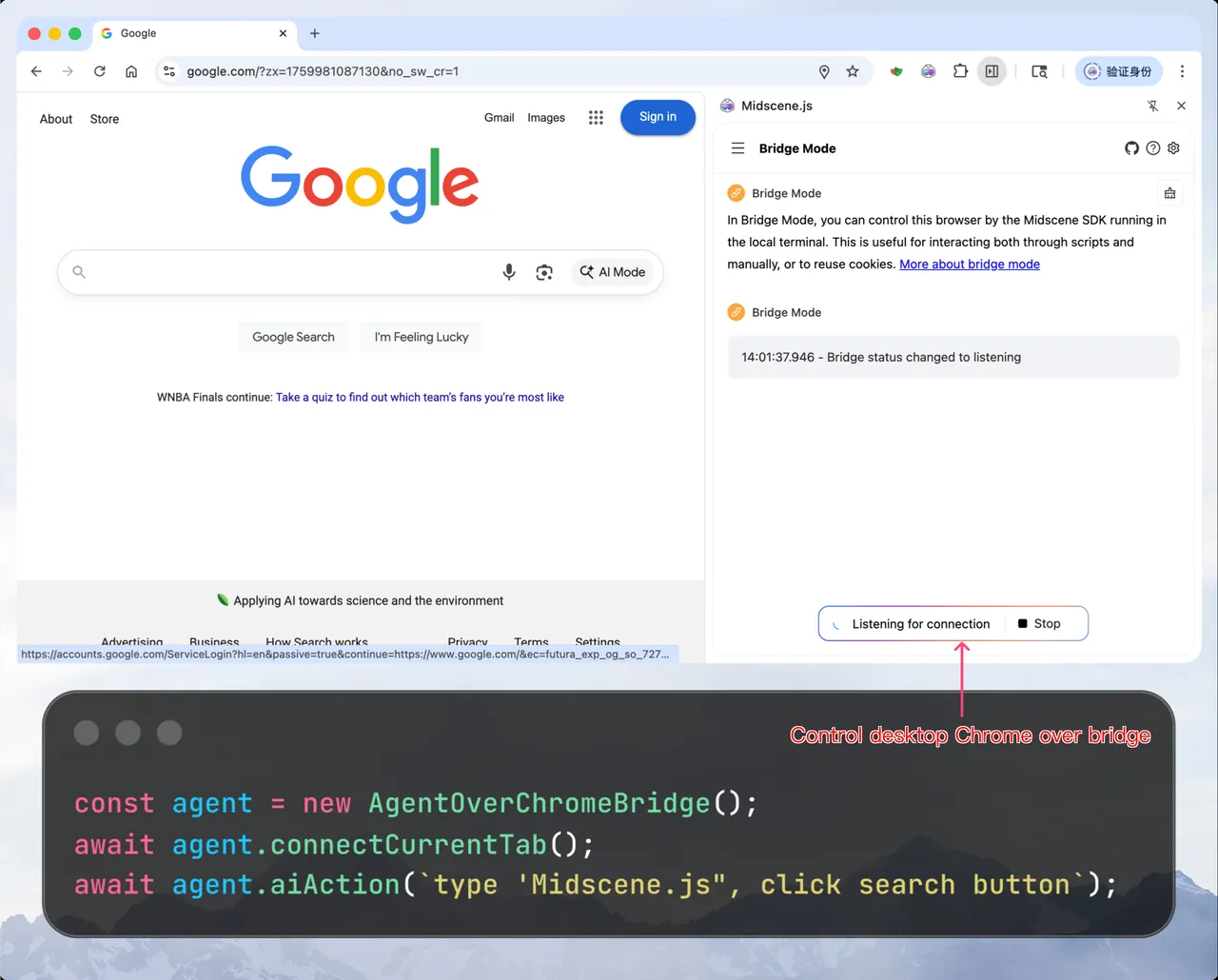
| Web | Playwright, Puppeteer, or controlling a desktop Chrome over a browser bridge |
| Android | A real device or emulator over ADB |
| iOS | A real device or simulator over WebDriverAgent |
| HarmonyOS | HarmonyOS NEXT over HDC |
| Desktop | macOS, Windows, and Linux, with remote desktop support |
| Custom interface | Provide screenshot and action capabilities and it can connect |
The project also packages the capability as skills, letting coding agents like Claude Code and Cline drive the UI through CLI commands, with one skill each for browser, desktop, Android, iOS, and HarmonyOS. The agent takes screenshots, reads the interface, and decides the next action on its own. The official example is telling: a coding agent builds a todo app, then uses the desktop skill to launch it, add three todos, check one off, delete one, and screenshot the final state. The developer only states the intent; the skill gives the agent the ability to see the screen and move the mouse, letting it verify its own code the way a person would.
Official Benchmarks and Cost
The project publishes three benchmarks, all from its own adapters and evaluations. We did not reproduce them, so this tier is recorded as pending reproduction.
| Benchmark | Result | Evaluation setup |
|---|---|---|
| AndroidWorld | Pass@1 93.10%, Pass@2 95.69%, Pass@3 97.41% | Midscene 1.9.5, gemini-3.5-flash |
| MobileWorld | Pass@1 78.63% (92 / 117) | Midscene 1.10.3, gemini-3.6-flash |
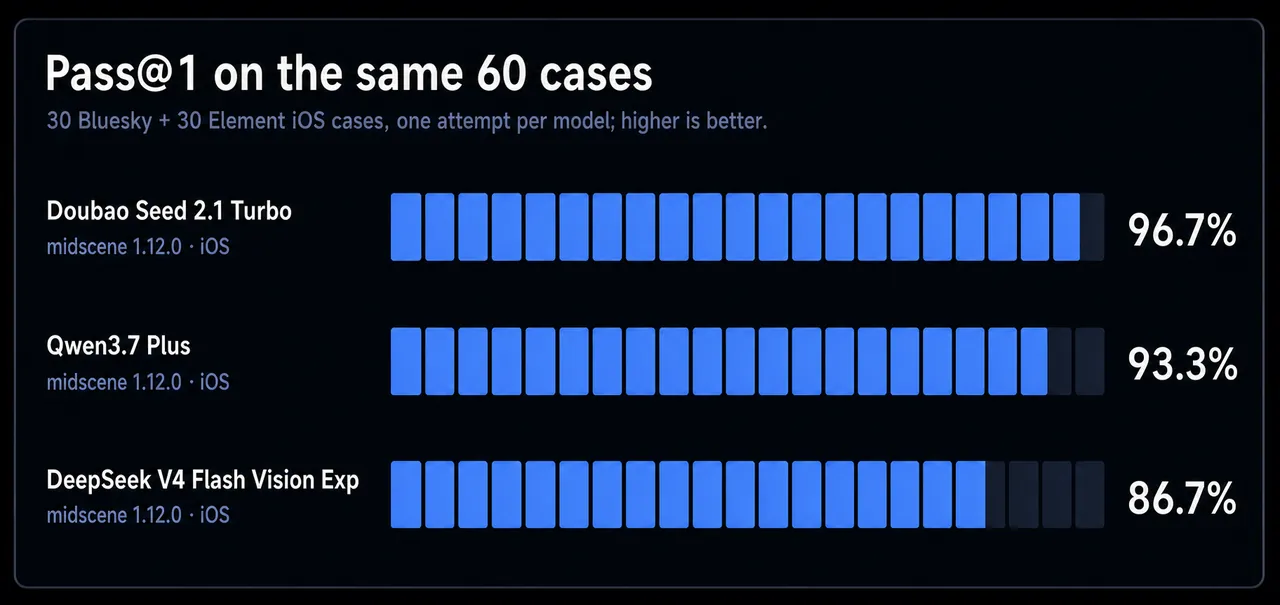
| AppControlBench | Pass@1 96.7% (58 / 60) | Midscene 1.12.0, Doubao Seed 2.1 Turbo |
AppControlBench rewards a closer look. It runs the same 60 real iOS-app tasks across several models: Midscene with Doubao Seed 2.1 Turbo passes 58 of them for a total model cost of $0.59, while on the same tasks Qwen3.7 Plus passes 93.3% and DeepSeek V4 Flash passes 86.7%. The report also states plainly that the action route for one case was calibrated — removing a single stale UI-entry description, with the final target state and grading rules unchanged.
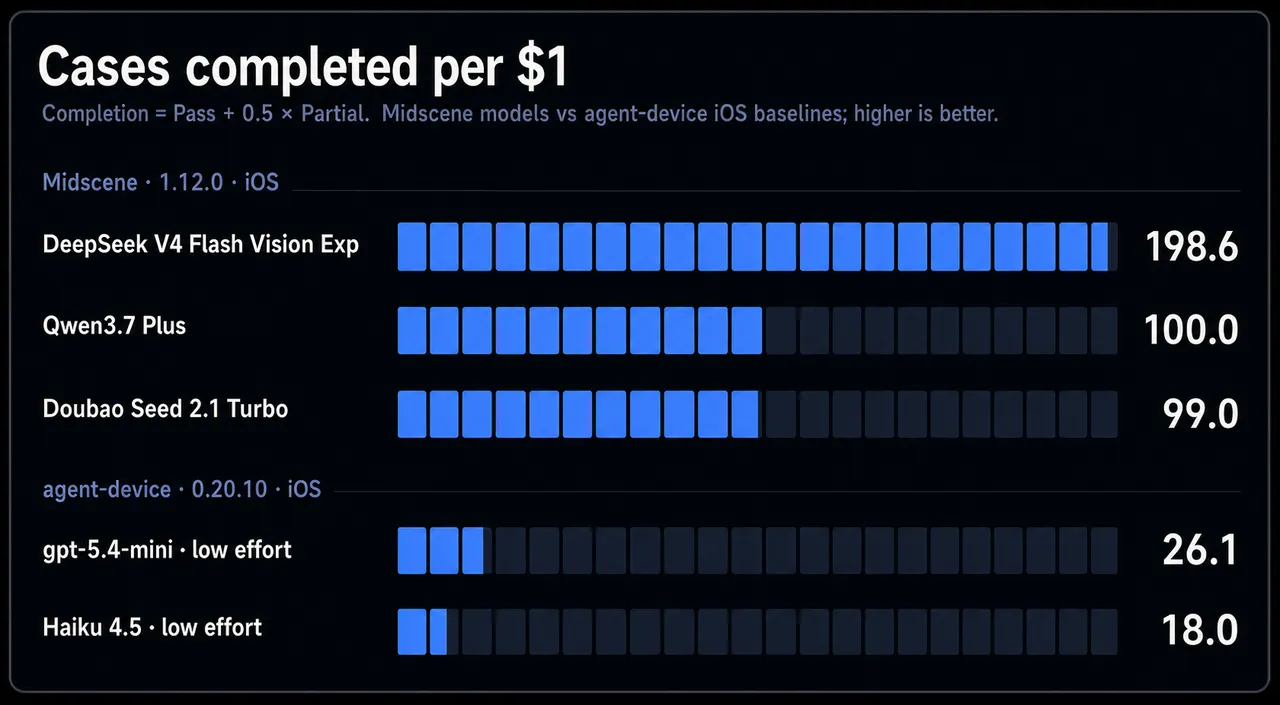
The more telling chart is cost efficiency. Expressed as "completed cases per dollar," Midscene with DeepSeek V4 Flash reaches about 198.6, Qwen3.7 Plus about 100, and Doubao Seed 2.1 Turbo about 99, while the comparison baselines on the same tasks manage only 26.1 and 18.0. The gap does not come from a smarter model but from cost structure: the pure-vision route never ships a bloated document tree to the model, so tokens track screenshot resolution and task complexity rather than element count.
These numbers deserve two caveats. They are all evaluations adapted and published by the project itself, and the reports openly note environment and validator adjustments. They are solid evidence that the route's cost structure is favorable; they are not proof that its absolute capability has arrived. The real capability level still depends on reproducing it in an actual business scenario.
Where It Draws Its Boundaries
The project does not hide the weak spots of the route. First, pure-vision localization has a hard model requirement: it needs a stable GUI-vision localization model, not just any large model, which narrows the choice. Second, complex tasks are inherently slower and more expensive, and stacking a planning or insight model raises latency and token use further. Third, Midscene Test is still Beta; its protocol and APIs will keep changing, and the legacy path is compatibility-only.
The most practical lesson appears in the "provide application knowledge" guide: from screenshots alone, a model stalls on knowledge it cannot see — which menu layer hides a feature, that a slider supports tapping tick marks rather than only dragging, that a price change is not applied until a second confirmation. The remedy is not to hard-code coordinates but to feed navigation paths, interaction rules, and business meaning into the agent as context. The guide also lists three anti-patterns: do not give only a vague goal, do not describe actions with fixed coordinates and pixel distances, and do not load an entire knowledge base into every case. The more irrelevant text in the prompt, the easier it is to miss what actually matters.
Where It Sits in This Section
Placed back on the agent-harness line, Midscene fills the layer between an agent and a graphical interface: unified task execution and replanning, an explicit division of labor across models, cross-platform action and query APIs, and execution records that are replayable and can be handed back to the agent for self-diagnosis. It is not a coding agent and it neither generates nor edits code. It lets an agent see the interface, move the pointer, and turn what would otherwise be a throwaway script into a test asset that can be maintained over time.
Pending Reproduction
We have not run any benchmark or reproduction against Midscene. All performance and cost figures above come from the official repository, documentation, and benchmark reports. The repository's activity, cross-platform coverage, and documentation quality make it a worthwhile entry in the GUI-agent toolchain, but its capability level remains pending reproduction and should be judged by end-to-end verification in a real business scenario.