
OPEN SOURCE DEEP DIVE
agent-desktop: A Verifiable Control Loop for Desktop Agents
A cross-platform accessibility-tree control layer that gives desktop agents snapshot-qualified refs, strict live re-resolution, and explicit delivery evidence.
Desktop agents usually fail for a reason more basic than planning. After they click, type, or drag, they often cannot prove which live control received the action or whether the application accepted the result. A model may know how to prepare a report, update a workbook, or send an email, but those intentions still have to cross into native applications with changing windows, virtualized lists, modal dialogs, and multiple documents that look alike. agent-desktop approaches that gap as a control-systems problem: read the operating system accessibility tree, act through a snapshot-qualified reference, then observe again.
This review covers commit 9eb9b296. The project is not a desktop foundation model and it does not autonomously decide what a user needs. It is infrastructure for the agent that does: a Rust CLI, a C FFI, and native adapters for macOS, Windows, and Linux. Its useful contribution to AI office workflows is a strict observation-and-action contract that remains inspectable when the interface moves underneath it.
Why office automation needs evidence, not faster coordinates
Coordinate automation treats the screen as a picture with controls painted on it. It recognizes a target, converts it to a pointer position, and sends a mouse event. That approach can work in a fixed test fixture, but an office desktop is unusually hostile to it. Windows resize, menus appear conditionally, spreadsheets virtualize rows, dialogs cover the main workspace, and a single application can show several documents with nearly identical titles. A successful input event says almost nothing about whether the intended control received it.
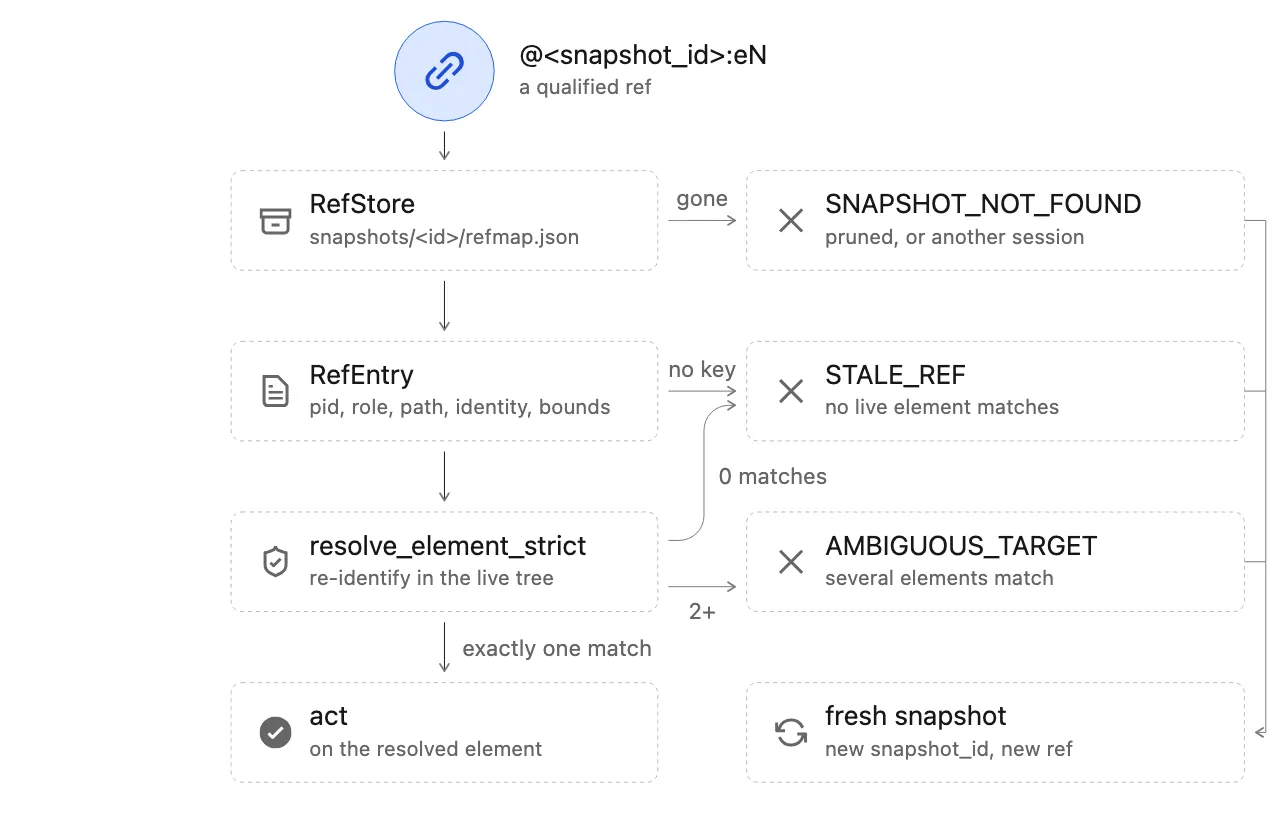
agent-desktop uses the accessibility tree as its source of truth. A snapshot returns JSON containing a reference for every actionable or drillable node. The agent acts on the reference and takes another observation to inspect the result, without pixel matching. References are qualified by the snapshot that created them, such as @s8f3k2p9:e8. A bare @e8 is rejected with INVALID_ARGS. This prevents an old observation from being silently treated as a handle to whatever now occupies the same screen position.
The distinction matters because many office actions are not idempotent. Typing into the wrong field can duplicate content, changing a slide layout can destroy formatting, and retrying an uncertain email send can produce a second message. The JSON contract separates delivery from retry permission. Only not_delivered is safe to retry; the other known delivery states are unsafe, and unknown is not safe for automatic retry. The agent has to read the live state before it repeats a side effect.
Architecture: one core, three native adapters, two entry points
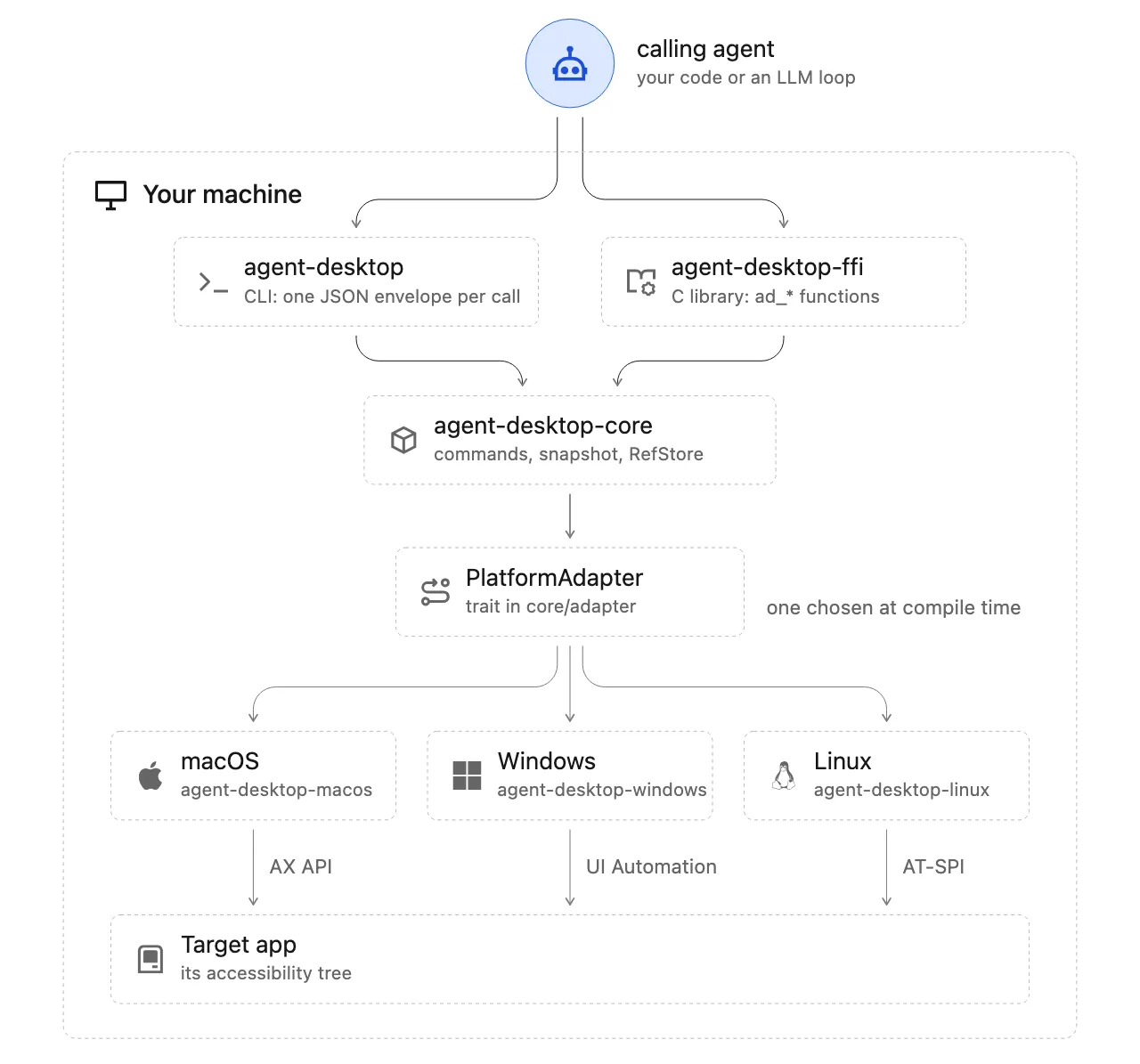
The repository is a Rust workspace. The shared core defines the PlatformAdapter boundary, refs, snapshots, actionability checks, delivery semantics, and the common JSON contract. Separate macOS, Windows, and Linux crates map native accessibility APIs into the roles, states, names, and capabilities understood by the core. The platform crates cannot import each other, and a CLI or C-library build selects one adapter at compile time. That structure keeps OS-specific behavior inside the adapter instead of allowing one platform's workaround to mutate the semantics of another.
An agent harness can invoke the CLI for each command. Every invocation returns one JSON envelope with ok and either data or error; errors carry a code, a delivery disposition, and usually a recovery suggestion. Hosts that need to avoid repeated process startup can use libagent_desktop_ffi. The FFI and CLI share strict ref resolution and delivery behavior, so a language binding does not become a second, weaker execution path.
| Platform | Accessibility source | Runtime requirements | Important office boundary |
|---|---|---|---|
| macOS | Accessibility API | Accessibility permission; Screen Recording for screenshots | Without permission, an empty observation may reflect the grant rather than an empty application UI. |
| Windows | UI Automation | No grant for applications at the caller's integrity level; elevated targets need an elevated caller | UIPI prevents a normal process from sending input into a higher-integrity window. |
| Linux | AT-SPI over D-Bus | The user's graphical session with at-spi2-core | Wayland narrows pointer and native-window support; X11 and GNOME capabilities are not interchangeable. |
Cross-platform support does not mean identical behavior. On Windows, type has no strict-headless UI Automation insertion path, so set-value is the semantic text operation. On Linux, physical pointer input depends on X11 and screenshots may use a Wayland portal. On macOS, accessibility and screen capture are separate permissions. A desktop-agent deployment should therefore begin with agent-desktop status and agent-desktop permissions; taking a snapshot first and guessing why the tree is empty is the wrong diagnostic order.
Snapshot-qualified refs and strict live re-resolution
Each observation persists a RefMap with the evidence needed to identify its elements later. Before a command acts, the core does not trust an old absolute path. It tries the stored positional path first, then a bounded broad search. Identifier evidence and role-conditional stable text are stronger than geometry. A unique rectangle becomes a last-resort locator only when the ref has no meaningful identity, and the match must still pass the stored identity checks. The design treats paths and bounds as search hints, never as durable identities.
Resolution fails closed with three operationally different errors. If the live observation contains no matching target, the result is STALE_REF. If several candidates cannot be separated, it is AMBIGUOUS_TARGET. If the snapshot is missing or expired, it is SNAPSHOT_NOT_FOUND. Multiple windows produce an ambiguity with candidate window IDs, so the agent can choose one with --window-id instead of assuming that the foreground window is correct.
Persistence is intentionally bounded. A namespace retains 128 saved snapshots and prunes back to 96 as new observations arrive. One persisted ref map may not exceed 1,048,576 bytes. The project also distinguishes a partial full snapshot from a drill-down. A normal observation can return a partial tree and mark the boundary where traversal stopped. A drill-down replaces the ref map inside an existing region, so it must be complete; the implementation refuses rather than deleting descendants it did not observe.
Headless by default, with no silent fallback to physical input
Ref actions use semantic accessibility operations by default. They do not activate an application, move the system cursor, synthesize keyboard input, or borrow the clipboard. That makes the default path suitable for an agent working while a person continues using the machine. It can click a control, set a value, or expand a list region without stealing focus. If the native semantic path cannot perform the operation, the command fails according to its interaction policy instead of quietly switching to a pointer click.
Physical input is opt-in through the global --headed flag. Hover, raw-coordinate movement, drag, and some platform-specific actions require it. The documentation explicitly rejects a common recovery shortcut: do not add --headed merely because a headless command failed. The first attempt may have changed application state even though the result was uncertain. Repeating the intent with physical input can duplicate the mutation. Headed mode expands capability, but it also crosses a user-permission and side-effect boundary.
The current binary advertises 60 command names and 56 operational commands. Four held-edge commands, key-down, key-up, mouse-down, and mouse-up, refuse to run until a daemon can own the hold lifetime and guarantee cleanup. Agents should use press, mouse-click, or drag instead of leaving a key or mouse button held across process boundaries.
Delivery state is not the same as task success
The most transferable part of the project is its refusal to collapse action delivery into business success. A result carries disposition.delivery as one of not_delivered, delivery_uncertain, delivered_unverified, or delivered_verified. A separate retry field answers whether another attempt is safe. A known non-delivery is safe to repeat. An uncertain delivery is not. An action can be known to have reached the application while its intended effect remains unverified.
| Field or state | What it establishes | Correct agent response |
|---|---|---|
ok: true | The command was delivered or the target was already in the requested state | Read the application result; do not treat the envelope as proof that the workflow succeeded. |
delivered_verified | The adapter read the postcondition it names | Inspect the verification scope. A stateful control check does not necessarily prove application-level persistence. |
delivered_unverified | Input was dispatched without reliable postcondition evidence | Observe the UI or external state before repeating a side effect. |
not_delivered | The action proved that no input landed, or the request was already satisfied | Retry only when retry is safe. |
unknown | There is insufficient evidence to decide whether input landed | Do not retry automatically. Take a fresh snapshot, inspect state, or escalate. |
batch reduces process startup overhead, but it is not a transaction. Commands run in order. Without --stop-on-error, entries after a failed entry still run, and the outer ok: true does not prove that every inner entry succeeded. A batch is appropriate for small actions that can still be verified individually, not for pretending that a multi-step submit operation has atomic rollback. Current limits are 64 entries, 1 MiB of input, 4 MiB of output, and a default 60-second budget.
Async interfaces should be synchronized with real signals rather than fixed sleeps. The wait command can observe text, element actionability, a window, a menu transition, an event, or a notification. After the condition changes, the agent should use refs from a fresh observation. When a click times out after possibly sending a request, the safe next step is to inspect the resulting state, not to click again.
Skeleton and drill-down keep large office trees usable
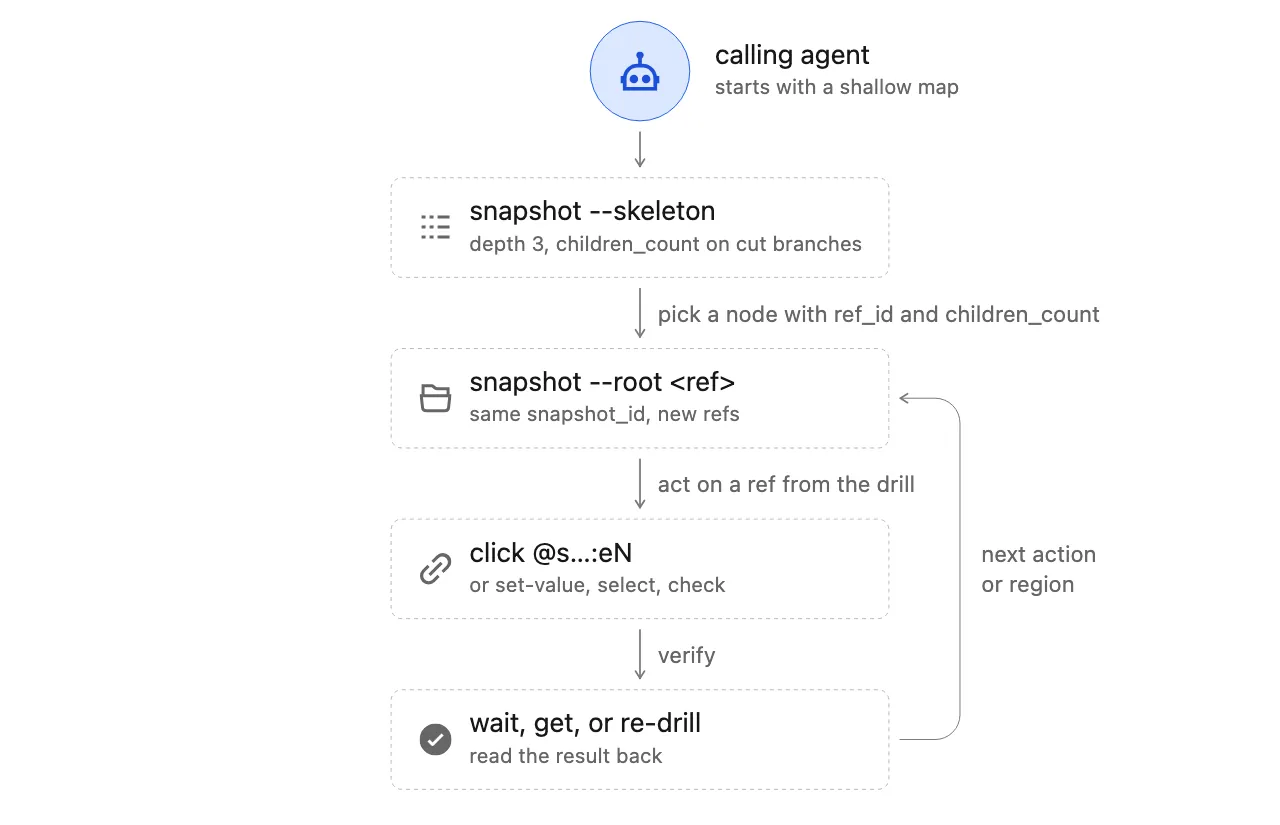
Excel, PowerPoint, Outlook, and Electron applications can expose trees far larger than an agent's useful context budget. snapshot --skeleton starts with a semantic depth of three and returns a navigable map. The agent selects a region and runs snapshot --root on one of its refs. Re-drilling replaces the refs inside that root while preserving the drilled root and refs outside the region. Other refs from the skeleton or from earlier drills remain valid until their own observation is replaced.
This is more than truncation. The implementation distinguishes raw depth from logical depth and skips transparent web wrappers that have no name, value, developer identifier, or actionable capability. Chromium, Electron, and WebView trees often contain chains of anonymous groups and panes that consume traversal budget without offering anything an agent can use. A wrapper that has a name or an action still consumes logical depth. The result is a smaller map without discarding the semantic containers that matter.
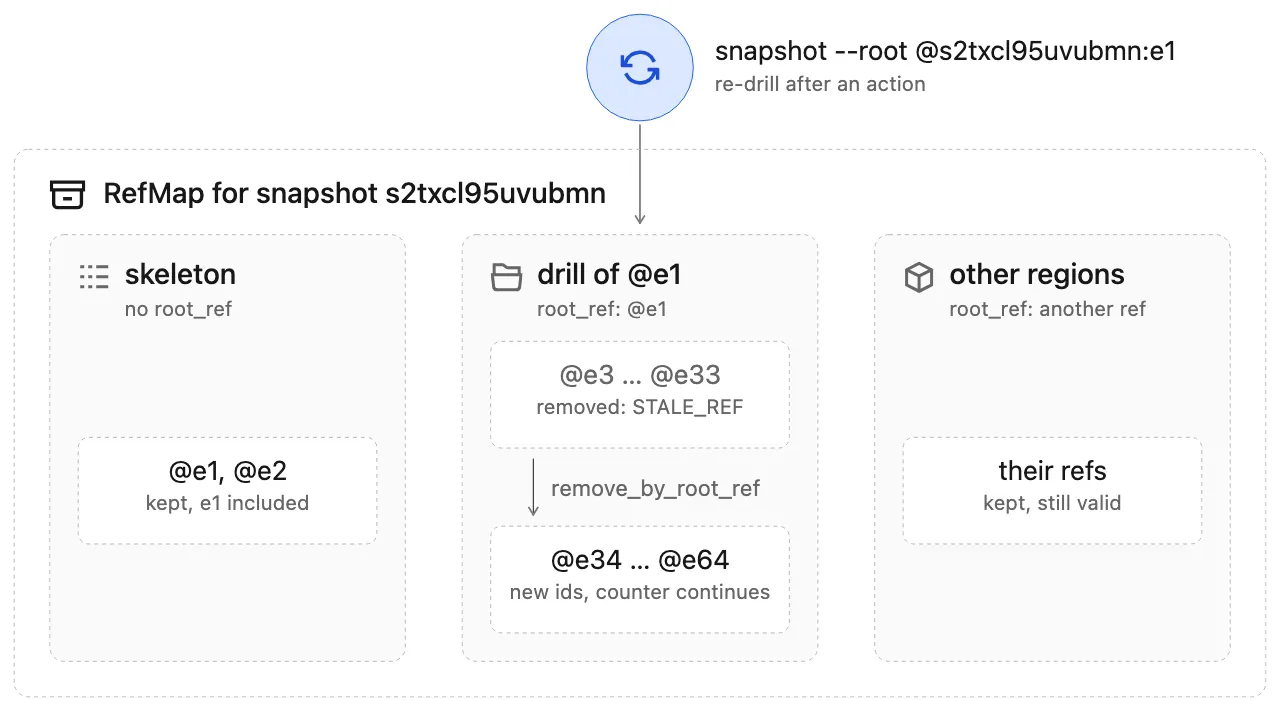
A practical office workflow is to map the broad regions first, drill only into the active worksheet, message list, or slide thumbnail area, act, and then re-observe that same region. If the application reflows, the old ref should fail. The agent can use the new skeleton instead of trying to preserve an identity that no longer exists. Snapshots are observations, not durable selectors for a document.
Where agent-desktop fits in AI office work
The project is useful at the boundary where an agent must enter a native desktop application and the result depends on local permissions, menus, dialogs, windows, or files. It does not infer a user's intent and it does not generate the document. An upstream model can draft the content, compute a spreadsheet plan, or design a slide structure; agent-desktop provides the audited path into the application that owns the final artifact.
| Office workflow | Recommended operation | What to verify |
|---|---|---|
| Write structured data into Excel | Open the workbook, locate the sheet and range, prefer set-value, and use skeleton drill-down plus element waits when the tree is large. | Re-read key cells, formula errors, row counts, and save state. A correct field value does not prove the workbook was persisted. |
| Edit text or layouts in PowerPoint | Use window and control refs to select slides, placeholders, and layouts. Treat overlays as separate surfaces. | Re-observe the slide and placeholder content; check that the edit did not land in the master or another presentation. |
| Triage Outlook mail | Resolve list rows and toolbar controls semantically. Wait for loading text or an actionable element when the list is asynchronous. | Re-read selection before moving, deleting, or sending. Sending is a high-risk action that must not be repeated after uncertainty. |
| Complete save and export dialogs | Wait for the dialog, snapshot its sheet, alert, or popover surface, then operate on controls inside it. | Confirm that the dialog closed and the target file exists. A fixed delay is not proof that saving completed. |
| Use native menus and notifications | Use targeted menu surfaces, explicit waits, and qualified refs. Ask for headed mode only when the platform requires physical input. | Confirm the command executed and the notification still belongs to the expected app and title after list reordering. |
The limitations are equally concrete. A control that the accessibility tree does not expose cannot be driven through this semantic path. Canvas-only interfaces, inaccessible legacy software, and windows blocked by security boundaries may have no usable refs. The project is not a pixel-matching system, so screenshot guessing is not a universal fallback. Dense web content in Chromium applications should be handed to agent-browser or another CDP client, while native menus, dialogs, windows, notifications, and screenshots remain on agent-desktop.
Automatic escalation from a failed headless command to headed mode is another anti-pattern. A better recovery sequence is to read disposition.retry, inspect the current UI and business state, retry only after proving non-delivery, and request explicit physical-input permission when the semantic capability is genuinely unavailable. For sends, deletes, submissions, and overwrites, the agent should verify the external result rather than treating a verified control state as proof that the application committed the operation.
Privacy and permission boundaries are part of the interface
Accessibility snapshots can contain document titles, field values, notifications, clipboard data, screenshots, and trace artifacts. Those are real desktop records, not harmless debug text. The project warns callers to keep snapshots and debug outputs out of public logs and uploads. A host integrating the tool with a model needs local policies for field allowlisting, secure-field masking, artifact retention, and data egress. A password value should never be echoed in a result, error detail, trace, or post-action state merely because the adapter can write into the field.
Permissions also change the meaning of a failure. macOS requires separate grants for accessibility and screen recording. Windows integrity levels determine whether a target is reachable. Linux requires the user's graphical session and a working AT-SPI bus. Checking those conditions at startup and preserving distinct errors for missing permission, unresponsive application, stale ref, and unverified delivery gives the agent a recoverable model of the desktop instead of a generic failure message.
That is the project's real position in the AI office stack. It does not replace document-generation models, and it does not turn native software into a web application. It supplies a verifiable control loop between semantic observation and audited action. For products that must operate local office suites, file managers, system dialogs, and native productivity tools, qualified refs, fail-closed resolution, and explicit delivery evidence address a production problem that a marginally better click model cannot.
The full vocabulary and recovery contract are documented in the project's CONCEPTS.md and JSON output specification.