OPEN SOURCE DEEP DIVE
Tolaria: A Git-First, AI-Native Desktop App for Markdown Knowledge Bases
Desktop app for macOS/Windows/Linux managing markdown knowledge bases: files-first, vault-as-git-repo, convention over configuration, plus 8 CLI agent adapters and a bundled MCP server for AI access.
What it is
Tolaria is a desktop application for macOS, Windows and Linux that manages markdown knowledge bases. The repository is refactoringhq/tolaria, licensed AGPL-3.0-or-later, primary language TypeScript, built on Tauri 2 + React 19 + Rust, with the project site at tolaria.md. At collection time it stood at 20,131 stars, 1,385 forks and 56 watchers, having been created on 2026-02-14 and pushed to as recently as the day of collection.
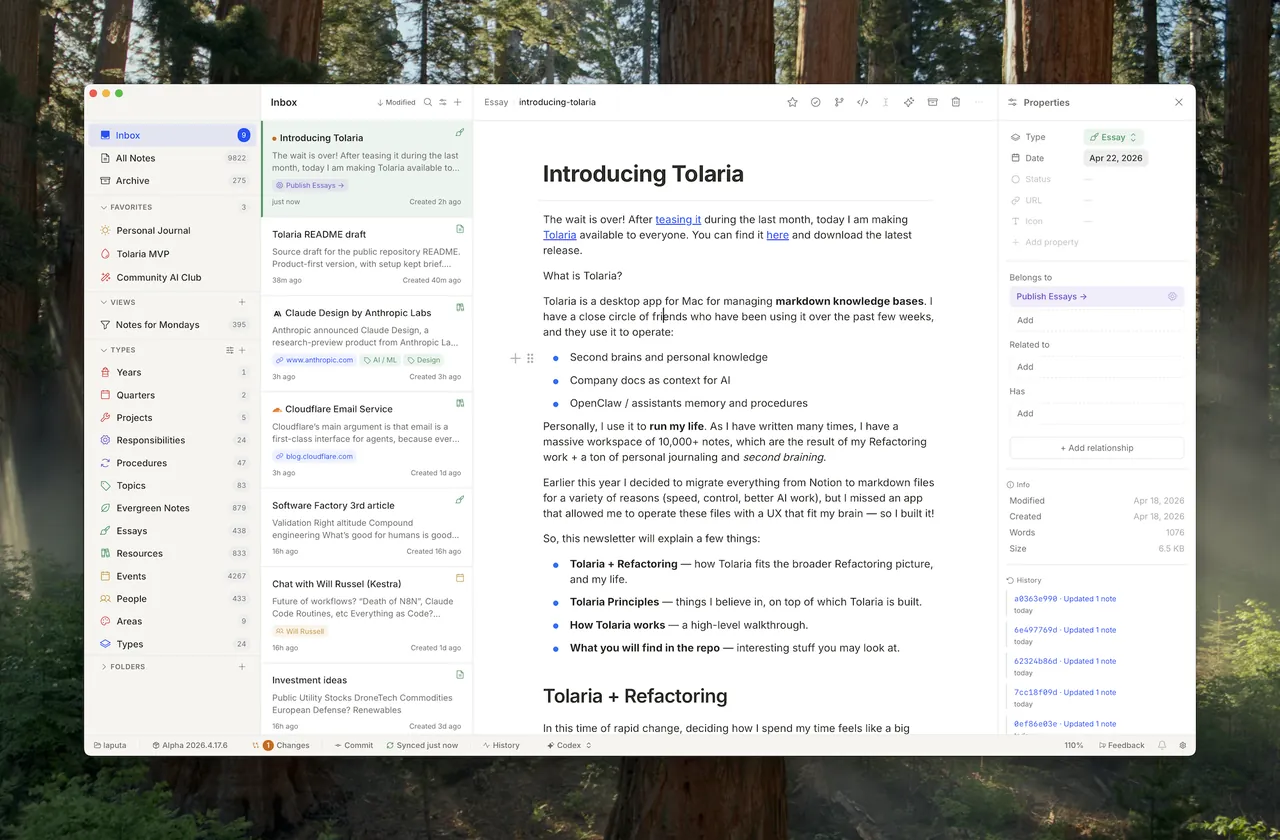
The README lists three things people actually use it for: running a second brain and personal knowledge, organizing company docs as context for AI, and storing memory and procedures for assistants and agents. The author, Luca Rossi (X: @lucaronin), uses it to run his own life and work: a vault of 10,000+ notes accumulated while writing Refactoring, a technical newsletter with roughly 200,000 subscribers and more than 300 original articles. That last detail matters more than it looks, because the product's central claim is that a method tested on one very large real vault beats a blank canvas.
At a glance
| Item | Value |
|---|---|
| Repository | refactoringhq/tolaria (AGPL-3.0-or-later, TypeScript) |
| Stars / Forks / Watchers (snapshot at collection) | 20,131 / 1,385 / 56 |
| Created / last push | 2026-02-14 / 2026-10-22 |
| Latest release tag | v2026-10-13 |
| Site / docs | tolaria.md; user docs in site/, published to GitHub Pages |
| Platforms | macOS, Windows, Linux (desktop); mobile foundation on Expo React Native |
| Storage format | Plain markdown files with YAML frontmatter; every vault optionally a git repository |
| Shell / frontend | Tauri 2.10, React 19, TypeScript 5.9, Rust (edition 2021), Vite 7.3, Tailwind v4 |
| Editors | BlockNote 0.46 rich editor, CodeMirror 6 raw editor, Mermaid 11.14 diagrams, tldraw 4.5 whiteboard, IronCalc WASM spreadsheet |
| AI integration | 8 CLI agent adapters (Claude Code, Codex, GitHub Copilot, OpenCode, Pi, Antigravity, Kiro, Hermes) plus a bundled MCP server |
| Install | brew install --cask tolaria, or signed release installers for the three desktop platforms |
| Repo topics | none set on the GitHub side at collection time |
The problem it attacks, in two layers
The project's own vision document splits the problem of "working effectively with AI" into two distinct layers, and the split is the clearest way to understand why the product looks the way it does.
The first layer is architectural. Most knowledge tools keep data in proprietary formats on remote servers. An AI tool cannot read them efficiently, cannot commit changes back, and cannot reason over the full structure. The format itself is the ceiling. The second layer is methodological: even with a good tool, most people do not know how to organize knowledge so that it becomes more useful over time rather than more noisy. What to capture, how to connect it, how to turn raw notes into a system that works with you.
Most personal knowledge management tools address only the first layer and hand you a blank canvas. Sophisticated users then build elaborate custom systems; everyone else quietly gives up after a few weeks. Tolaria's stated position is to ship the method alongside the tool. The method is opinionated but not rigid: the types, the relationships and the structure can all be changed, but you do not have to invent them from scratch.
The method: an ontology for knowledge work
The framework organizes work along two axes, whether something is one-time or recurring, and whether it spans multiple sessions or one. That produces three first-class containers plus one deliberate non-container:
| One-time | Recurring | |
|---|---|---|
| Multi-session | Project — has a start and an end | Responsibility — no end, measured by KPIs |
| Single-session | Task — deliberately left to an external task manager | Procedure — a checklist or routine |
Everything else is context, and context has four types: Notes (the atomic unit, connectable to one or more containers), Topics (areas of interest with no performance expectation), Events (things that happened, anchored to a date) and People (contacts and their history). Relations between notes are first-class citizens — not bare wiki-links, but typed, bidirectional connections, which is what makes the resulting graph navigable by a machine rather than merely viewable.
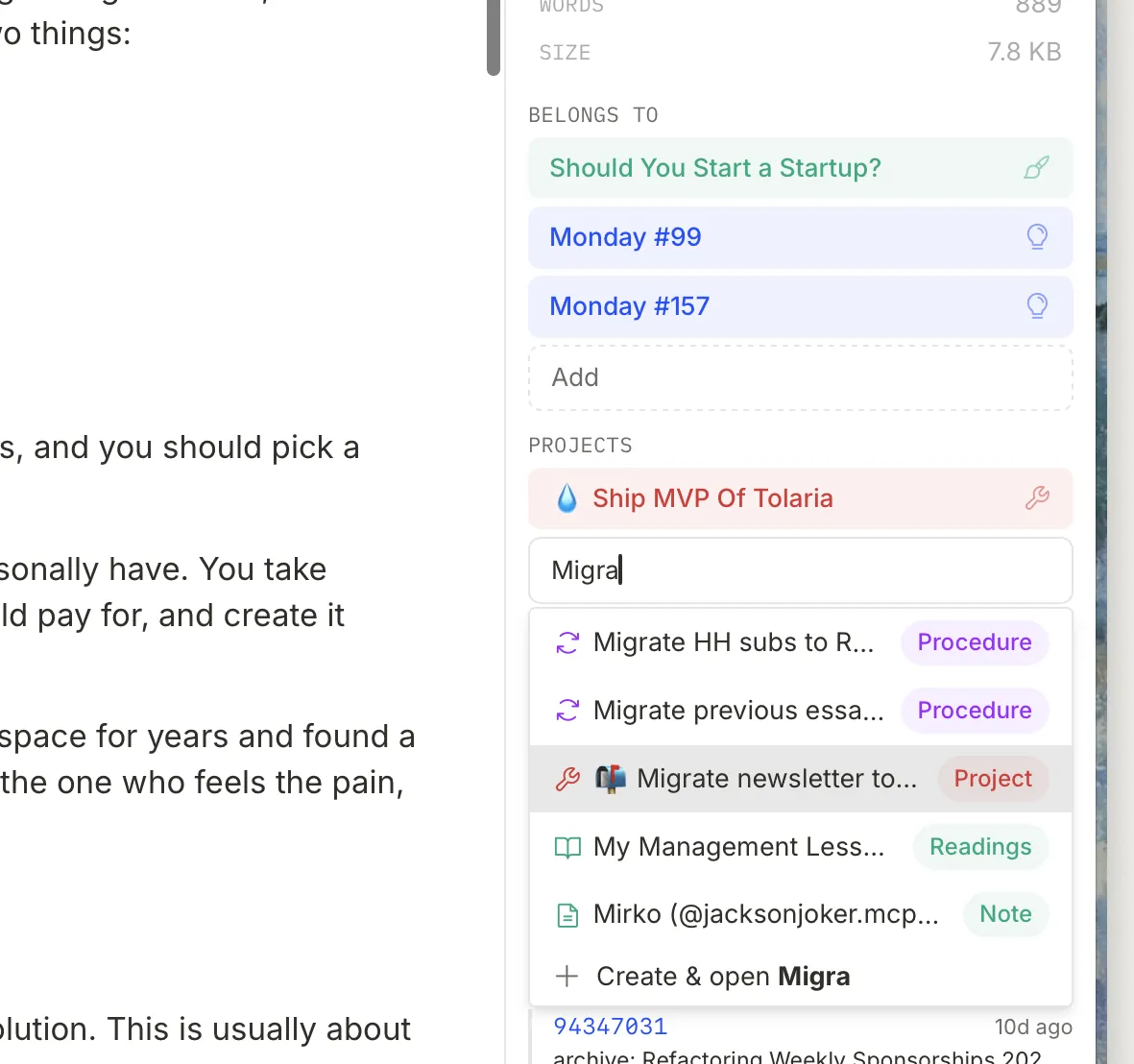
belongs_to, related_to, has) and humanized in the UI; a field counts as a relation when its value contains [[wikilinks]], so there is no hardcoded field-name list in the application source.Underneath the ontology sits one principle that the vision document repeats: notes exist to get things done. Not to be stored for an abstract future, not to demonstrate organization. Without a real purpose the maintenance cost of note-taking is never justified and people stop; with one — writing regularly, shipping things, making better decisions — the system pays for itself. What "express" means changes by who you are: for writers, captures become highlights, highlights become evergreen notes, evergreen notes become the building blocks of articles; for builders, captures feed projects, decisions and procedures; for operators and managers, value accumulates in the recurring structure rather than in individual notes. The constant is the flow: capture → organize → express.
Capture and organize are deliberately separate
Capture is meant to be fast, frictionless and available everywhere — a thought, a saved article, a Kindle highlight, a voice memo. Captured notes land in the vault unconnected, with no relationships and no organization, and the docs treat that as correct rather than sloppy: never let friction during capture cause a good idea to be lost.
Organize is a separate, periodic activity, weekly being the natural cadence. The question asked of each note is what is this useful for?, and the project is unusually blunt about the expected answer: deleting more than 50% of captures is normal and healthy. What survives gets connected to a Project, a Responsibility or a Topic; every note should eventually reach at least one actionable container, and the inability to connect something is itself treated as a signal worth attention.
The Inbox is the interface expression of that split, and the implementation detail is worth noting because it is easy to get wrong: the Inbox is not a folder. It is a derived state — the set of notes with no outgoing relationships. Connect a note to anything and it leaves the Inbox automatically. The goal is Inbox Zero, reached periodically rather than continuously.
Convention over configuration
The method lives inside the app as conventions: standard field names and folder structures that carry well-defined meanings and trigger specific behaviour with zero setup.
| Convention | Effect |
|---|---|
type: | Assigns the note to an ontology type; types are navigation lenses, not schemas — no required fields, no validation |
status: | Renders as a coloured chip in lists and the inspector |
Workspace: [[workspace/refactoring]] | Assigns the note to a context / mounted workspace |
Belongs to: | Connects the note to its parent container |
start_date: / end_date: | Shows a duration badge; date entry stays ISO (YYYY-MM-DD) so frontmatter remains predictable |
_field (underscore prefix) | App and UI preferences that belong to a note live in that note's frontmatter rather than in separate config files or localStorage |
config/relations.md | Overrides which relationship fields appear by default |
config/semantic-properties.md | Controls how fields are rendered |
AGENTS.md | Canonical vault guidance for AI agents; CLAUDE.md is a compatibility shim that imports it |
This is convention over configuration, not instead of it, and the architecture document gives the reason directly: the more structure comes from shared conventions rather than per-user custom configuration, the less bespoke instruction an AI agent needs to navigate the vault correctly. The method and the AI-native architecture are the same bet made twice.
The filesystem is the only authority
The core invariant is stated plainly in docs/ARCHITECTURE.md: the app never owns the data. Vault data exists in three simultaneous representations, and they are ranked:
- Filesystem — the
.mdfiles on disk. The single source of truth. When in doubt, the file on disk wins. - Cache —
~/.laputa/cache/<vault-hash>.json, a startup index that is always reconstructible by deleting it. It lives outside the vault so it never pollutes the user's git repository, and the vault path is normalized before hashing so macOS/tmpaliases and separator variants share one cache identity. - React state — the in-memory
VaultEntry[]for the session, always derived from cache or filesystem.
Writes are disk-first: anything that mutates vault data writes through Tauri IPC before React state updates, so a failed write cannot leave the UI claiming something the disk does not contain. Where responsiveness matters, optimistic updates are allowed but must carry a rollback callback. If state ever diverges — crash, external edit, race — a full reload_vault rescan atomically replaces cache and state.
Startup speed on a 10,000-note vault comes from a git-backed incremental cache with three strategies:
| Condition | Strategy | Work done |
|---|---|---|
| No cache or corrupt cache | Full scan | walkdir every .md file, parse everything |
| Cached HEAD equals current HEAD | Cache hit | git status --porcelain, re-parse only uncommitted changes |
| HEAD moved | Incremental update | git diff old..new --name-only, selective re-parse of changed files |
Cache replacement is best-effort and deliberately defensive: write a temp file, fsync, then rename into place only after a short-lived writer lock plus an on-disk fingerprint check confirm that another window or process has not already refreshed it. The cache carries a version number (v14 at collection time) bumped whenever VaultEntry fields change, which forces a full rescan rather than trusting a stale shape. Note renames get their own crash safety through a hidden <vault>/.tolaria-rename-txn/ staging directory holding backups and one manifest per in-flight rename; unfinished transactions are recovered on the next scan so a crash cannot leave a note missing or visibly duplicated.
AI-native rather than AI-attached
This is the part that separates Tolaria from a markdown editor with a chat panel bolted on. There are two distinct mechanisms.
One: the app drives local CLI agents as subprocesses. The AI panel spawns whichever agent you have installed, and there are eight adapters — Claude Code, Codex, GitHub Copilot, OpenCode, Pi, Antigravity, Kiro and Hermes Agent — sharing one runtime scaffold for request shape, prompt wrapping, JSON-line and line-oriented subprocess lifecycle, streaming normalization and version probing. Each adapter translates Tolaria's permission mode into that agent's own flags, and the two modes are meaningfully different rather than cosmetic:
| Agent | Vault Safe | Power User |
|---|---|---|
| Claude Code | File, search, edit tools plus Skill; strict Tolaria MCP config, acceptEdits | Adds Bash, pre-approved through --allowedTools |
| Codex | --sandbox read-only --ask-for-approval on-request exec --json - | --sandbox workspace-write --ask-for-approval never exec --json - |
| GitHub Copilot | copilot -p <prompt> -s --no-ask-user, only write and Tolaria MCP tools preapproved | --allow-all-tools — explicitly without --allow-all or --yolo |
| OpenCode | Denies bash and external directories | Allows bash, still denies external directories |
| Antigravity | Boolean --sandbox flag | --dangerously-skip-permissions, the one documented bypass exception (ADR-0159) |
Prompts go through stdin rather than the command line, which keeps generated context out of the Windows process argument list and away from OS argument-length limits. Availability detection does not simply trust the desktop app's inherited PATH — detectors check the current process path, the user's login shell, and common toolchain locations (~/.local/bin, ~/.claude/local, mise/asdf shims, nvm, npm-global, Homebrew, Windows npm/pnpm/Scoop shims, Kiro's MSI install path, the macOS Codex app resource), which is why first-run onboarding can work on a machine where the agent was installed after the GUI session started. Every app-launched agent also receives a local orientation to Tolaria's own documentation: scripts/build-agent-docs.mjs generates a bundled agent-docs/ resource from the VitePress sources, and agents are told to read the vault's AGENTS.md for local conventions and search the bundled docs for product behaviour.
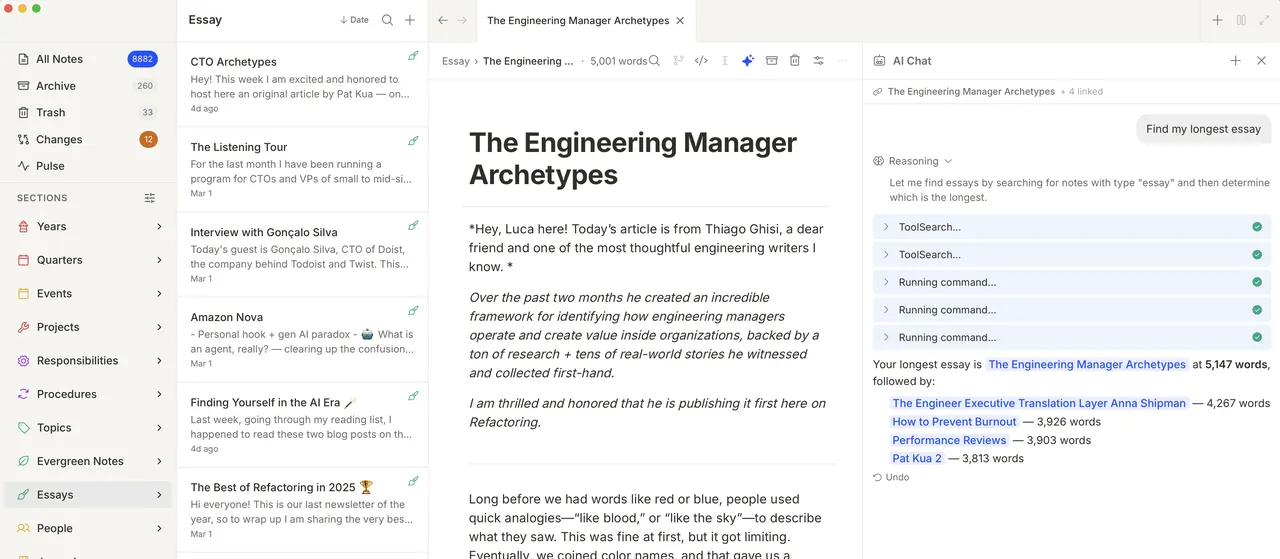
Two: a bundled MCP server, so agents that are not launched by Tolaria can still reach the vault. The server (mcp-server/index.js with tool-service.js, vault.js and ws-bridge.js) exposes a compact tool surface:
| Tool | What it does |
|---|---|
search_notes | Title or content substring search |
vault_context / list_vaults | Mounted-vault summary — entity types, folders, recent notes, root AGENTS.md instructions — and which active vaults carry those instructions |
get_note / read_note | Parsed frontmatter, body and mtimeMs for conflict-guarded edits |
create_note | Creates a note without overwriting an existing file |
update_note | Replaces full markdown, optionally failing if mtimeMs changed since the read |
append_to_note | Appends verbatim markdown |
open_note / ui_open_tab / ui_open_note / highlight_editor / ui_set_filter | Drive the desktop UI: open a tab or the editor, highlight an element, set the sidebar filter |
refresh_vault | Rescan after an external file change |
Two transports are supported: stdio for standard MCP clients, and WebSocket for the live app bridge, with port 9710 carrying tool calls and 9711 broadcasting UI actions back to the frontend. Registration into external tools is user-initiated through the status bar or command palette, never a startup side effect, and it is additive — Tolaria upserts its own entry into ~/.claude.json, ~/.claude/mcp.json, ~/.gemini/config/mcp_config.json, ~/.cursor/mcp.json, ~/.config/mcp/mcp.json or ~/.config/opencode/opencode.json while preserving other servers, and resolves an MCP runtime (Node 18+ preferred, Bun 1+ as fallback) before writing config so no client is left pointing at a missing binary. Durable external processes resolve active workspaces at call time from vaults.json rather than baking in one path. The small print is instructive about maturity: on Linux the bundled MCP server still spawns the system node, and AppImage builds extract mcp-server/ to ~/.local/share/tolaria/mcp-server/ with a version marker so external registrations survive the changing AppImage mount point.
Git is the sync layer, and its absence is handled honestly
Every vault can be a git repository, and git is treated as the natural way to sync, collaborate and keep history — no proprietary cloud in between. Auto-sync pulls on a configurable interval; a fast-forward reloads the vault, folders and saved views, and replaces the active tab's content only when that tab is clean, restoring editor focus if it had focus. Push rejection maps to an explicit pull_required state, merge conflicts open a resolver, and the status bar exposes five sync states rather than a single spinner.
Commit messages can be drafted from the diff. When the active AI target is a configured direct model, Tolaria sends bounded path/status/line-count metadata plus bounded get_file_diff excerpts so the model produces semantic summaries; agent targets, offline AI, oversized path lists and model failures all fall back to a deterministic changed-file summary. AutoGit adds dialog-free checkpoints after configured idle or window-inactive thresholds, and in multi-workspace mode each active repository is committed and pushed independently so one rejected remote does not block the others.
Two design decisions here are worth calling out. First, when a vault is not a git repository, Tolaria treats git as unavailable, not degraded: history, changes, commit, sync, conflict, remote and AutoGit surfaces disappear, the status bar shows a Git disabled warning, and only Initialize Git for Current Vault remains registered — background git work is switched off rather than failing repeatedly against a plain folder. Second, initialization is careful about identity and signing: it heals the legacy repo-local vault@tolaria.md email, respects identities resolvable from local/global/system scope, writes a fallback only when nothing resolves, and disables commit signing for that single setup commit so a broken GPG configuration cannot strand onboarding — while later commits honor the user's signing config first.
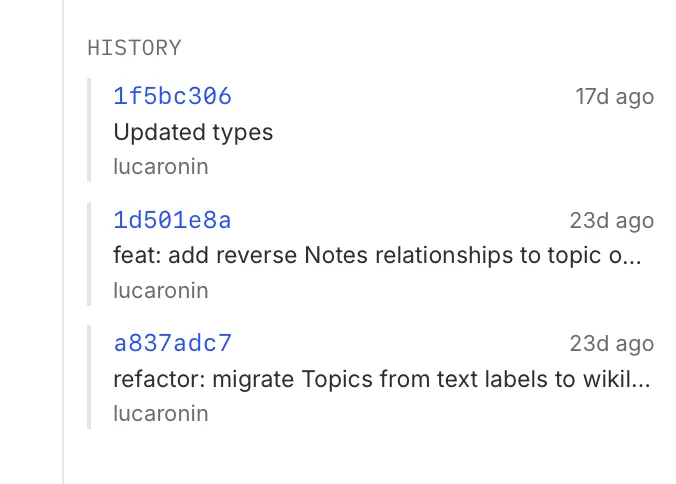
refactoringhq/tolaria-getting-started and then has every remote removed, so a fresh vault opens local-only and a remote is an explicit later choice through the Add Remote flow.What is actually in the box, technically
The editor story is broader than "markdown note app", which is why the project sits naturally in an office and documents context rather than a developer-tools one. Alongside the BlockNote rich editor and a CodeMirror 6 raw editor (markdown, HTML, YAML, JSON, Python, SQL, JS/TS grammars), the app renders Mermaid diagrams, embeds a tldraw whiteboard, and ships an IronCalc WASM workbook as a spreadsheet editor. The layout is a four-panel workspace — sidebar, note list (or Pulse view), editor, right panel — with multi-window note windows that start an explicitly scoped auxiliary process while preserving the shared vault registry's own startup selection.
Localization is app-owned: a runtime in src/lib/i18n.ts over flat JSON catalogs in src/lib/locales/, with en.json canonical, English as the fallback for missing keys, Lara CLI synchronization, and legacy codes normalized (zh-Hans → zh-CN). The ui_language setting being null means "follow the system language when supported". A date display format preference is published app-wide so note rows, property chips, inspector cells and search subtitles all render dates consistently.
The mobile foundation is Expo React Native (Expo 54, RN 0.81), and its persistence work is described in unusual engineering detail for a project this young: standalone iOS text saves go through an asynchronous atomic writer with a private versioned recovery record published before replacement, structural entry operations use exclusive rename for moves and private quarantine before deletion cleanup, and UUID completion receipts make queue retries safe so a replay cannot overwrite later edits or delete a recreated entry. The docs are explicit that a move plus its backlink rewrites is not yet one transaction, and that Expo Go and Android still need their own equivalent implementation.
Why not Obsidian
The project answers the obvious comparison directly, and the answer is about philosophy rather than features. Obsidian is a blank canvas, infinitely configurable through plugins and community extensions, and powerful for users who want to build their own system and have the time and patience to do so. Tolaria ships a complete point of view: a knowledge framework, semantic conventions, defaults that work immediately, no plugin hunting. The second half of the comparison is about business model — Obsidian treats git as an afterthought because its revenue is built on proprietary sync, whereas here git is the sync, collaboration and history layer.
The honest reading of that tradeoff: if you already have a working method, the opinionated defaults are friction. If you have never been able to keep a system alive past a month, a blank canvas is precisely the thing that failed you.
Where it is going
Three stages, described as extensions of the same foundation rather than pivots. Stage 1 is current: personal knowledge management with AI as the primary collaborator. Stage 2 is independent knowledge workers — creators, freelancers, consultants — where the same ontology applies (a newsletter creator has editorial projects, a subscriber-growth responsibility and a publishing procedure) and AI sees client commitments and content pipelines as well as personal notes. Stage 3 is small teams, where the access model changes: different people see different subsets of the vault through workspace filtering and git-based access control, version history becomes the audit trail, and agents become shared collaborators on team knowledge.
The claimed early adopter is a technically-minded individual frustrated by Notion's performance, complexity or lock-in, comfortable with git, wanting AI-native by design rather than by bolted-on feature, and valuing data ownership.
Getting it running
On macOS: brew install --cask tolaria. Otherwise download the latest release for macOS, Windows or Linux — Windows installers are Authenticode-signed, though company-managed devices may still need IT approval of the publisher. First launch offers to clone the getting-started vault, which walks through the whole app. Building from source needs Node.js 20+, pnpm 8+, Rust stable, and macOS or Linux for development; Tauri 2 on Linux requires WebKit2GTK 4.1 and GTK 3, and pnpm dev serves a browser-based mock mode on localhost:5173 while pnpm tauri dev runs the native app. Technical documentation is in docs/ARCHITECTURE.md, docs/ABSTRACTIONS.md, docs/GETTING-STARTED.md and an extensive ADR directory.
Tradeoffs to weigh before adopting
The license has teeth. AGPL-3.0-or-later is strong copyleft: building a hosted service on a fork means publishing your changes. The Tolaria name and logo are additionally covered by a trademark policy, so the code being open does not make the brand free to reuse.
The repository is young and moving fast. Created February 2026, 43 open issues at collection time, and a release cadence measured in days. The architecture documentation is exceptionally detailed — hundreds of numbered ADRs are referenced throughout — which is a good sign about engineering discipline, but a fast-moving young codebase still means breaking changes and rough edges, and some of that detail documents known limitations rather than finished behaviour.
Search is keyword-based. The stack lists keyword search over a walkdir-based file scan; there is no in-app semantic index. Semantic reach comes from pointing an agent at the vault through MCP, not from the search box.
Collaboration is your problem, by design. There is no hosted sync. Multi-user workflows depend on a git remote you choose and on git's own access control. A collaboration layer (packages/markdown-yjs, apps/server/src/collab) exists in the tree, but Stage 3 team use is roadmap, not shipped product.
Types are lenses, not schemas. No required fields and no validation means nothing stops a vault from drifting into inconsistency — the discipline is the weekly Inbox Zero pass, which is a human commitment, not an enforced one.
Not yet reproduced
We have not installed or benchmarked Tolaria. Everything above is drawn from a close read of the repository README, docs/VISION.md, docs/ARCHITECTURE.md and the live GitHub API at collection time. The performance-sensitive claims that matter most in practice — startup latency on a 10,000+ note vault, cache-hit behaviour across git commits, and how well each CLI agent adapter holds up in daily use — are documented by the project and should be treated as pending independent verification.
Source: github.com/refactoringhq/tolaria · tolaria.md