OPEN SOURCE DEEP DIVE
OpenMontage: Turn Your AI Coding Assistant Into a Full Video Production Studio
Open-source agentic video production system with no code orchestrator in sight: your AI coding assistant is the orchestrator, driven by YAML pipeline manifests, Markdown stage-director skills, 100+ registered tools and a seven-dimension scored provider selector. Research, proposal, script, scene plan, assets, edit and compose run as gated stages with creative approvals, budget governance and an auditable decision trail; with zero API keys it still cuts real-footage videos from Piper TTS, Archive.org, NASA, Wikimedia and free stock corpora, while the Backlot board shows every stage, storyboard gate and dollar live.
Not "a clip per prompt", but an auditable production studio
OpenMontage, opened by calesthio at the end of March 2026 and grown to tens of thousands of stars within half a year, calls itself the first open-source agentic video production system (AGPL-3.0, site at openmontage.video). The difference from typical "AI video tools" is not image quality but the granularity of the work object: a point tool hands you one sampled clip; OpenMontage hands you a full production line from topic to finished piece, with research, proposal, script, scene plan, assets, edit and compose as named stages, each with its own artifacts, review criteria and success gates.
One sentence in the README carries the whole project stance and is easy to skim past: most "free AI video" stacks quietly mean "animate a handful of stills". OpenMontage can do that too, but it also supports a second path: build a CLIP-searchable corpus from Archive.org, NASA, Wikimedia Commons and free-key sources like Pexels, Unsplash and Pixabay, retrieve clips that actually move, cut them with intent, and render a finished video. The 100-second documentary How Salt Made History in the repo is exactly that path: real archival footage, original narration and hand-authored motion graphics, with no paid video model involved.
No orchestrator in code: your coding agent is the orchestrator
The architecture choice is deliberately radical: there is no code orchestrator. Claude Code, Cursor, Copilot, Windsurf or Codex is the orchestrator; Python only provides tools and persistence. Every creative decision, orchestration rule, review criterion and quality bar lives in files a human can read and edit: YAML pipeline manifests declare stages, allowed tools, review criteria and success gates; Markdown stage-director skills teach the agent how to execute each stage; JSON checkpoints make runs resumable and carry the decision log plus a cost snapshot.
flowchart TB
    U["your one-line brief"] --> R["research
15-25+ live web searches
YouTube / Reddit / HN / news / academic"]
    R --> P["proposal
pick pipeline · lock render_runtime
cost estimate · style playbook"]
    P --> G1{"creative gate: approve?"}
    G1 -- no --> P
    G1 -- yes --> S["script
screenplay + narration and voice direction"]
    S --> SP["scene_plan
scene cards · shot intent · durations"]
    SP --> A["assets
7-dimension scored provider selection"]
    A --> G2{"storyboard gate: per-scene contact sheet
takes / prompts / per-asset cost / quality scores"}
    G2 -- no --> A
    G2 -- yes --> E["edit
retrieval ranking · cutting intent · caption timings"]
    E --> C["compose
Remotion / HyperFrames / FFmpeg"]
    C --> V{"pre-compose validation + post-render self-review
ffprobe · 4-position frames · audio levels
delivery promise · subtitle presence"}
    V -- fail --> E
    V -- pass --> F["final.mp4 + auditable decision trail"]
Two engineering details in that flow deserve attention. First, render_runtime is locked at proposal time: Remotion carries data-driven explainers and the existing React scene stack, HyperFrames carries motion-graphics-heavy briefs that express naturally as HTML + GSAP (including the character-animation pipeline's rigged SVG output), and FFmpeg handles encoding and assembly; silently swapping the renderer mid-run is defined as a governance violation, not an optimization. Second, every provider choice, style decision and fallback is written into an auditable decision trail: which alternatives were considered, with what confidence, and why the winner won, accumulated across stages and replayable afterwards.
Three layers of knowledge: what exists, how to use it, why it works
The repo slices agent knowledge into three layers. Layer 1 is tools/ plus pipeline_defs/: 100+ registered tools (video generation, images, TTS, music, mixing, subtitles, enhancement, analysis, avatar and lip sync) and the YAML manifests, answering "what exists". Layer 2 is skills/: pipeline director skills, creative techniques, quality checklists and the reviewer/checkpoint protocol, answering "how OpenMontage wants it used". Layer 3 is .agents/skills/: deep external technology knowledge packs answering "how the underlying tech works". Each tool declares which Layer 3 skills it relies on, so the agent drills down on demand instead of stuffing 700+ skill and knowledge files into context.
Around that sit 20+ JSON Schemas for contract validation (make test-contracts runs with zero API keys), three visual style playbooks (Clean Professional, Flat Motion Graphics, Minimalist Diagram), and root-level CLAUDE.md, CURSOR.md, COPILOT.md, CODEX.md and .windsurfrules files that all point at the same two entries: AGENT_GUIDE.md and PROJECT_CONTEXT.md. That agent-readable documentation is itself one of the project's main deliverables.
100+ tools, 60+ providers, and a seven-dimension selector
Video generation covers Kling (fal.ai and official direct), Veo 3.1, Runway Gen-4, Seedance, MiniMax, Hunyuan, WAN, CogVideo and LTX-Video among 20+ providers including local GPU options; images cover FLUX, Imagen, GPT Image, Seedream, Recraft, local Stable Diffusion and ManimCE; speech covers ElevenLabs, Google TTS (700+ voices), OpenAI TTS, Azure and fully offline Piper. Which one gets used is not decided by adjectives in the prompt but by a scored selector across seven dimensions:
| Dimension | Weight | Question it asks |
|---|---|---|
| task fit | 30 | can this provider make this kind of shot or sound |
| output quality | 20 | measured quality and style match |
| control | 15 | enough knobs (first/last frame, reference, seed) |
| reliability | 15 | failure rate and retry behavior |
| cost efficiency | 10 | cost per unit of output |
| latency | 5 | time to result |
| continuity | 5 | consistency with assets already used in this film |
As one line: score(p) = Σᵢ wᵢ · norm(p) / Σᵢ wᵢ, with each normᵢ mapping observations onto a comparable range. The selector also normalizes loose briefs first and then surfaces the winner's agent_skills to the agent. Because decisions and alternatives both land in the audit trail, "why Kling and not Veo for this shot" has an answer after the fact.
Real videos with zero API keys, costs in the open
| Capability | Zero-key tool | Notes |
|---|---|---|
| Narration | Piper TTS | free, fully offline text-to-speech |
| Open footage | Archive.org + NASA + Wikimedia Commons | archival footage, educational media, documentary texture |
| Extra stock | Pexels + Unsplash + Pixabay | developer keys are free to obtain |
| Composition (React) | Remotion | spring-animated scenes, stat cards, charts, word-level captions, TalkingHead |
| Composition (HTML/GSAP) | HyperFrames | kinetic typography, product promos, rigged SVG characters |
| Post-production | FFmpeg | encoding, subtitle burn-in, audio mixing, color grading |
The cost samples in the README are direct evidence of the governance working: The Last Banana, a 60-second animated short with six Kling v3 clips via fal.ai, Chirp3-HD narration and royalty-free piano, cost $1.33 in total; Reimagine Your Universe, five generated scenes plus a bespoke HyperFrames composition in vertical format, about $4; Imagine the Possibilities, a seven-world showcase, about $5. For the real-footage path, say documentary montage, tone poem or stock-footage collage in the prompt and add "use real footage only".
Backlot: the production on a wall you can see
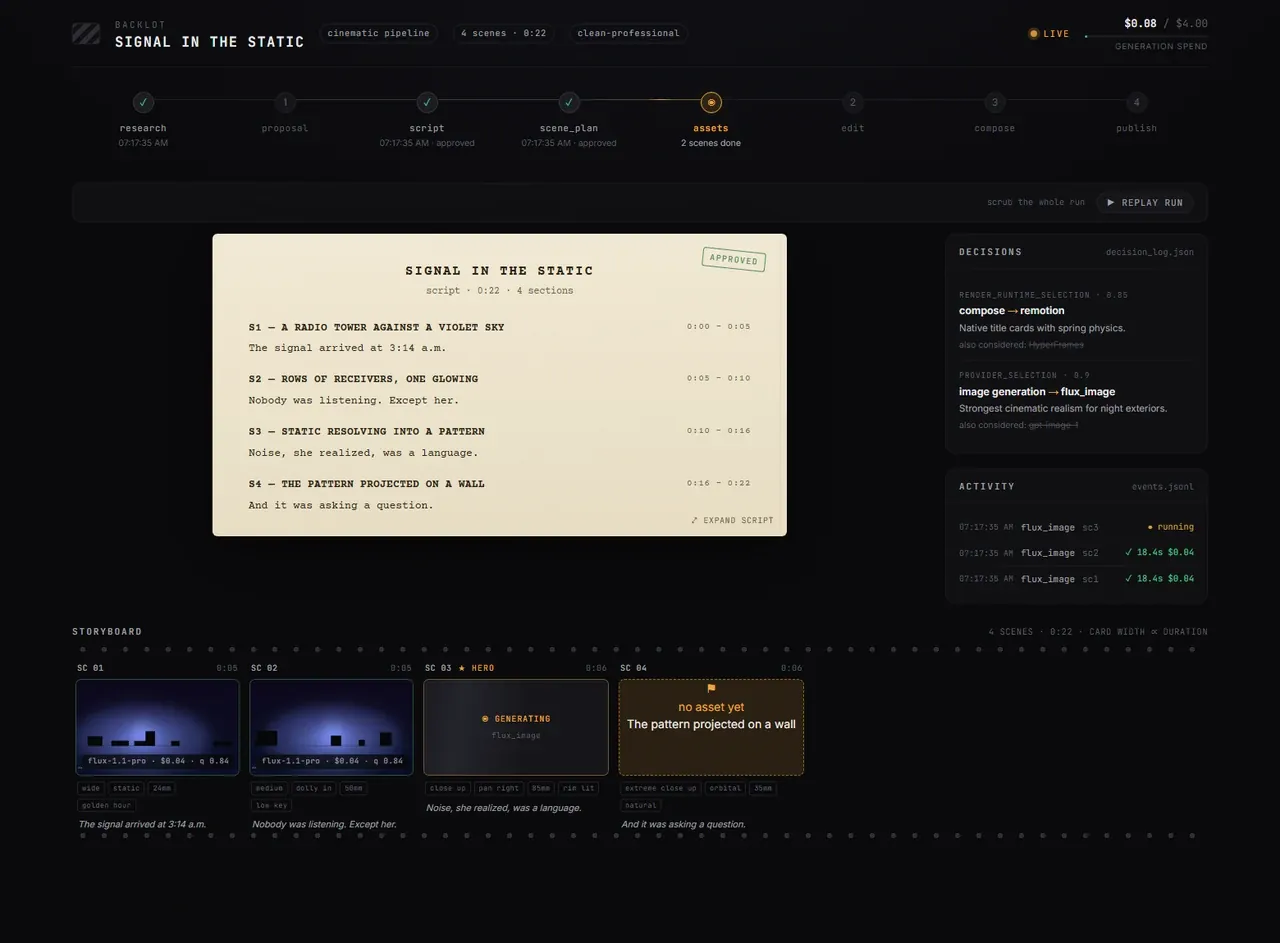
Chat tells you what the agent said; Backlot tells you what the production is doing: stage lights come on, the script lands as a screenplay page, scene cards shimmer while assets generate, and every provider decision and dollar goes on the wall. More importantly the storyboard is now a real approval gate: asset generation pauses on a per-scene contact sheet listing takes, prompts, per-asset cost and quality scores, so you approve the visuals before the render, not after the money is gone.
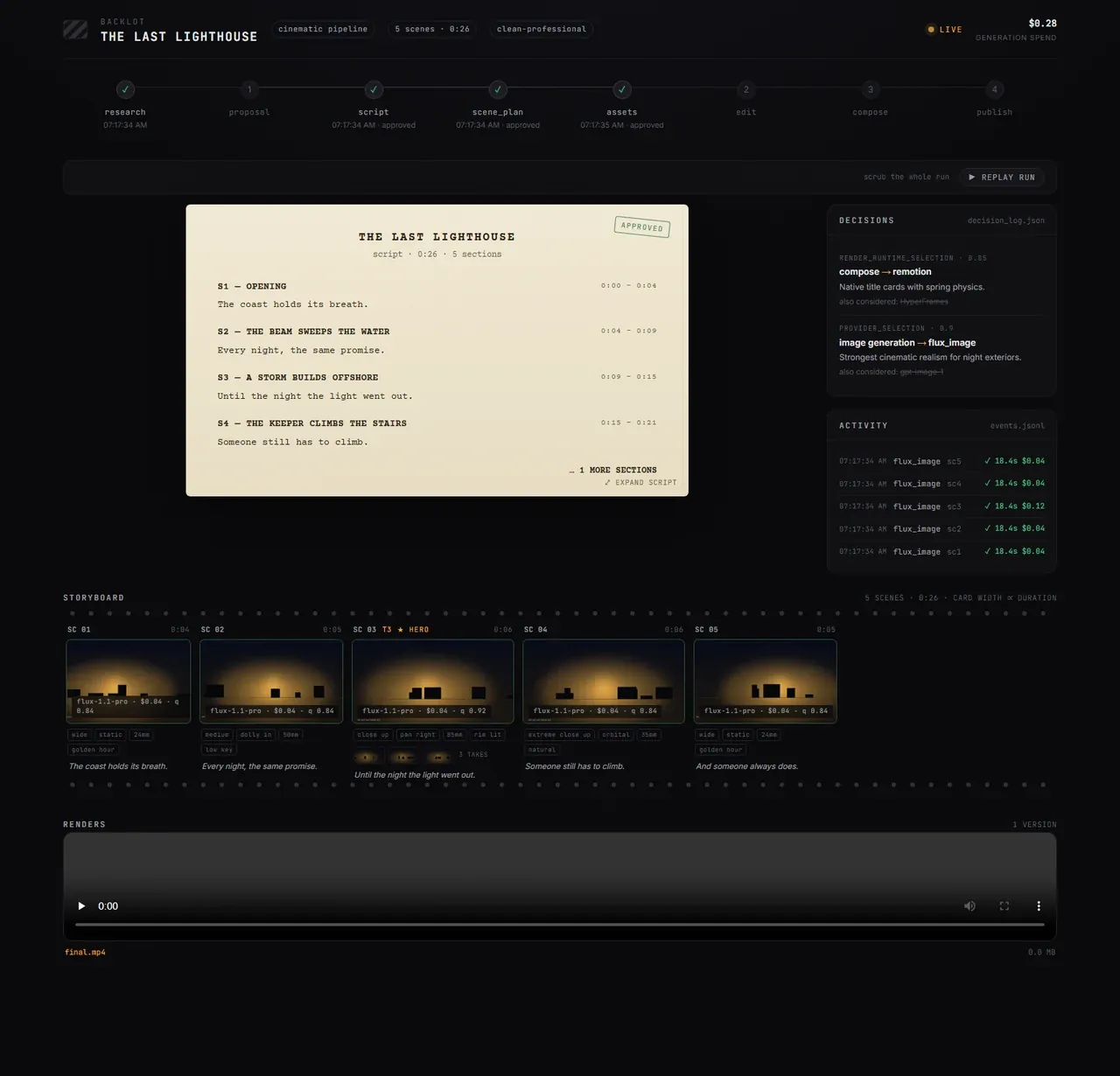
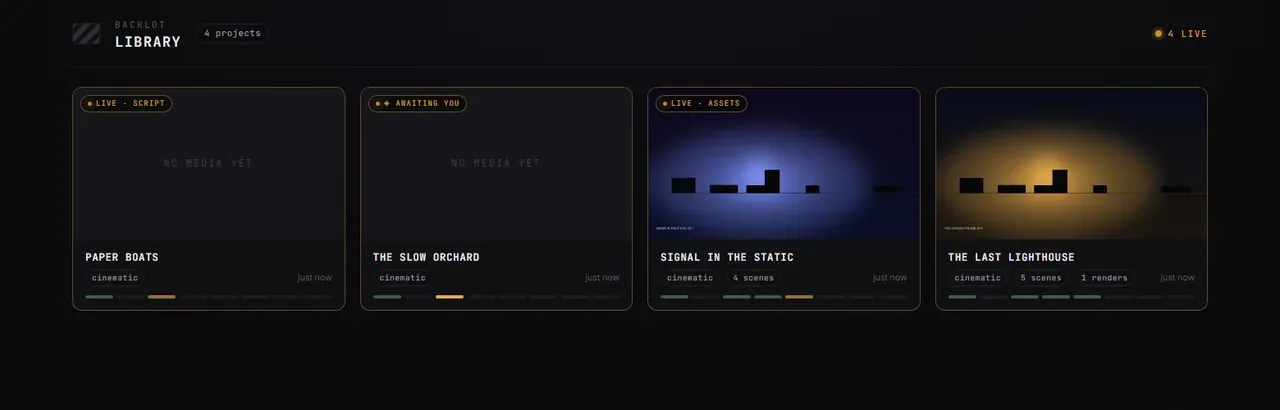
python -m backlot open opens the library, python -m backlot open <project-id> opens one board, and python scripts/backlot_simulate_run.py streams a simulated run when you have none yet; after a run finishes, REPLAY RUN replays the whole production from its timestamps, scrubbable end to end.Quality gates and budget governance: no garbage, no surprise bills
Before rendering there is pre-compose validation: delivery-promise enforcement, a six-dimension slideshow-risk assessment and renderer governance, blocking "looks like a slideshow" plans before GPU time is wasted. After rendering there is a mandatory self-review: ffprobe validation of containers and streams, frame extraction at four positions, audio level analysis, delivery-promise re-check and subtitle presence; anything failing means the agent never presents the piece.
Money is modeled with the same seriousness. The budget loop is estimate → reserve → reconcile: at proposal time estimate = Σ stages Σ actions unit_price(provider, action) × count; during execution a reserve of reserve = estimate × (1 + contingency) is held; at close-out actual ≤ reserve must hold before the run can be reconciled. Governance modes are observe, warn and cap; a single action above the default $0.50 needs explicit approval and the default total cap is $10. Overspend is a gate in the process, not an error string.
Eleven pipelines, eight platform exits
| Pipeline | Produces | Best for |
|---|---|---|
| Animated Explainer | researched explainer with narration, visuals, music | education, tutorials |
| Animation | motion graphics, kinetic typography | social, product demos |
| Avatar Spokesperson | avatar presenter videos | corporate comms, training |
| Cinematic | trailers, teasers, mood edits | brand films |
| Clip Factory | ranked batch of short clips from one long source | repurposing long content |
| Documentary Montage | real-footage cut from a CLIP-indexed free corpus | video essays, mood pieces |
| Hybrid | source footage plus AI support visuals | graphics over existing footage |
| Localization & Dub | subtitles, dubs, translations | multi-language distribution |
| Podcast Repurpose | podcast highlights as video | audiograms |
| Screen Demo | polished screen recordings and walkthroughs | product docs |
| Talking Head | footage-led speaker videos | vlogs, interviews |
On the exit side there are eight platform profiles: YouTube 1080p/4K/Shorts, Reels, Feed, TikTok, LinkedIn and 21:9 cinematic. Reference-driven creation closes the loop here too: paste a YouTube video, Short, Reel, TikTok or local clip you love, and the agent analyzes transcript, pacing, scenes, keyframes and style, returning two or three differentiated concepts, an honest tool path, a cost estimate at your target duration, and a sample before full production commits.
Limits: it is not a SaaS and does not pretend to be
Running it needs an AI coding assistant plus Python 3.10+, FFmpeg and Node 18+; after make setup everything starts from a one-line brief. With a GPU, make install-gpu unlocks free local generation via WAN 2.1/2.2, Hunyuan, CogVideo and LTX; Ollama and LM Studio support is marked coming soon. The license is AGPL-3.0, so wrapping it inside a closed-source service needs thought about copyleft reach first. Community lives in GitHub Discussions, and the @OpenMontage YouTube channel ships every video with its full prompt, pipeline, tools and cost so you can reproduce it. For anyone trying to turn "AI makes video" from a slot machine into engineering, this habit of pushing decisions, costs and quality into auditable files is more worth copying than any single render.