
OPEN SOURCE DEEP DIVE
Hex: Local Voice Dictation That Never Leaves Your Machine
Hold a shortcut, speak, let go: Hex transcribes on-device with Parakeet, Whisper, Qwen3-ASR and more, then pastes at your cursor. Rust engine, per-app output pipelines, local streaming API. MIT.
Hex is a voice dictation appliance that runs entirely on your own machine: hold a shortcut, speak, let go, and the text lands at the cursor of whatever app you are in. It is built by anomalyco — the team behind OpenCode — in native Rust, ships for macOS, Windows and Linux on both x64 and ARM64, and is MIT licensed. The repository carries roughly 8.7k stars and a simple promise: the first run downloads a speech model, and after that nothing leaves your machine.
What makes Hex worth reading closely is not the dictation trick itself but the engineering around it: a swappable zoo of on-device ASR models, a per-application output pipeline, an authenticated local streaming API that lets other programs borrow the engine, and a development culture where experimental features live in a Labs drawer and performance claims are backed by alternating-run benchmarks.
The Dictation Loop
The core interaction is one sentence: hold the shortcut, speak, release. Hex captures the microphone, transcribes on device, and pastes the result at the cursor. If holding a key feels wrong, Shortcut mode can be set to Tap, where one press starts and another stops. Option-Shift-V (Ctrl-Alt-V on Windows and Linux) pastes the last dictation again, which turns a mis-paste into a one-key recovery instead of a re-recording.
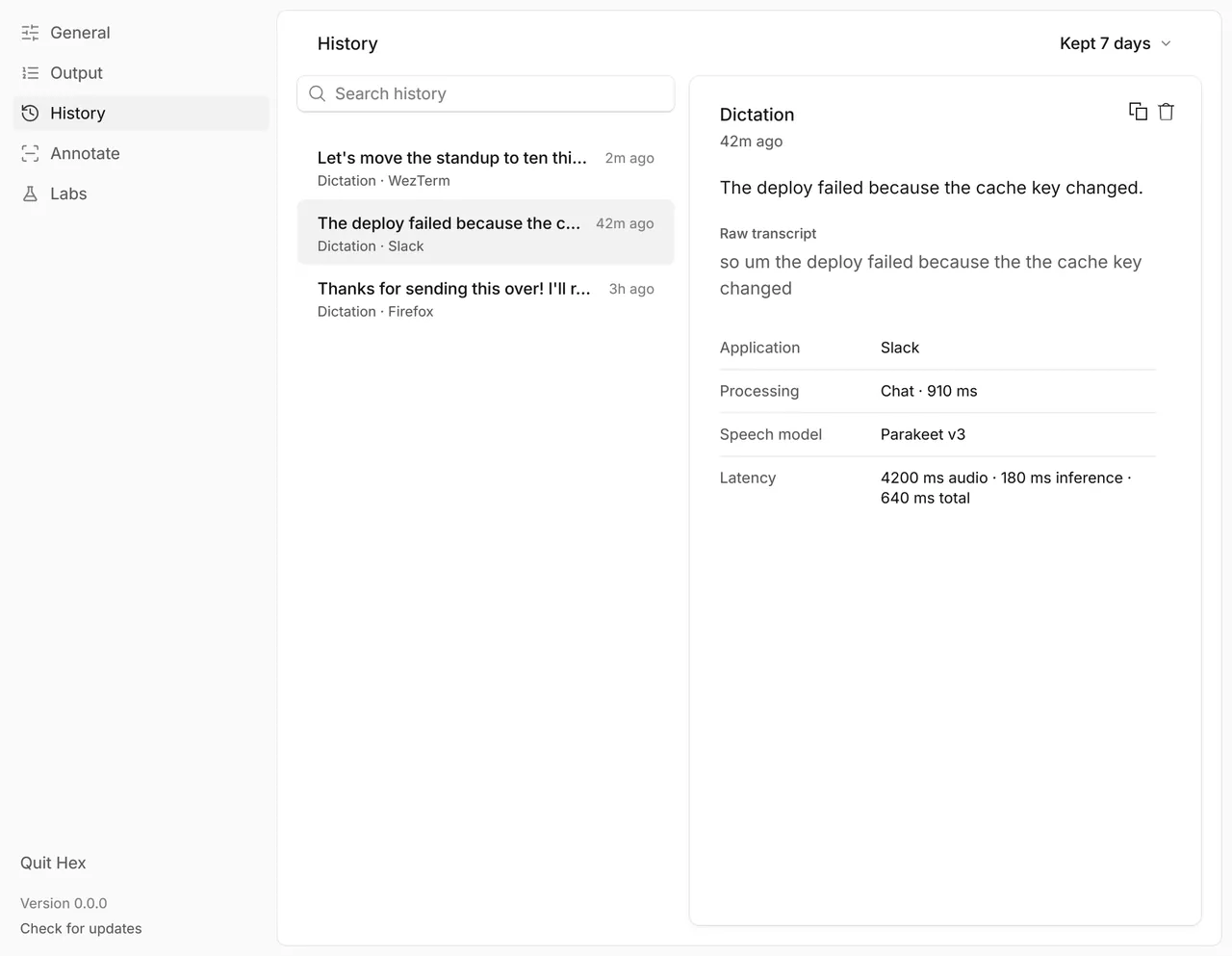
On an English system the default model is Parakeet Unified English, a streaming recognizer that writes while you talk, so the text is ready when you let go. Other languages start with the model recommended for them. Every dictation is kept in History — searchable, retained for seven days by default — with the raw transcript, the target app, the processing steps and the model that produced it.
A Model Zoo You Can Swap
Hex downloads one model on first run and transcribes with it locally from then on; the same model serves Meetings and the hex transcribe command. Settings' picker offers a deliberately wide bench, each entry described by what it is actually good at:
| Model | Languages | Character |
|---|---|---|
| Parakeet Unified English | English | Default on English systems; streaming, text ready on release |
| Parakeet v3 | 25 European | Detects which language you speak |
| Cohere Transcribe | 14 | Fewest wrong words; a big download |
| Whisper large-v3-turbo | Almost any | Reads your vocabulary list |
| Qwen3-ASR 0.6B | Chinese + 29 more | Reads your vocabulary list |
| SenseVoice Small | Chinese, Japanese, Korean, English | Small download |
| Nemotron 3.5 ASR | 27 | Streaming, writes while you talk |
| Granite Speech 5.0 | 7 | IBM's model, with punctuation |
| One-language models | Hebrew, Russian, Norwegian, Swedish, Egyptian Arabic | ivrit.ai Whisper, GigaAM v3, NB-Whisper, KB-Whisper, QwenCleo-ASR |
| More English | English | Parakeet v2, Underdog Bark 3.0 |
You can also add your own GGUF model file through the picker. Vocabulary — one list of names and terms Hex should know — is read while transcribing by Whisper and Qwen3-ASR; Parakeet models read it with the Labs "Vocabulary help" switch on, and the optional OpenCode rewrite uses it too. The list travels between desktop, iPhone and Android apps in a shared .hexwords file.
Output: Every Dictation Runs a Pipeline
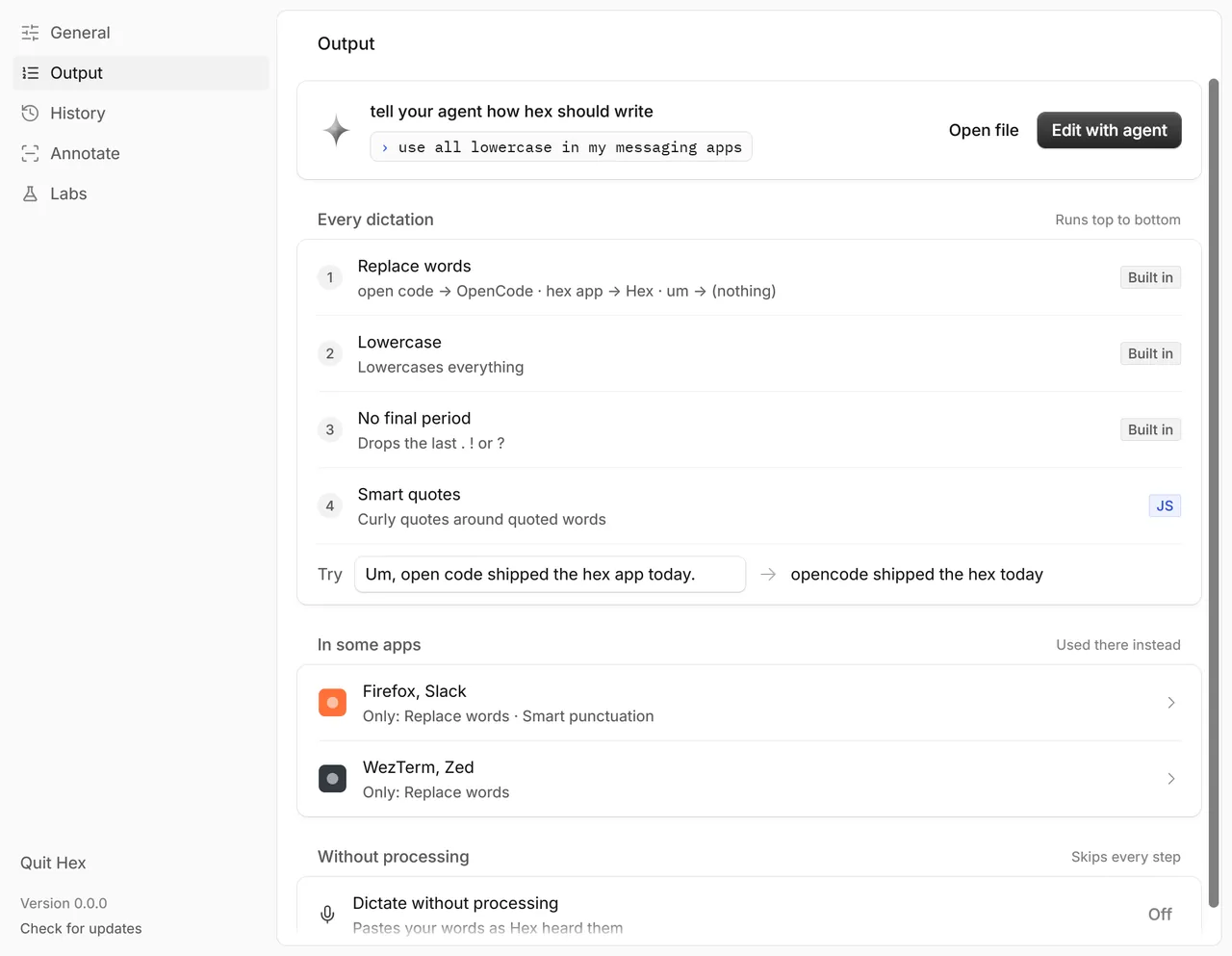
Raw ASR text is rarely what you want pasted. Hex runs every dictation through Output steps you choose: word replacements, built-in cleanups, your own scripts, and an optional OpenCode rewrite. Steps can differ per app or per website, so the same sentence can be cleaned one way in a chat window and another way in a code editor. The deterministic personal transformations live in an explicit TypeScript user config (~/.config/hex/hex.config.ts) executed in embedded QuickJS — a documented decision that trades a runtime dependency for size and latency.
Beyond Dictation: Annotate, Meetings, and a CLI
Annotate records the screen while you draw and talk, on macOS, Linux and Windows (GNOME Wayland needs a Labs switch). Meetings is a macOS lab that records a call and writes its transcript. And the command line works whether or not the app is running: hex transcribe meeting.m4a prints a recording's transcript, reading WAV, AIFF, CAF, FLAC, MP3, Ogg, WebM and MP4/M4A/MOV — including a video's soundtrack. The same hex binary controls the running app through hex status, hex dictation and hex settings.
A Local Engine Other Apps Can Borrow
Hex exposes an authenticated local API and a published TypeScript SDK so your own tools can transcribe with the same loaded model. The live surface is /streams: another app on the same computer records its own audio and pushes 16 kHz mono samples; Hex returns partial text while it listens, one final segment per window, and final text when the app finishes.
The security shape is worth copying. Discovery is an owner-only file (local-api.json in Hex's data folder) carrying port and token; every request carries a Bearer token, and every stream request additionally carries that stream's owner token. A wrong or missing stream token answers 404 — the same as an unknown id — so stream ids cannot be probed. Streams never load, download or switch a model: they use whatever dictation holds, and answer 503 model-not-loaded if there is none. The roadmap moves this surface from the running app into a shared launchd engine service (anomaly.hex.engine) with the UI as one more client, without changing the client contract.
Engineering Notes
The engine is native Rust; the window is a Rune UI shared across macOS, Windows and Linux with one settings file, hosted by a single Hex process per user. GPU shader caches matter more than they look: the perf docs record that without warm shader caches a dictation spent 4.6 to 5.3 seconds of every six compiling shaders, which is why benchmarks keep per-variant warm caches.
Performance claims are measured with strobe, the team's native-app benchmark harness: it builds two variants, launches each in a fresh private home, and compares them in alternating runs, then writes the evidence block into the pull request itself. Feature governance is equally explicit: new or user-requested features land in Labs, off by default, each with an audience of Everyone or Dev — a stable build never lists, accepts or runs a Dev lab.
Contribution is unusual: the project does not take pull requests from outside. You open an issue describing the bug or idea, and their agents usually turn it around fast. The repository's own agent guide makes the internal contract visible — dev is canonical, there is no main, and any change to what the window draws regenerates Linux golden images in the same PR.
Getting It
Stable releases ship as a macOS Apple-silicon DMG, Windows x64/ARM64 installers, and Linux x86_64/ARM64 executables plus .deb and .rpm packages; a self-updating dev channel tracks the newest build of dev. Package-manager routes: brew install --cask anomalyco/tap/hex, AUR hex-bin, a Linux install script, and nix profile add github:anomalyco/hex.
Why It Matters
For the speech-and-audio stack, Hex is a reference point for what on-device ASR looks like as a finished appliance rather than a demo: streaming recognizers that finish when you stop talking, a model bench chosen by measured character instead of brand, deterministic post-processing you own, and a local engine contract other software can build on. The privacy claim is structural, not a policy page — after the first model download, audio never leaves the machine.
Source: github.com/anomalyco/hex (README, docs/README.md, docs/streams.md, docs/perf.md, AGENTS.md, dev branch), product site anoma.ly/hex. Figures are the project's own documentation screenshots.