
Share the Test, Not the Code: How Shopify Reflex Lets Agents Test Native Apps Without an Emulator
Shopify Reflex separates headless Core logic from native UI, exposes each ViewModel as typed state and actions, and runs one deterministic test suite against both iOS and Android.
In Native is now the future of mobile at Shopify, Shopify explained why it was moving from React Native back to Swift and Kotlin. In Helix, it described how coding agents rebuild screens through small checkpoints and strict gates. Both posts mention a CLI that lets an agent inspect an app's state and run actions without a simulator. This post is about the architecture behind that CLI. Shopify calls it Reflex.
When Shopify decided to rebuild its apps natively, it returned to a basic question: how should a mobile app be built when agents write most of the code? The largest bottleneck was the feedback loop. An agent can write a screen in minutes, but proving that the screen works normally requires an emulator, a build, a tap script, and a great deal of patience. Shopify had invested in simulator tooling to speed this up, then hit a ceiling.
Reflex is the architecture that emerged. App logic runs headlessly. Every screen exposes its state and possible actions through one small contract. A CLI drives that contract on both platforms from the same test file. The result is a much faster feedback loop and a practical way to keep two native implementations in sync.
What Reflex changes
Reflex is an MVVM-based architecture that shapes an app into something an agent can build, test, and drive quickly without rendering a UI. It rests on four pillars:
- A core module with no UI. Everything except views lives in a module with no UI imports and no device-dependent code. The app's logic can therefore run headlessly on macOS or the JVM.
- A strict ViewModel contract. Every screen follows the same Elm-style shape: actions enter, state leaves, and one reducer is the only place that changes state.
- ViewModel introspection. Each ViewModel exposes a JSON contract with a name, its state, and the actions it accepts. A process outside the app, such as a CLI, can read a screen and act on it.
- A platform-agnostic CLI. Agents interact with the app through this contract without launching a simulator or emulator. The same test case can cover iOS and Android.
Together, these choices let an agent explore the app feature by feature without a device. Because one test file runs against both native implementations, a feature cannot ship on only one platform while the other silently falls behind.
From the agent's side, the interface is deliberately small:
lsprints the current screen's name, its JSON state, and the actions it accepts.do Action [json]invokes an action and models a user interaction.
The CLI can run against a headless core process or a real build. In both cases it talks only to ViewModels, never to the rendered UI.
$ dev cli ios --fixtures
> ls
InventoryDetail
  state   {"productId": "1", "stockCount": 12, "isSaved": false}
  actions Increment, Decrement, Save, SetQuantity {quantity}, goBack
> do Increment
> ls
InventoryDetail
  state   {"productId": "1", "stockCount": 13, "isSaved": false}
  actions Increment, Decrement, Save, SetQuantity {quantity}, goBack
That is the entire user interface. There is no TUI, color scheme, or loading animation. Agents do not need those embellishments. The time Shopify did not spend polishing terminal output went into improving the feedback loop.
Share the test, not the code
Two native apps mean two implementations of every screen, so something must keep them equivalent. Shopify's answer became a principle: share the test, not the code. The implementation is written twice, but the test is written once.
No shared code between platforms
iOS uses Swift and Android uses Kotlin. Each app uses its own UI toolkit and concurrency model, with no cross-platform layer between them. With agents writing most of the code, a second native implementation costs much less than it once did. An abstraction layer still carries its full cost: it adds a maintenance surface, hides platform behavior that may later matter for performance, and turns every platform upgrade into a two-step migration.
Writing the same ViewModel twice is cheaper than maintaining a bridge between the two native codebases.
Parity enforced by tests
If code is not shared, something else must keep the platforms aligned. At Shopify, that is the test suite. Every behavior test runs against both platforms, and a pull request cannot merge if it passes on only one. The shared artifact is the test.
The usual testing strategies each had a problem:
| Approach | Strength | Tradeoff identified by Shopify |
|---|---|---|
| Cross-platform end-to-end tests | One suite can cover both apps and exercise a realistic flow. | Still requires a simulator or emulator, remains slower than an agent loop should be, and failures are debugged through video or screenshots. |
| Native UI tests with XCUITest and Espresso | Faster and more reliable than broad end-to-end tests. | Must be written once per platform, and passing on one platform says little about the other. |
| Unit tests | Very fast. | Tests a mock of the app rather than the app, is duplicated by platform, and two implementations of the suite can drift. |
| Reflex CLI behavior tests | Runs headlessly, uses real reducers, services, navigation, and fixtures at external edges, and covers both platforms from one file. | Does not verify pixels or whether every visual control is wired correctly. Those concerns remain in separate visual review and screenshot tests. |
The resulting approach is closer to grey-box testing. A test cannot see pixels, and it cannot see private internals. It sees exactly what the UI sees: the ViewModel's state and the actions that the ViewModel accepts. Everything underneath is the real application logic, including real reducers, real services, a real GraphQL client, and real navigation. Fixtures replace external dependencies only at the process boundary where the app would otherwise call the network or device. No mocking framework is used anywhere in the suite.
A contract built from first principles
Remove the UI from the equation
Shopify uses a small inventory-management app as an example. A user selects a product from a list, opens its detail screen, and changes the stock count. The example deliberately omits detail so the architecture is easier to see.
The example code is Swift, but the Kotlin implementation has the same structure and reads almost identically. Each platform app is split into two modules, plus a module for the CLI:
- Core owns ViewModels, services, navigation state, GraphQL, persistence, and deep links. It is a plain Swift package on iOS and a plain JVM module on Android. It imports neither UIKit nor
android.*. - Mobile owns SwiftUI or Compose views and platform integrations such as Keychain, push, the camera, and the share sheet. Mobile depends on Core. Core knows nothing about Mobile.
- CLI depends on Core in the same way Mobile does, but runs on macOS or the JVM instead of a phone. That is what lets it control the app without a screen.
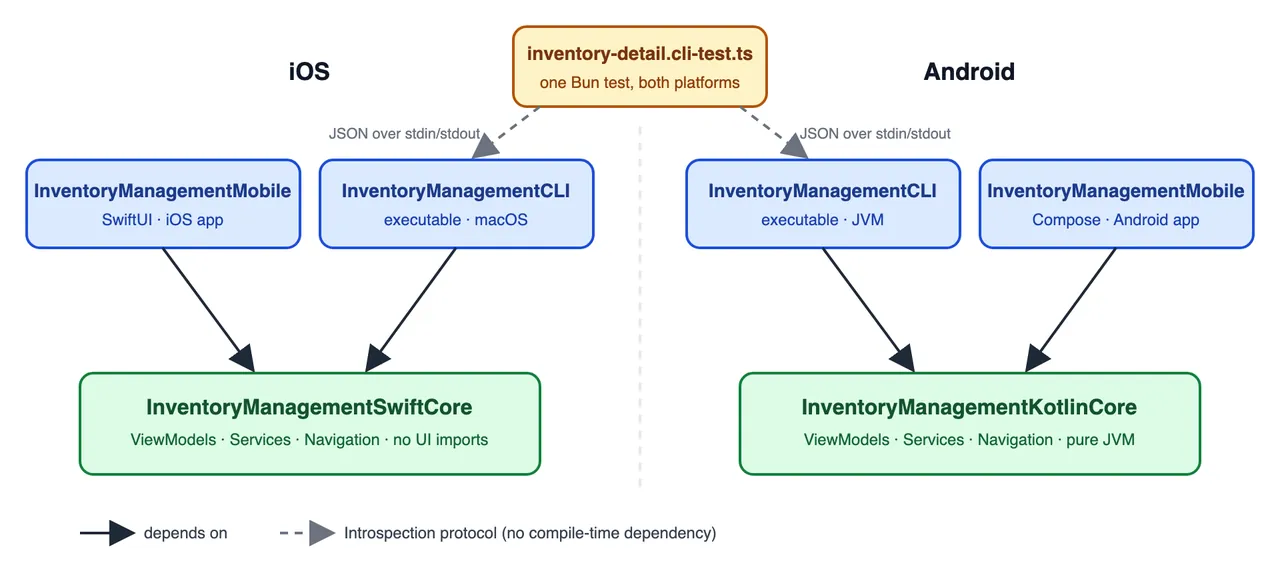
Core declares protocols for everything it needs from the platform and receives implementations through its constructor. This is ordinary dependency inversion without a dependency-injection framework. The mobile app and CLI are simply different hosts that construct Core. The CLI supplies fixtures instead of real platform services.
// The app: InventoryManagementMobile/InventoryManagementApp.swift
let core = InventoryManagementCore(
    storage: KeychainStorage()
)

// The CLI: InventoryManagementCLI/main.swift
// Same core, no platform UI.
let core = InventoryManagementCore(
    storage: InMemoryStorage()
)
The split provides several concrete benefits:
- Navigation lives in Core. Pushing a screen is a state change on a navigator, so the CLI can walk the entire app without creating a view. Deep links work the same way.
- Core runs wherever the language runs. Swift Core builds on macOS and could in principle run on Linux. Kotlin Core is a pure JVM module, so Android behavior tests need a JVM rather than an emulator.
- Tests do not render. There is no layout pass, animation, or wait for a view to appear. An action is a function call followed by a JSON read.
- Fixtures are constructor arguments. GraphQL responses, Keychain entries, biometric availability, and feature flags all enter through the constructor. An edge case is simulated by passing a different fixture, not by patching a mock in the middle of a test.
Headless execution changes the economics of testing. Shopify reports that more than 1,700 behavior tests finish in roughly four minutes on CI, on both platforms.
Reflex itself has no third-party dependencies. Its essential pieces are a base ViewModel class, one small introspection protocol, and the discipline to keep Core free of platform imports. Keeping that discipline is difficult for humans, but agents are good at repeating a strict pattern.
The shape of the app
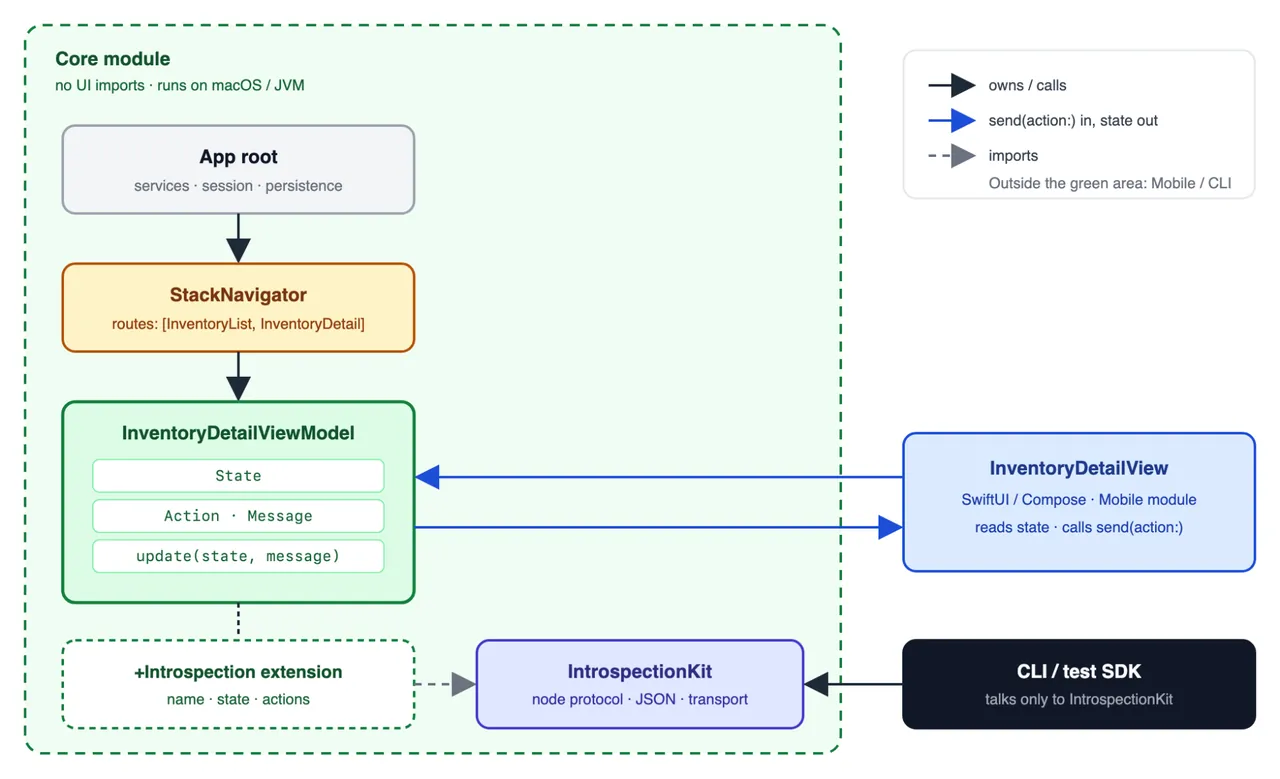
Inside Core, the app is a tree of plain objects. The root owns the network client, current session, and persistence. Below it are navigators such as Tab, Push, and Modal, each holding the routes currently on screen. At the leaves is one ViewModel per screen. Nothing in this tree knows about UI.
Views live outside Core in the Mobile module. A view binds to one ViewModel, reads its state, and calls send(action:). That is the entire relationship between a view and the rest of the app.
Introspection Kit is a separate module that defines the contract between ViewModels and the CLI. Each ViewModel receives a small extension that describes it as a node: a name, state as JSON, and accepted actions. The CLI and test SDK talk only to this layer. The app itself never calls it.
ViewModels: action in, state out
Every screen is backed by a ViewModel influenced by the Elm architecture. Its parts are:
- State contains everything the screen displays. The View reads State and nothing else.
- Action is the public surface. It is an enum representing everything a View or CLI can ask the ViewModel to do, dispatched through
send(action:). - Message is the internal surface. A view action is wrapped in a message, and asynchronous results from services also arrive as messages. Only the ViewModel sees messages.
- update(state, message) is the reducer. It is the only place state changes, and every path converges there.
- Services provide networking, storage, and other side effects through protocols injected by the constructor.
A View has exactly two responsibilities: read state and call send(action:). It never calls a method on the ViewModel and never writes state.
// InventoryManagementCore: pseudo-Swift, boilerplate omitted.
final class InventoryDetailViewModel: ViewModel {
    class State {
        let productId: String
        var stockCount = 0
        var isSaved = false
    }

    enum Action {                 // What a View or the CLI can do.
        case increment, decrement, save
        case setQuantity(Int)     // Actions can carry values.
    }

    enum Message {                // Everything the reducer handles.
        case viewAction(Action)
        case saved                // Results from services return as messages.
    }

    let service: InventoryService   // A protocol injected by the constructor.

    override func update(state: State, message: Message) {
        switch message {
        case .viewAction(.increment):
            state.stockCount += 1
        case .viewAction(.decrement) where state.stockCount > 0:
            state.stockCount -= 1
        case .viewAction(.setQuantity(let quantity)):
            state.stockCount = quantity
        case .viewAction(.save):
            service.save(state.stockCount) { self.send(message: .saved) }
        case .saved:
            state.isSaved = true
        default:
            break
        }
    }

    func send(action: Action) {
        send(message: .viewAction(action))
    }
}
Action is public, Message is internal, and update is the single writer. Because the shape is strict, an agent can reproduce it correctly hundreds of times.
Introspection Kit: the ViewModel seen from outside
The CLI needs to read a ViewModel and send actions to it. Introspection Kit defines that relationship with one protocol:
public protocol IntrospectionNode {
    var name: String { get }
    var state: [String: JSONValue] { get }
    var actions: [IntrospectionAction] { get }
    var child: (any IntrospectionNode)? { get }
}
A ViewModel exposes itself by returning a node from an introspection extension. The node keeps a reference back to the ViewModel. Android has one structural difference: Kotlin extensions cannot make a type implement an interface, so a separate class such as InventoryDetailViewModelIntrospectionNode lives next to the ViewModel.
The app never calls this layer. Deleting the introspection files leaves the app fully functional; only the ability to drive it from a terminal is lost.
// InventoryManagementCore/InventoryDetailViewModel+Introspection.swift
extension InventoryDetailViewModel: IntrospectionProviding {
    var introspectionNode: IntrospectionNode {
        Introspection(viewModel: self)
    }

    private struct Introspection: IntrospectionNode {
        unowned let viewModel: InventoryDetailViewModel
        let name = "InventoryDetail"

        var state: [String: JSONValue] {
            [
                "productId": .string(viewModel.state.productId),
                "stockCount": .number(viewModel.state.stockCount),
                "isSaved": .bool(viewModel.state.isSaved),
            ]
        }

        var actions: [IntrospectionAction] {
            [
                IntrospectionAction(title: "Increment") {
                    viewModel.send(action: .increment)
                },
                IntrospectionAction(title: "Decrement") {
                    viewModel.send(action: .decrement)
                },
                IntrospectionAction(title: "Save") {
                    viewModel.send(action: .save)
                },
                IntrospectionAction(
                    title: "SetQuantity",
                    input: SetQuantityInput.self
                ) {
                    viewModel.send(action: .setQuantity($0.quantity))
                },
            ]
        }
    }
}

@IntrospectionInput
// Generates the JSON schema shown by the CLI. This can also be done manually.
struct SetQuantityInput: Codable {
    let quantity: Int
}
A node has four parts:
- name is a stable identifier for the screen. Tests use it to know where they are.
- state is the ViewModel's state encoded as JSON. Every field a user can see belongs here.
- actions contains one entry per Action case, with a title and a closure that calls
send(action:). An action can take a parameter.SetQuantitydeclares an input type, and the CLI decodes a JSON object into that type before the closure runs. The@IntrospectionInputmacro generates the input schema from the properties, so malformed payloads can be rejected before reaching the ViewModel without manually maintaining a separate schema. - child is an optional link to the node below this one. Following child links from the root is how the CLI finds the focused node and how containers propagate actions.
Writing the node by hand, or with agents, is valid. Because its shape is strict, it can also be generated at build time:
@Introspectable
// Generates the node above from State and Action at build time.
final class InventoryDetailViewModel: ViewModel {
    class State { ... }
    enum Action { case increment, decrement, save, setQuantity(Int) }
    ...
}
Three rules keep the contract honest:
- If a user can see it, it is in state. If a user can do it, it is in actions. The node is a plain JSON view of the ViewModel.
- The node never repeats UI logic. It lists every action every time, with no conditionals. Whether Decrement does anything at zero stock is the ViewModel's decision, made in update, exactly where the decision is made for a button tap. If code in the node starts with an
if, the rule belongs in the ViewModel and the result belongs in state. - Actions go through
send(action:)and nothing else. A node never calls another ViewModel method or mutates state. The CLI cannot do anything a View could not do.
The contract is not only for tests. Shopify wanted its app to be agentic-first. The same state-and-actions surface is used by Sidekick, Shopify's AI assistant, to act inside the app. There is no separate integration layer. Anything an agent can do from the terminal, an agent inside the app can do too.
The tree
Introspection nodes mirror the object tree, one node per object and linked through child. The app root's node has the navigator as its child, and the navigator's node has the ViewModel of the top route as its child. The CLI always focuses on the deepest node in that chain, matching the fact that a user only interacts with what is on top.
Containers can deliberately lend actions to the focused child. A stack navigator propagates goBack. A tab navigator propagates selectTab. A plain ViewModel propagates nothing. If an agent asks the CLI to run an action that is neither on the focused node nor lent by an ancestor, the CLI refuses and lists the available actions.
Transport
In the headless CLI, the core process reads newline-delimited JSON from standard input and writes responses to standard output. In a real build, a tiny socket server provides the same protocol over a port and talks to the same ViewModels that the screen is bound to. This is why a simulator updates as commands are typed: there is zero interaction with the rendered UI, only views observing state. The server is compiled out of release builds and does not exist in the shipped app.
The test trophy
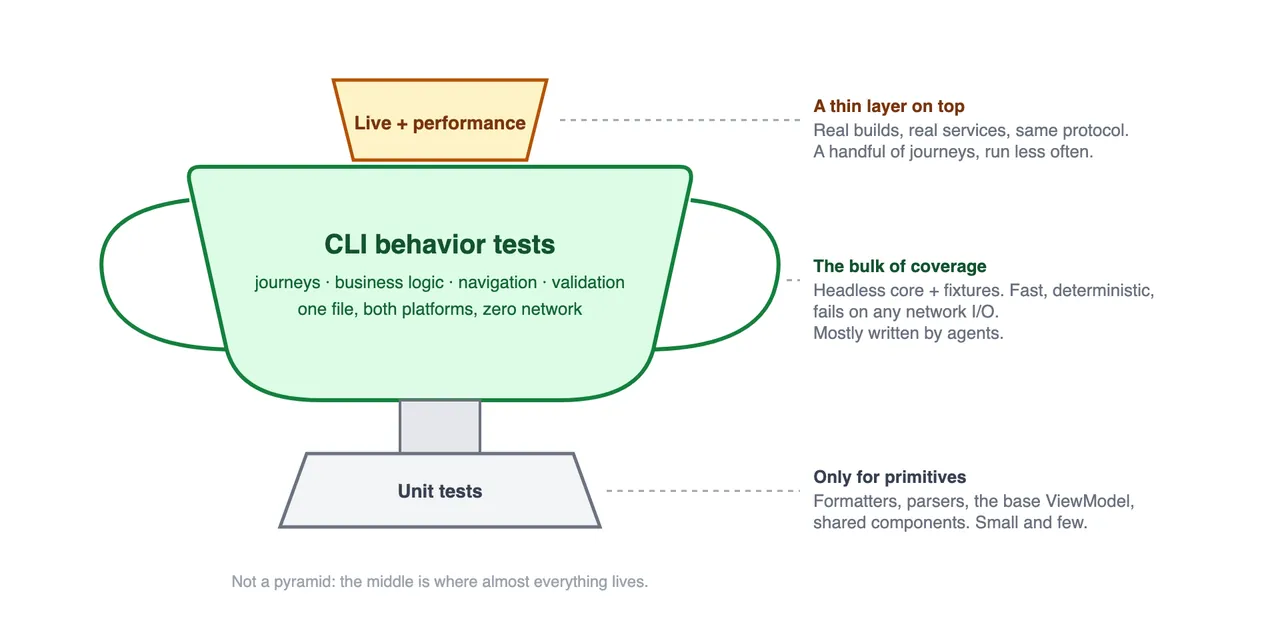
Shopify's test distribution looks less like a pyramid and more like a trophy with a very wide middle:
- Unit tests cover primitives and shared components: formatters, parsers, the base ViewModel, and pagination helpers. There are few of them.
- CLI behavior tests cover business logic, validation, navigation, error handling, and complete user journeys. This is the bulk of the suite, and one file runs on both platforms. These tests form the behavior gate for Helix: a checkpoint does not advance until its CLI tests pass on iOS and Android.
- A thin top layer contains a handful of live integration journeys and a performance suite that drives real builds through the same protocol.
Zero network, enforced
A behavior session installs a guard that blocks every HTTP request in the host process and fails the test if any request was attempted, even if the application caught the error and recovered. Every network call and external dependency must have a fixture. The suite therefore has no I/O and no network-induced flakiness. The cost is large fixtures. One journey can require a dozen GraphQL responses, which is tedious for a human to maintain but manageable for an agent.
Failures are readable
When a grey-box test fails, the message identifies the failed assertion. An agent can act on that result without opening a debugger.
Tests read like journeys
Shopify built a small test SDK for Introspection Kit on top of Bun's test runner. It speaks the same JSON protocol as the CLI, has no runtime dependencies, and adds two helpers:
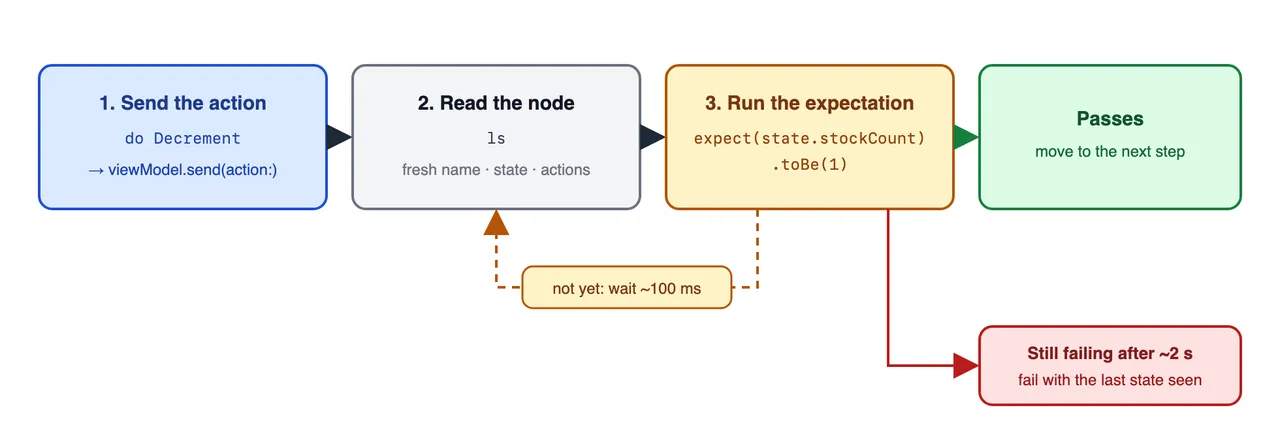
preconditionwaits until the focused node is the expected screen.doruns an action and waits for an expectation on the fresh state.
The same test runs unchanged on iOS and Android; the harness chooses the platform:
// Every journey starts on the list and opens one product.
async function openInventoryDetail(session, id = "1") {
  // Wait until the focused node is "InventoryList".
  await session.precondition("InventoryList");

  // Run an action, then poll until the expectation passes.
  await session.do({
    action: "SelectProduct",
    payload: {id},
    expectation: ({name, state}) => {
      expect(name).toBe("InventoryDetail");
      expect(state.productId).toBe(id);
    },
  });
}

test("given save succeeds, the user can adjust the quantity and save it", async () => {
  await using session = createBehaviorSession({
    fixtures: [fixture("Inventory.stockCount2")],
  });
  await openInventoryDetail(session);

  await session.do({
    action: "Decrement",
    expectation: ({state}) => expect(state.stockCount).toBe(1),
  });
  await session.do({
    action: "Decrement",
    expectation: ({state}) => expect(state.stockCount).toBe(0),
  });

  // Decrement is always listed. At zero, the ViewModel decides it is a no-op.
  await session.do({
    action: "Decrement",
    expectation: ({state}) => expect(state.stockCount).toBe(0),
  });

  // Actions with inputs take a JSON payload.
  await session.do({
    action: "SetQuantity",
    payload: {quantity: 40},
    expectation: ({state}) => expect(state.stockCount).toBe(40),
  });

  await session.do({
    action: "Save",
    expectation: ({state}) => expect(state.isSaved).toBe(true),
  });
});

test("given save fails, the quantity stays unsaved", async () => {
  await using session = createBehaviorSession({
    fixtures: [fixture("Inventory.saveFails")],
  });
  await openInventoryDetail(session);

  await session.do({
    action: "Save",
    expectation: ({state}) => expect(state.isSaved).toBe(false),
  });
});
Both helpers poll for a couple of seconds, then fail with the last state they observed. There are no sleeps and no "wait for element" helpers. A test is a transcript of what the user did and what they saw.
Shopify could make these tests as granular as unit tests but deliberately does not. A unit-test failure pinpoints a small implementation detail. Here the failure already contains the journey step, action, expected state, and observed state. Agents are good at reading that evidence and finding the cause. Folding steps into one journey saves execution time and maintenance. Failure scenarios that require different fixtures, such as a failed save, remain separate because their setup differs.
After a warm-up step, the test above runs in a couple hundred milliseconds without a device on either platform.
The same test on an iOS simulator takes around two seconds.
Why it is not packaged as an open-source library
Shopify says the article is the open-source release. There is no library to publish because the useful part is not the company's code. Introspection Kit is coupled to Shopify's session model, navigators, and fixture formats, none of which would transfer cleanly to another app. What transfers is Reflex, the architecture itself. A capable coding agent can implement it inside another codebase and in that codebase's language.
Shopify lists what an app needs to bring Reflex in:
- Separate the platform from Core. Create one module with no UI imports and inject every platform capability through its constructor. If Core cannot build on macOS or the JVM, the boundary is not clean yet.
- Make every ViewModel look the same. Action in, state out, one update function, and services passed through the constructor.
- Add introspection as an extension. Expose state as JSON, every action as a closure over
send(action:), and no conditionals. - Build a tree and focus the leaf. The app root and navigators are nodes too. Let containers lend a small number of actions downward. Everything else is off-limits, just as off-screen controls are to a user.
- Fail on any network. Use fixtures everywhere. This is the only way a large suite remains deterministic.
- Write skills, not docs. Teach agents how to run the CLI, add a fixture, and name a test. The CLI is useful only if an agent can discover and reach for it.
- Remove human-only complexity. No TUI, decorative output, or interactive wizards. This is a tool for agents, so keep it simple and fast.
Reflex gave Shopify a feedback loop that matches an agent's pace and one suite that keeps two native apps in sync. Today that suite is the shared source of truth between iOS and Android, agents write most of it, and the fastest way to learn what the app does is still to open a terminal and type ls.
FAQ
How valuable are these tests if they do not test the UI?
Most screen failures happen in logic, and the behavior tests cover that logic directly. Checking that a button is wired to send(action:) is rarely where bugs live. UI verification remains elsewhere: every Helix checkpoint receives a visual review against the reference app, screenshot tests cover the few components where pixels matter, and the team uses the app every day. ViewModel behavior tests plus visual review and screenshot tests determine whether a screen is ready.
Why not use unit tests plus XCUITest and Espresso?
Unit tests and native UI tests are both written once per platform and neither establishes parity. They also do not let an agent explore the app outside a prewritten test. Exploration turned out to be as important as the tests themselves. An agent that can list its way through the app debugs and builds features faster. The same interface also makes the app agentic-first for Sidekick, which would otherwise need a separate integration.
What about Appium or agent-driven device automation?
Shopify uses those tools where they fit. Because it owns the codebase, it can expose a grey-box interface so an agent reads state directly instead of inferring state from an accessibility tree or screenshot. That avoids extra round trips spent interpreting the screen. More importantly, headless tests let thousands of scenarios finish in minutes on CI. Running the same scenarios as end-to-end tests would take hours and require much more parallel device infrastructure.
RobotWorld perspective
Reflex is not a robotics system and makes no claims about perception, manipulation, physical dynamics, or safety. Its relevance to physical AI is narrower but important: it shows how to turn an agent-operated system into a deterministic, introspectable state machine. A software agent can call ls, see typed state, select an action, and verify the next state. A robot stack needs the same discipline, but with timestamps, uncertainty, sensor provenance, actuator preconditions, and a safety envelope added around every action.
The strongest transferable idea is the boundary. Reflex keeps UI and device integrations outside Core, then injects fixtures for everything external. In robotics, the analogous split would keep policies and task logic away from hardware drivers, inject simulated or recorded perception and actuator adapters, and expose a typed action surface that an external coding agent can inspect. The node tree's "focus the leaf" rule is also useful for robots with layered controllers: an agent should see the actions currently available to the active skill, not every low-level command in the entire stack.
The limits are equally clear. A headless ViewModel can prove a navigation rule in milliseconds because the state transition is deterministic. A real robot cannot eliminate timing, contact, perception error, or environmental uncertainty with fixtures. Reflex tests would need to sit beside simulation, hardware-in-the-loop tests, monitored deployment, and physical safety controls. It is best understood as an architecture pattern for the agent-facing control layer, not as evidence that physical behavior can be certified without a device.
Source and editorial note
This bilingual article is a complete translation and adaptation of Shopify Engineering's "Reflex: an architecture for building mobile apps with agents (2026)", published November 5, 2026 by Thiago Magalhaes. The seven code examples embedded in the source as Gists have been inlined here for durable reading. Architectural diagrams and GIFs are reproduced from the original article. The explicitly labeled RobotWorld perspective section is editorial analysis added by RobotWorld; it is not part of Shopify's post.
Source:Shopify Engineeringhttps://shopify.engineering/reflex