
Agent-Native Computer Use: When an Agent Reverse Engineers Its Own Software Interface
An agent used binaries and reverse-engineering tools to build MCP servers for FreeCAD and Fruit Ninja. It passed all five CAD tasks and cut a vent task from 40 minutes to 44 seconds.
A conventional computer-use agent sees a program the way a person sees it: a window, a menu, a dialog, a screenshot, and a mouse. That interface is universal, but it is also an expensive abstraction. Every action becomes a visual observation followed by a model response, and every response must be translated back into coordinates and clicks. The program already knows that a vent is a three-dimensional object, that a fruit has a velocity, and that a document has a feature tree. The screen discards most of that structure.
The MIT-MI Agent-Native Computer Use project asks a different question: if an agent is allowed to inspect the software it is using, can it build a more direct interface for itself? The researchers give an agent only installed binaries and a reverse-engineering toolkit, then ask it to produce an MCP server. The agent must identify functions, inspect a running process, write the server, and test it. It receives no source code, documentation, internet access, or benchmark tasks while building.
The result is not merely “an API wrapper.” The agent changes both sides of the relationship. It adds a new harness, the MCP server, and it also modifies the environment by injecting an agent script into the running application. In FreeCAD, that script calls the application's own Python API on the Qt main thread. In Fruit Ninja, it reads exact object positions and velocities from the game process. The agent stops asking where to click and starts asking the application for state and operations.
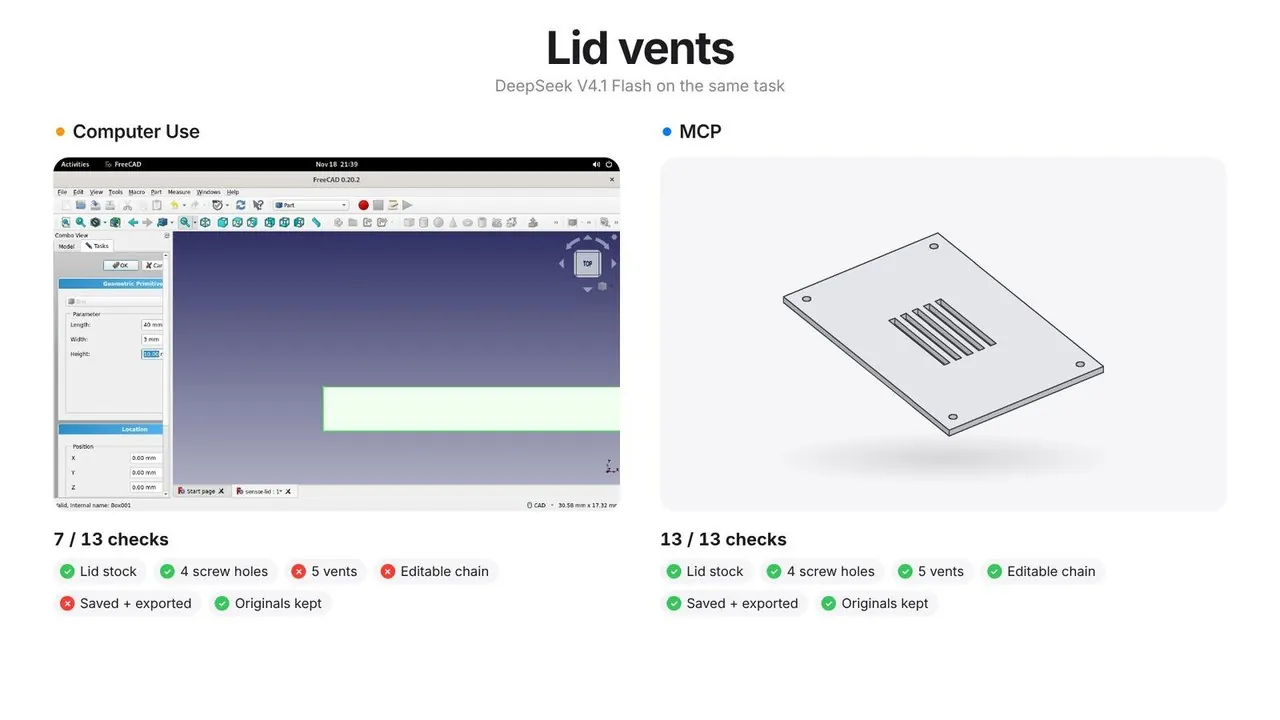
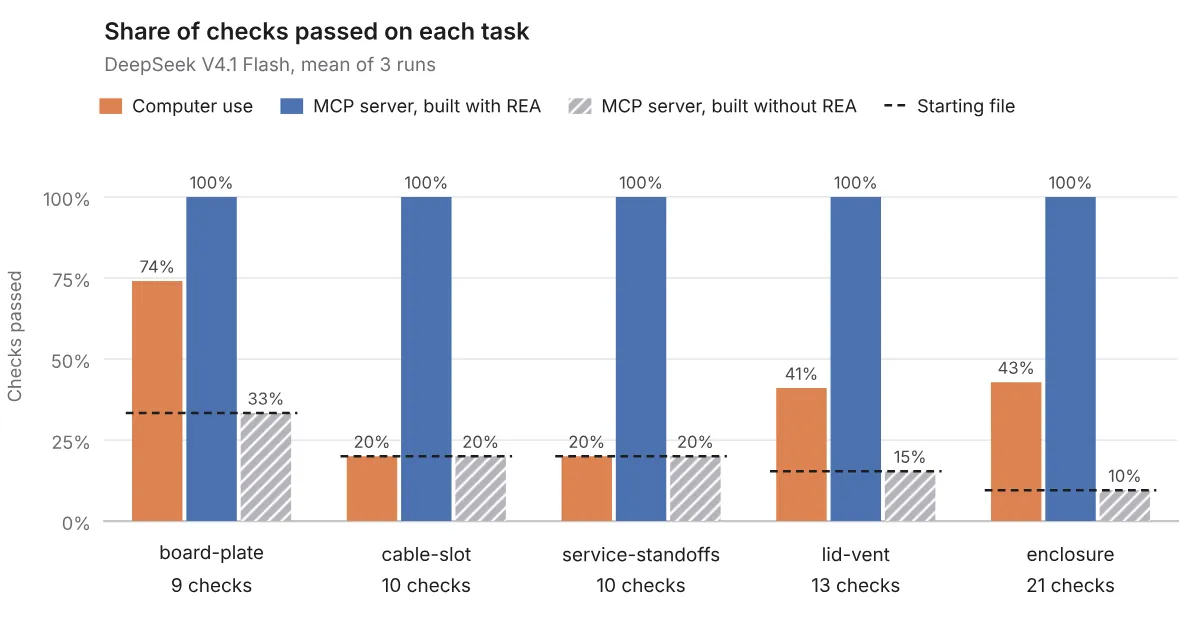
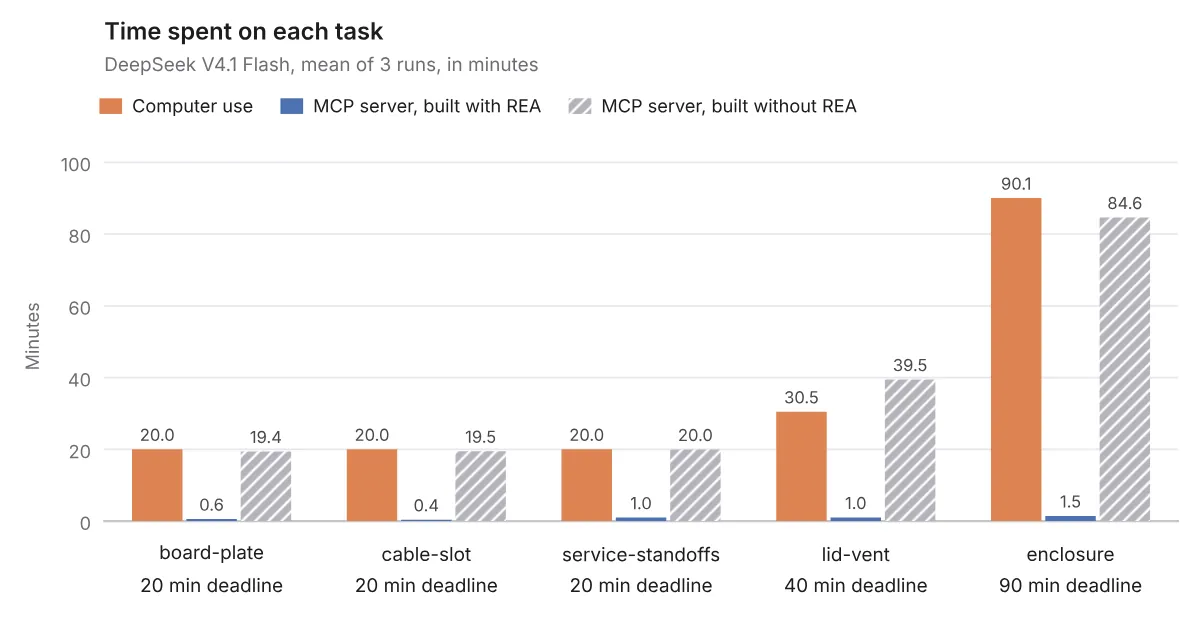
The headline comparison is deliberately extreme. On a FreeCAD lid-vent task, the MCP run finished in 44 seconds with 0.64 million tokens, while the computer-use baseline spent 40 minutes and 22.2 million tokens. Across five CAD tasks, the MCP server completed every check, whereas computer use averaged about 40% of the checks. The authors call the approach agent-native computer use: a form of operation that follows the program's internal concepts rather than the visual controls designed for human eyes.
The central claim is not that screenshots are useless. It is that the screen should not be the only channel through which an agent understands and changes software.
01. Why the screen is an expensive interface
A screenshot contains a rendered projection of state, not the state itself. When a person edits a CAD model, the visible result may show a hole, a surface, and a label, while the underlying document also contains parameters, constraints, feature dependencies, the selection, the active workbench, and the history needed to recompute the model. A vision model must infer those hidden structures from pixels and text rendered in a panel. If it mistakes a generated edge for a sketch line or clicks the wrong row in a dense model tree, the next screenshot may show a plausible but incorrect model.
This is a familiar problem in robotics. A robot policy rarely controls a manipulator by looking at photographs of its own pendant and then choosing menu items. A well-designed stack exposes joint positions, end-effector poses, controller modes, force estimates, and object states. The visual interface is useful for commissioning and diagnosis, but it is not the primary control surface. The same distinction appears here between GUI automation and an application-level tool interface.
| Question | Vision-based computer use | Agent-native MCP interface |
|---|---|---|
| How is state observed? | Capture a screenshot and infer objects from pixels | Read the application's own objects, properties, and computed results |
| What is one action? | A click, key, drag, or other low-level input | A complete operation such as cut, export, or auto-play |
| Where does latency enter? | Every action waits for a new observation and model reply | A server can run a local loop and return the aggregate result |
| What happens when the interface changes? | Coordinates and screen understanding may break | Tool discovery and re-testing can repair the interface |
| What is the main tradeoff? | Broad applicability with weak state access | Deeper program knowledge with a build and maintenance cost |
Earlier work already showed that MCP tools can improve desktop-agent performance. The difference in this project is where the tools come from. In OSWorld-MCP, people supply additional tools; when the tools do not cover a task, the agent can still fall back to the screen. Here the agent examines the binary, tests hypotheses against the live process, and decides which operations its own server should expose. The tool layer itself becomes a learned artifact.
02. Analyze, test, build, check
The FreeCAD builder runs offline in a sandbox. It receives the installed application, a reverse-engineering toolkit called REA, shell access, file tools, and a budget. It does not receive the evaluation tasks, so it cannot build a task-specific macro and call that success. The agent must construct a reusable interface before it knows which CAD operations will be requested.
The build follows four practical stages. Analyze inspects binaries, exports, linked libraries, runtime type information, Qt objects, and other clues about the application's internal structure. Test runs the program and probes the live process, using Frida for FreeCAD and a memory inspection layer for Fruit Ninja. Build writes the MCP server and whatever in-process script the server needs. Check sends real requests through the finished MCP. A failed call returns the agent to implementation; an unresolved fact returns it to experimentation.
flowchart LR
  A[Offline builder agent] --> B[Analyze binaries, exports and runtime metadata]
  B --> C[Test guesses on the live process]
  C --> D[Write MCP server and injected agent]
  D --> E[Call tools through the MCP]
  E -->|bug| D
  E -->|new question| C
  E -->|working server| F[Frozen MCP artifact]
One FreeCAD build spent 37 minutes and 203 tool calls. It used 12 calls to analyze, 84 to test, 70 to build, and 37 to check. The other two builds took 30 and 85 minutes. That variation is important. The paper reports the solve cost separately from the build cost, because the server is intended as a one-time interface for a program rather than a per-task prompt or macro.
The resulting FreeCAD server exposed 85 tools. They were not arbitrary shell commands. They described application-level operations: list documents, inspect an object, create a box, set a property, cut one body from another, recompute the document, save a project, export STEP or STL, and read computed geometry. The interface was broad enough that the same tools could support five different CAD tasks without being edited during evaluation.
03. The harness and the environment both change
Most computer-use research changes the harness around an unchanged application. A better vision encoder, a more reliable click model, or a different planning loop improves the agent without touching the program. The agent-native build changes both the harness and the environment. The harness receives an MCP server. The application receives an injected agent that exposes its internal state and operations.
In the FreeCAD implementation, the MCP server is a Python process that speaks JSON-RPC over standard input and output. When a tool is called, the server locates the running FreeCAD process and attaches with Frida. A short JavaScript payload resolves Python runtime exports such as PyGILState_Ensure, PyRun_SimpleString, and PyGILState_Release. It acquires the interpreter lock, executes a bootstrap string, and releases the lock. That bootstrap loads the longer in-process agent.
The injected agent opens a Unix-domain socket at /tmp/freecad_mcp_agent.sock. Tool calls arrive as JSON requests containing an operation name and arguments. The agent does not execute FreeCAD operations on the socket thread. It places each job on a queue and uses QMetaObject.invokeMethod with a queued Qt connection to dispatch the work onto FreeCAD's main thread. This detail matters: calling GUI or document APIs from a background thread caused FreeCAD to crash, so the agent moved every operation onto the thread that owns the Qt event loop.
flowchart LR
  T[Task agent] -->|MCP over stdio| S[MCP server]
  S -->|find PID and attach| F[Frida]
  F -->|bootstrap injected agent| I[agent.py inside FreeCAD]
  S -->|Unix socket JSON request| I
  I -->|queue job| Q[Qt main-thread dispatcher]
  Q --> P[FreeCAD, FreeCADGui, Part, Sketcher, Mesh]
  P --> O[FCStd, STEP, IGES, STL and view images]
  O -->|result| I
  I -->|JSON result| S
The main diagram in the source simplifies the transport. Operationally, there are two distinct steps. Frida is used to bootstrap and inject the agent into a process that is already running. After injection, routine tool calls travel over the Unix socket and are queued onto the Qt thread. Separating those paths makes the mechanism easier to reason about: Frida is the entry point into the environment, while the socket is the ongoing control channel.
The agent script inside FreeCAD imports the application's own modules and uses their normal APIs. A boolean cut is therefore not a sequence of menu clicks. It is a call that creates or manipulates a document object and asks FreeCAD's modeling kernel to recompute the result. Reading a shape can return its volume, area, bounding box, faces, edges, and vertices. Saving and exporting invoke the same document operations a user would invoke through the application.
The environment is not modified by patching the executable on disk. It is instrumented while running. That keeps the installed application in place and lets the server attach to a new process when needed. The server has to discover the current process, inject the matching agent, and re-establish the socket after restarts. Those lifecycle details are part of the interface, not incidental plumbing.
04. Five CAD tasks expose the difference
The FreeCAD evaluation starts each task from a partially completed project file. The agent must preserve existing linked features while resizing plates, moving holes, creating slots, adding standoffs, cutting vents, shelling an enclosure, and repositioning a label plate. The work is graded from saved output files, not from a screenshot that happens to look plausible.
| Task | Required work | Checks | Deadline |
|---|---|---|---|
board-plate |
Resize a mounting plate, move two holes, preserve linked cuts, save STEP and STL | 9 | 20 min |
cable-slot |
Perform the plate edit and cut a slot through the plate | 10 | 20 min |
service-standoffs |
Perform the plate edit and fuse four standoffs in a chain | 10 | 20 min |
lid-vent |
Resize a lid, move four screw holes, and cut five vents in sequence | 13 | 40 min |
enclosure |
Release a two-part enclosure with shell, posts, cutouts, holes, vents, and a rotated label plate | 21 | 90 min |
The starting files already pass 10% to 33% of their checks, so the reported percentages include some credit the agent did not earn. The meaningful comparison is the gap above that baseline. On cable-slot and service-standoffs, computer use passed 20%, which was the starting-file score; it did not complete any new requirement. On board-plate, the easiest task, it reached 74%. The MCP runs reached 100% on all five.
| Task | Computer-use checks | RE-built MCP checks | Computer-use time | RE-built MCP time |
|---|---|---|---|---|
board-plate |
74% | 100% | 20.0 min | 0.6 min |
cable-slot |
20% | 100% | 20.0 min | 0.4 min |
service-standoffs |
20% | 100% | 20.0 min | 1.0 min |
lid-vent |
41% | 100% | 30.5 min | 1.0 min |
enclosure |
43% | 100% | 90.1 min | 1.5 min |
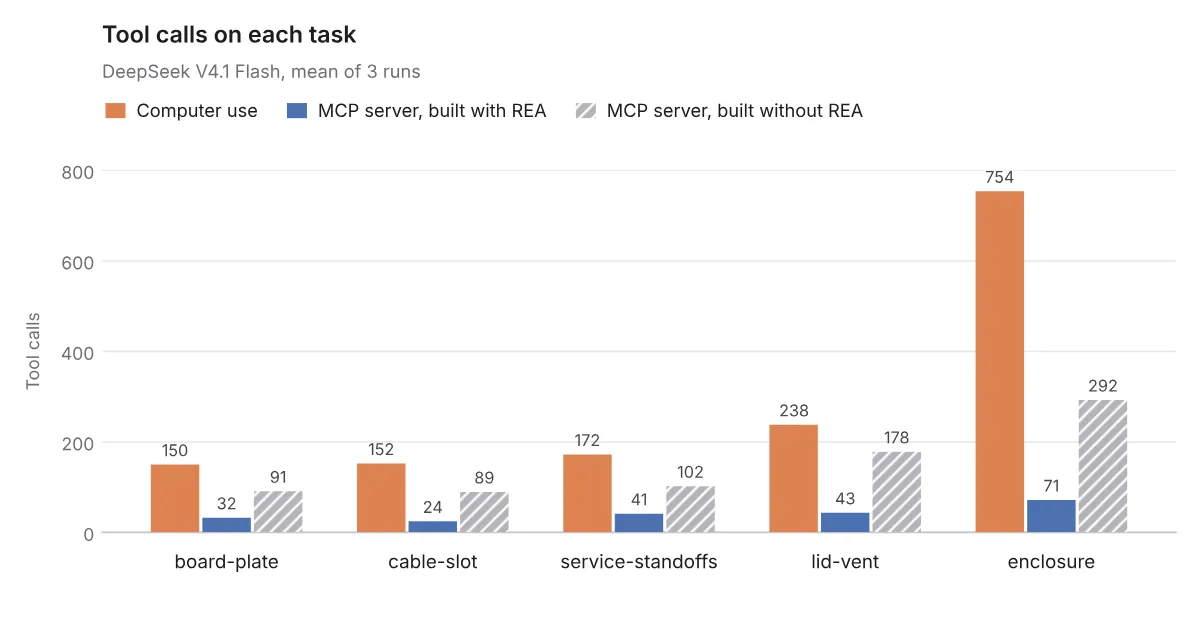
The aggregate cost difference follows from the same mechanism. Across the five tasks, the MCP runs used 4.5 minutes, 3.1 million tokens, and 211 calls. Computer use used 180.6 minutes, 127.1 million tokens, and 1,466 calls. Each GUI action was a small input; each MCP action could express a complete modeling operation. The token reduction is not a compression trick. The model spends less context re-reading the same visual scene and less output describing a sequence of low-level clicks.
05. Inside one lid-vent run
The lid-vent example is useful because it shows what an agent-native operation sequence looks like. The model opens the document, lists its objects, and reads the lid, four screw holes, four existing cuts, and a gasket reference. It resizes the lid to 120 × 80 × 3 mm and moves the screw holes. It creates five vent boxes, each 40 × 3 × 7 mm, and cuts them from the lid one after another. It recomputes the document, saves the project, exports STEP and STL, activates the 3D view, saves a view image, and reads the final volume and topology.
In the recorded run, the model made 46 calls in 18 replies over 44 seconds. The baseline computer-use run made 265 calls over 40 minutes and passed 7 of 13 checks. The difference is not that the MCP model was faster at clicking. There were no clicks. Each call carried a semantic operation and returned a structured result that the next call could inspect.
The enclosure task pushes the same interface further. It includes 26 linked features, shell operations, posts, port cutouts, lid holes, vents, and a rotated label plate. The MCP run completed all 21 checks in about 86 seconds according to the appendix comparison, while computer use reached 13 of 21 checks at the 90-minute deadline. This is where the screen abstraction becomes more than an efficiency issue. A human-oriented feature tree is useful for visual inspection, but a model can use the dependency graph and object properties more reliably than a sequence of panel clicks.
06. The no-reverse-engineering ablation
If the advantage came only from giving the model an MCP, a server that drives menus and screenshots might perform just as well. The researchers test that possibility with a locked no-reverse-engineering condition. The agent runs as a separate user. It cannot read the application's files, maps, memory, logs, or home directory. Analysis tools are removed. It can still see the screen and send input through a filtered window-control path, so it can build a server that reads OCR and clicks controls.
Those servers passed no check beyond the starting file on any FreeCAD task. They made 752 tool calls and usually ran to the deadline. In one run, the no-RE server misread object names in the model tree; in another, it failed to switch workbenches. Because the task model never saw the screen itself, it could not notice and repair the OCR error. The interface had become a brittle imitation of a human workflow, with an extra layer of indirection.
| Capability | Server built with reverse engineering | Server built without reverse engineering |
|---|---|---|
| FreeCAD state | Reads document objects and their properties from inside the process | Takes screenshots and OCRs the tree and property panel |
| FreeCAD action | Calls FreeCAD's own functions on the main thread | Clicks menus, buttons, and dialog fields |
| Fruit Ninja state | Reads exact kind, position, velocity, and score from memory | Captures frames and tracks fruit from pixels |
| Fruit Ninja action | Runs a local high-frequency controller with ballistic prediction | Drags simulated mouse strokes from the image loop |
| Failure mode | Requires permission to inspect and instrument the process | Misreads labels, misses objects, and is bounded by visual latency |
This ablation is stronger than telling a model “do not reverse engineer.” It turns the condition into a permissions boundary. The no-RE agent lacks the kernel access, files, and tooling needed to inspect the process, and the solve-time MCP runs under the same restrictions. The FreeCAD result also shows why an MCP is not automatically a better interface. If its tools still bottom out in pixels, it can add complexity without adding reliable state.
07. Fruit Ninja separates state access from real-time control
FreeCAD is open source and its tasks are not under real-time pressure. Fruit Ninja HD provides a harder test: a closed-source Windows game running under Wine, with fruit falling while the model thinks. The builder uses Kimi K3 and the same four-stage loop. Its RE-built MCP exposes five tools: get_state, auto_play, slash, start_mode, and restart_round.
The most important tool is auto_play. It reads active fruit and bomb objects from the game process, predicts their short-term motion, scores candidate slash segments, prefers groups that can produce combo bonuses, and keeps a margin around bombs. It runs a loop at roughly 60 Hz with a 12 ms sleep, sending mouse strokes through the game's input path. The model itself does not receive sixty screenshots per second. It calls a tool that performs a whole real-time play segment.
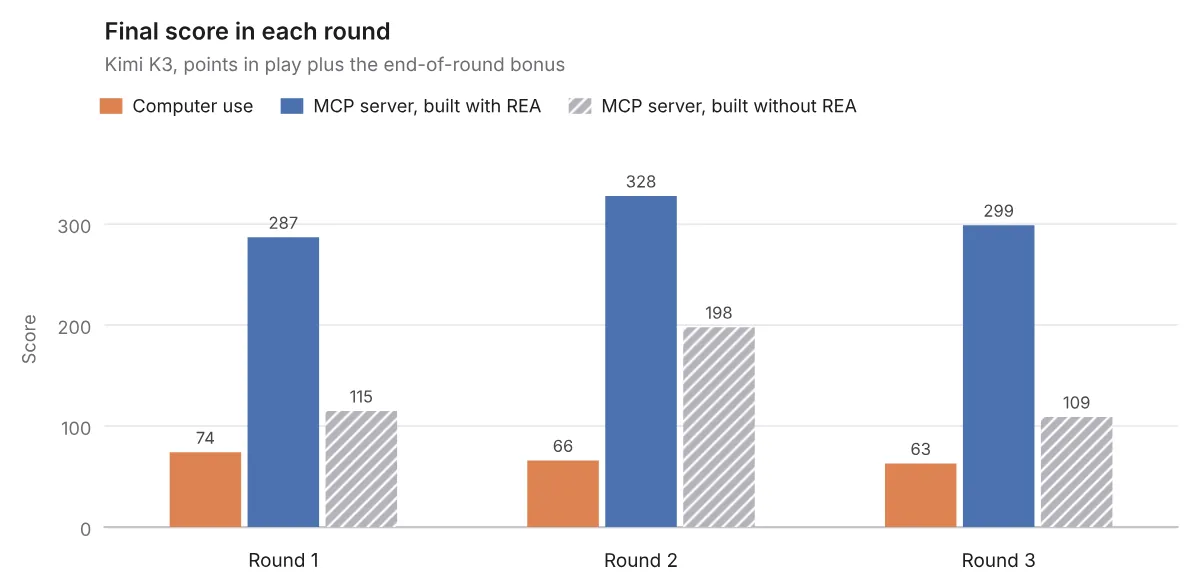
Across three Arcade rounds, the RE-built MCP averaged 225 points in play, compared with 90 for the no-RE server and 6 for computer use. Final scores were 304.7, 140.7, and 67.7 respectively. The final-score gap is real but partly distorted by bonuses such as “Bomb Lover” or “No Bananas Sliced,” which can reward behavior unrelated to skilled fruit slicing. The in-play numbers show the direct effect.
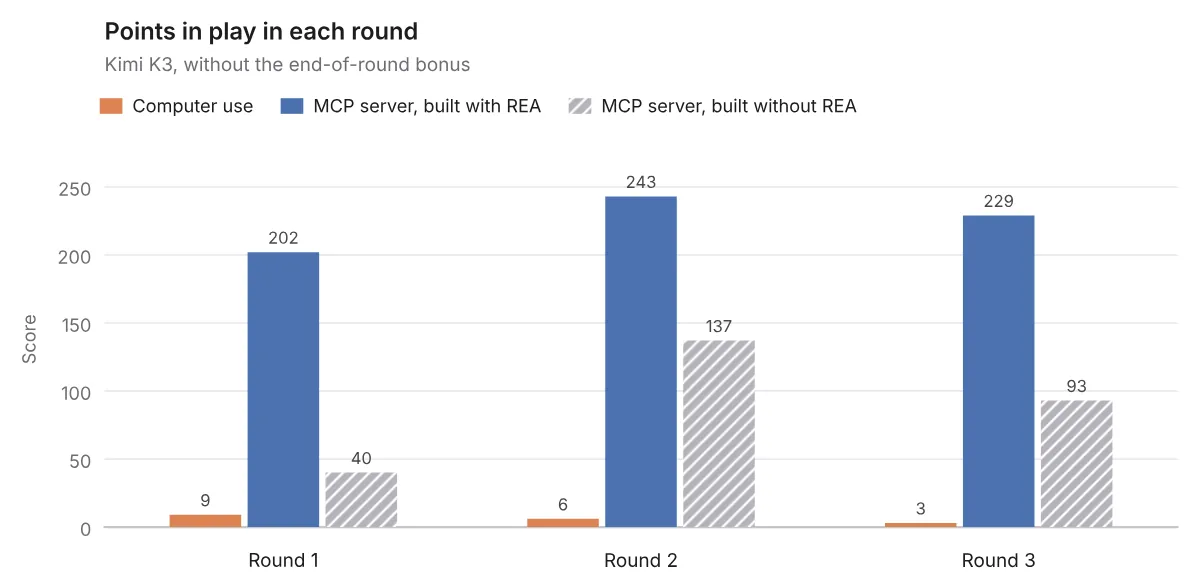
| Condition | Round 1: in-play / final | Round 2: in-play / final | Round 3: in-play / final | Mean in-play / final |
|---|---|---|---|---|
| MCP built with reverse engineering | 202 / 287 | 243 / 328 | 229 / 299 | 224.7 / 304.7 |
| MCP built without reverse engineering | 40 / 115 | 137 / 198 | 93 / 109 | 90 / 140.7 |
| Computer use | 9 / 74 | 6 / 66 | 3 / 63 | 6 / 67.7 |
The controller's coverage is even clearer than the score. The recorded RE rounds sliced 70 of 70, 79 of 79, and 92 of 92 visible fruit, plus all six special items, with no bomb hits. The no-RE visual controller sliced roughly 86% to 90% of visible fruit and hit about two or three bombs per round. Exact state access removed object identity errors; local control removed model response latency from the slash loop.
There is an essential caveat in interpreting this result. The model did not demonstrate that a language model can make expert-level decisions at 60 Hz. The fast policy lives inside the MCP tool, written by the builder. In the three recorded RE rounds, the player model made only one to three calls per round. The experiment demonstrates tool synthesis and delegation: the agent moved a real-time control problem into a local program that could observe state and act fast enough. It does not establish model-level real-time throughput.
08. What this means for robotics and physical AI
The FreeCAD result is directly relevant to robotics because mechanical design is part of the embodied-AI stack. Robot arms, grippers, sensor mounts, enclosures, fixtures, and simulation assets are created and revised in CAD. A model that can reliably manipulate feature trees and export geometry can participate in design iteration instead of only describing changes in prose. It can preserve constraints, recompute a model, inspect volume and topology, and produce the files needed by downstream simulation or fabrication.
The broader pattern extends to other engineering tools. Robot software is assembled from CAD kernels, ROS and ROS 2 nodes, simulation environments, mesh tools, calibration utilities, motor-control IDEs, and vendor applications. Many of these expose Python bindings, plugins, command registries, or process-level APIs. A task-blind builder could inspect those layers and create a stable set of semantic operations. The agent would no longer need to understand the position of a button in a vendor GUI before it can inspect a joint limit or regenerate a URDF.
| Robotics workflow | Useful agent-native operations | Why structured state matters |
|---|---|---|
| Mechanical design | Edit feature parameters, preserve dependencies, recompute, export STEP/STL | Visual edits can leave invalid or unconstrained geometry |
| Simulation asset preparation | Inspect meshes, apply transforms, assign materials, verify collision geometry | Rendered appearance does not reveal collision or mass properties |
| Robot commissioning | Read controller modes, joint limits, faults, and calibrated transforms | Panel labels are less reliable than typed state and error codes |
| Data pipeline operations | Query dataset metadata, validate episodes, start and monitor processing | Long workflows benefit from whole-operation calls and explicit status |
There is also a caution for the field. An agent-native interface expands capability by expanding access. FreeCAD's embedded Python interpreter made the approach easier because the builder could invoke an existing extension surface. A closed industrial controller may not offer such a path, and attempting to instrument it without authorization could violate safety policy, warranties, or law. The project's reverse-engineering condition explicitly assumes that binary and process access are permitted.
Safety has to live in the tool boundary. A CAD operation can overwrite a design; a controller tool could command motion; a simulation tool could alter a model used for training. An agent-built server needs strong argument validation, explicit units, dry-run or preview modes where possible, transaction boundaries, and human approval for hazardous effects. The fact that the agent wrote the tool does not make the tool trustworthy. The server and its tests become part of the safety case.
09. The limits of the evidence
The paper is an early demonstration, not a general proof that every program can be made agent-native. The FreeCAD evaluation uses one model, DeepSeek V4.1 Flash, and three runs per task. The Fruit Ninja comparison uses one builder and three rounds per condition, with no fixed game seed. The ratios are directionally strong but not stable population estimates.
The build time is excluded from the solve-time comparison. That is reasonable for a reusable interface that serves many later tasks, but it changes the economics for a one-off operation. Builds took 30, 37, and 85 minutes in the FreeCAD experiment, so a single easy task may not repay the setup cost. The paper also does not measure the cost of maintaining a server after an application upgrade, or the risk that a tool looks correct on tested documents but fails on unfamiliar schemas.
FreeCAD is a favorable case because it embeds Python and exposes a Python API. Fruit Ninja is a harder case because object state must be recovered from memory, but it is still a relatively small application with inspectable data structures. A fully native binary with obfuscation, anti-debugging, remote services, or a large asynchronous state machine would be more difficult. The project should therefore be read as a new direction for interface construction, not as a universal reverse-engineering recipe.
The strongest result is not “MCP beats screenshots.” It is that a builder can discover a program's internal operations and redesign the agent's interface around them.
10. From fixed tools to an evolving interface
The current experiment freezes the MCP before the task agent sees any evaluation task. That is what makes the result credible as a reusable interface, but it is not the endpoint. The authors propose that the agent should keep reshaping the server while it works. If a task is awkward with the available tools, the agent can return to the binary, test the relevant behavior, and add, redesign, or combine operations.
This is a different model of software use from calling a fixed API. The interface becomes a living artifact that co-evolves with the task. A successful tool can be retained and shared with other agents. A repeated sequence can become a compound operation. A failed abstraction can be split into lower-level primitives. The agent is no longer only a user of an environment; it modifies the boundary through which it perceives and acts on that environment.
flowchart LR
  A[Agent starts a task] --> B[Use current tool server]
  B --> C{Is the operation awkward or unreliable?}
  C -->|no| D[Finish and keep the interface]
  C -->|yes| E[Inspect binary or live process]
  E --> F[Add or redesign a tool]
  F --> G[Test the new operation]
  G --> B
For robotics, this is both promising and demanding. The promise is a future in which an agent can prepare its own CAD, simulation, calibration, and data tools from the binaries and interfaces available in a lab. The demand is that the resulting interfaces be observable, testable, permissioned, and safe. The more directly an agent can reach into a program, the more important it becomes to know what the program is allowed to change.
The project's contribution is to make the boundary itself an object of agent reasoning. A screen interface is not the only way to use a computer, and an API is not something that must always be supplied by a vendor. An agent that can inspect a program, build a semantic interface, and verify it can reshape both its harness and the environment it acts on.
Source and code
This article is an independent deep analysis of the project page and its released implementation. The source page documents the four-stage build, FreeCAD tasks, no-RE ablation, Fruit Ninja experiment, appendices, and limitations. The code repository contains the FreeCAD and Fruit Ninja builders, the MCP servers, experiment tooling, tests, and evidence pipelines.
- Project page: Agent-Native Computer Use: When Agents Reshape the Environment for Their Own Use
- Code: MIT-MI/Agent-Native-Computer-Use-Code
- Authors: Yinzhen Huang, Yann, Ao Qu, Morluto, Kaoru, N0zo, and Paul Liang
- Published: November 2026
Source:MIT-MI / Agent-Native Computer Use Projecthttps://mit-mi.github.io/Agent-Native-Computer-Use/